
ABOUT THIS PAGE
Using these AI guidelines
Most schools and districts are past asking whether students will use AI. The questions now are what the rules should be, who they apply to, and how to keep them current as the tools change every few months.
This page pulls together what we've learned working with thousands of schools on those questions: whether you need a formal policy, what it should cover, how schools have written theirs, and real examples you can borrow from. Working in the UK? See our UK AI policy guide.
OUR TEAM'S SUGGESTIONS
Tips for forming your AI policy
Does my school or district need an AI policy?
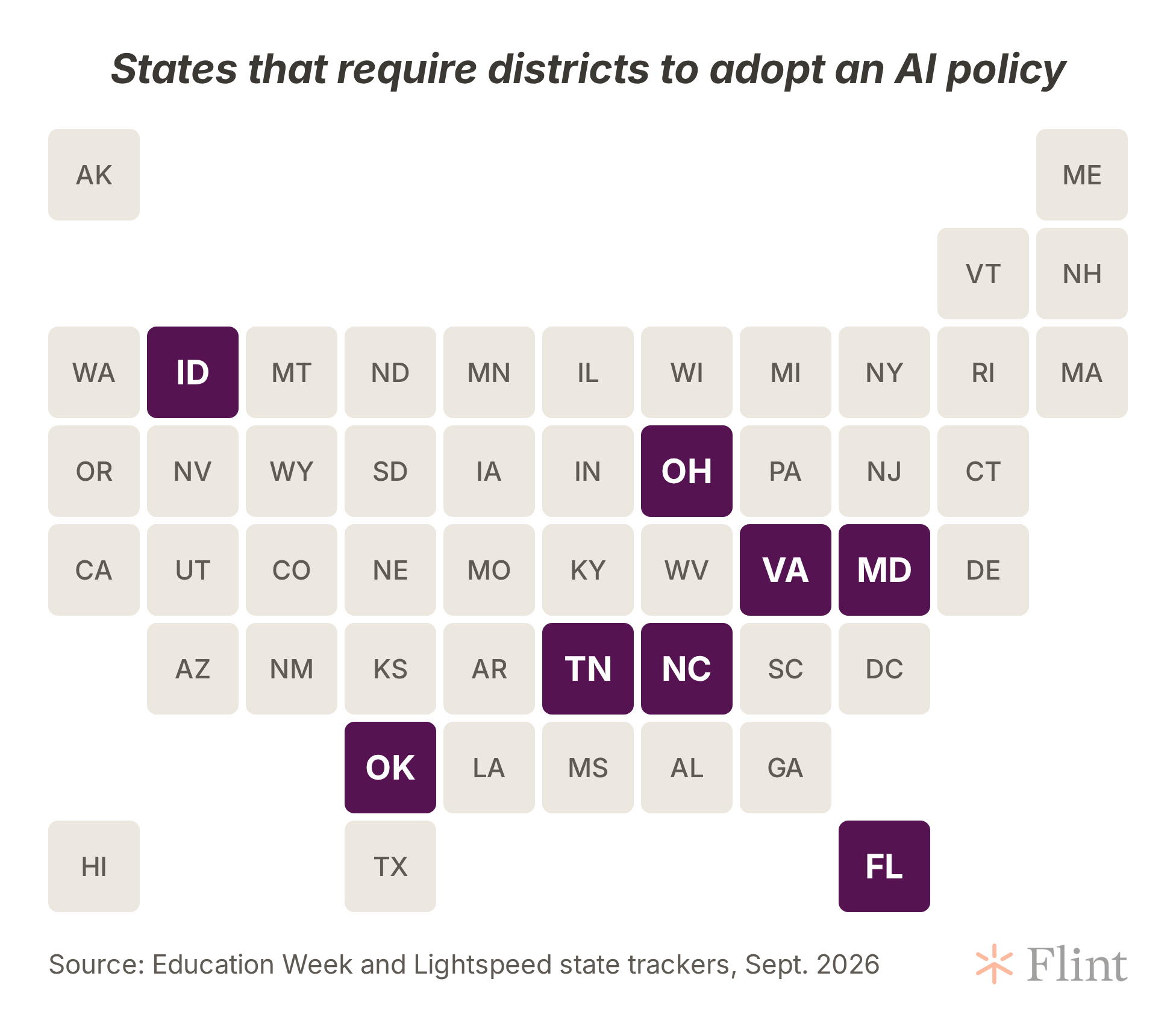
In a growing number of states, yes. At least eight now require districts to adopt one, according to Education Week's tracker:
| State | What's required | When |
|---|---|---|
| Ohio | Every district, community school and STEM school adopts an AI policy. A state model policy is available | In effect since July 1, 2026 |
| Tennessee | Districts adopt an AI use policy | In effect since 2024 |
| Florida | Districts and charter boards amend their internet safety policies to cover AI, including parent opt-in for each tool students use directly. See our guide to Florida's AI rule | Effective October 29, 2026; districts have until July 1, 2027 to adopt and implement |
| Maryland | Districts adopt policies aligned with state guidance and name an AI coordinator | Within 120 days of state guidance |
| Oklahoma | Districts adopt a written AI policy covering approved uses, student data and family notice | Before the 2027-28 school year |
| North Carolina | Districts and charter schools adopt policies on AI use by students and staff | June 30, 2027 |
| Idaho, Virginia | Districts adopt policies aligned with a state framework | Dates set by the state; see Lightspeed's tracker |
Laws are changing quickly, so check with your state education agency before relying on this table. AI for Education keeps a directory of each state's guidance.
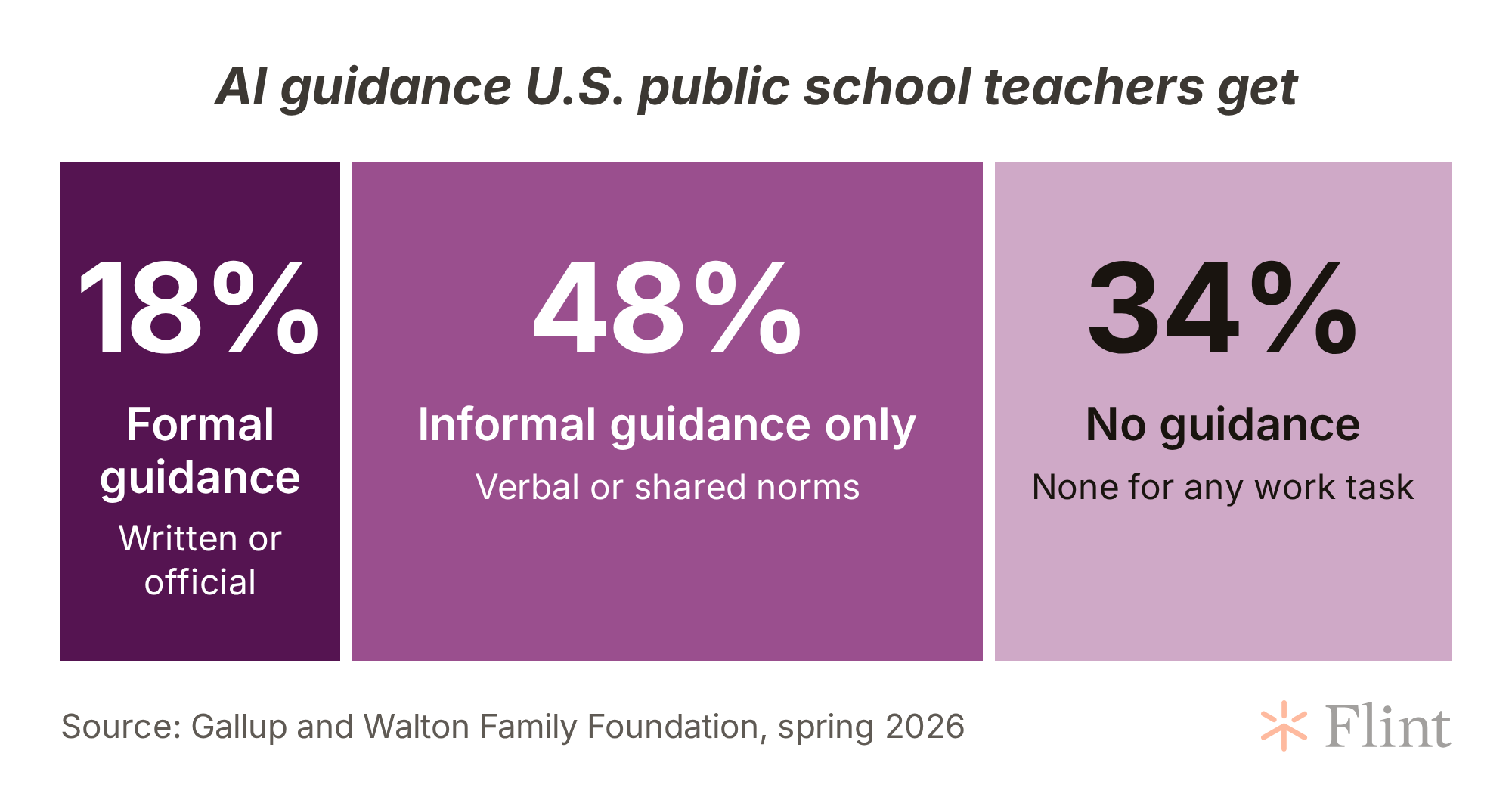
Even where it isn't required, teachers are asking for one. In a Gallup and Walton Family Foundation survey from spring 2026, only 18% of public school teachers said they had any formal guidance on using AI at work, and a third had no guidance at all. RAND found that just 45% of principals said their school or district had AI policies or guidance during the 2024-25 school year, while more than half of students were already using AI for schoolwork.
A policy doesn't have to be long or rigid. Many districts keep the board-approved policy short (values, who's responsible, what's off-limits) and put the details that change often, like approved tools and classroom examples, in separate guidance that's easier to update. Tucson Unified works this way, as Education Week reported.
What existing policies can we lean on?
Start with your student handbook, academic honesty policy, acceptable use policy and data privacy agreements. Much of what an AI policy needs to say already lives in them, and your AI rules should be reflected there when those documents are next revised.
Existing policies were usually written to prevent misuse, so they rarely say what students are allowed to do with AI. Your new rules should make clear whether students can use AI to study on their own, research a project, or get feedback on a draft, and when they need to say that they did.
WHAT TO INCLUDE
What to put in your AI policy
Most published templates, from state model policies to NEA's sample board policy, cover the same ground. Use this as a checklist when you draft or review yours.
AI policy checklist
- Purpose: two or three sentences on why your school uses AI and what you want to protect
- Scope and definitions: who the policy covers and what counts as AI, including features built into tools you already use
- Allowed and off-limits uses, set separately for each grade band
- Academic integrity: what honest AI use looks like and how students disclose it
- Student data: which tools are approved and what data they may collect
- Human oversight: teachers, not AI, make grading, discipline and placement decisions
- Safety: deepfakes, harassment, and students bringing personal or mental health topics to a chatbot
- Families: how parents learn which AI tools their children use
- Training for staff and AI literacy for students
- Ownership and review: who approves tools, who answers questions, and the date of the next review
Set rules by grade band
A rule that makes sense for a high school senior rarely fits a second grader, and more districts now set different rules for each age group. New York City paused student-facing AI for 2-K through 8th grade for the 2026-27 school year while allowing supervised pilots in high school. Florida's new rules require extra review for any AI tool used in VPK through 5th grade.
For students under 13, check each tool's terms. Many general-purpose chatbots are only licensed for users 13 and older, and tools that collect data from younger children fall under COPPA.
Protect student data and vet your vendors
Your policy should say that only approved tools may be used with student information, and who does the approving. Before approving an AI tool, ask the vendor:
Questions to ask any AI vendor
- Is student data ever used to train your models?
- Do you sign our data privacy agreement, and how do you comply with FERPA and COPPA?
- What ages is the tool built for, and what happens when a younger student uses it?
- Can teachers see what students ask the AI and what it says back?
- How does the tool respond when a student raises self-harm, abuse or other safety concerns?
- Can we turn features on and off, and will you tell us before adding new ones?
- What evidence shows it improves learning?
That last question comes from the U.S. Department of Education, whose August 2026 guidance asks schools to choose technology based on evidence and to stop using tools that aren't improving learning. Evidence on AI is still thin: a federal research review found only 20 rigorous studies of AI's effect on K-12 learning, so a short pilot with clear goals is often the best evidence you'll get.
Check what's already switched on, too. In August, Google turned on Gemini by default for many student accounts, and several administrators found out after the fact. Our Gemini guide walks through the options.
Name the harms your policy covers
Cheating gets most of the attention, but the incidents that reach principals' offices are often different. RAND found that 13% of principals had dealt with bullying involving AI-generated deepfakes, rising to 22% in high schools. Say plainly that creating or sharing fake images, audio or video of real students or staff is prohibited, and connect it to your existing harassment policy.
Chatbots that act as a friend are a newer concern. Florida now bars classroom AI that is designed to meet students' emotional needs or simulate companionship, and California passed new safety rules for companion chatbots used by children in September 2026. Your policy should say what happens when a student brings a personal or mental health issue to an AI tool, and who on staff is alerted.
Handle academic integrity without relying on detectors
AI detectors are unreliable, and Education Week notes they have mislabeled writing by English learners as AI-generated. Half of the nation's 10 largest districts now explicitly discourage them, Chalkbeat found.
What works better is being clear, assignment by assignment, about how much AI help is allowed, and asking students to show how they used it. Many schools use a scale like Leon Furze's AI Assessment Scale so every assignment carries a clear level, from no AI to full AI use.
How to create your AI policy and guidelines
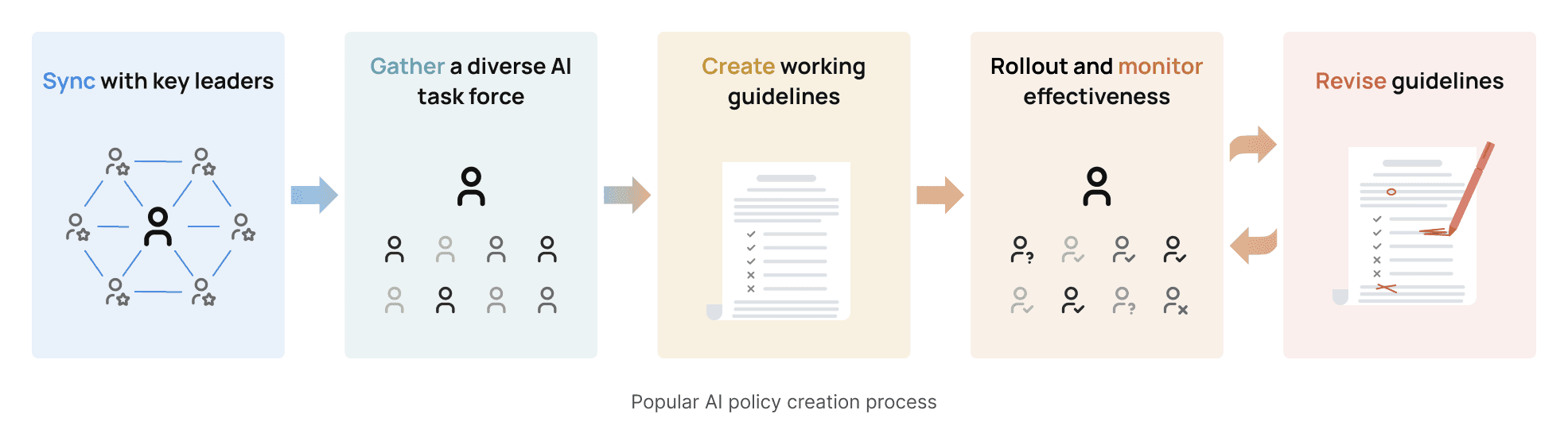
Every school's process looks a little different. Some of the schools that use Flint wrote a policy first, and others chose a tool and then wrote rules around it. These are the steps we see most often.
-
Sync with your school leaders. Bring together board members, administrators, and department or building leads to agree on goals. Start by listing which AI tools and built-in AI features students and staff can already reach, and whether you're rewriting existing policies, writing a new one, or both. If your state requires a policy, note the deadline.
-
Gather an AI task force. Include teachers across subjects and grade levels, people who are skeptical of AI as well as enthusiasts, and someone who handles data privacy. Some schools add students and parents, who often raise issues staff don't.
-
Create a set of working guidelines. A small group can draft, using the checklist above. Then have teachers test the guidelines in real classes and report what's unclear or missing.
-
Roll out and monitor reactions. Share the policy with teachers, students and families in plain language. Keep a way for people to ask questions and flag problems, whether that's department meetings, office hours or a simple form.
-
Revise as necessary. Put a review date in the policy itself and keep it. New tools, new features in the tools you already use, and new state rules will all require updates.
Further reading
-
Most Teachers Receive No Formal Guidance on AI Use from Gallup and the Walton Family Foundation
-
Which States Require Schools to Have AI Policies?, Education Week's state tracker
-
5 Best Practices for Crafting a School or District AI Policy from Education Week
-
Artificially Intelligent Bullies: Dealing with Deepfakes in K–12 Schools from RAND
-
Guidance on responsible use of education technology from the U.S. Department of Education
-
AI in K–12 Education: The Good, the Bad, and the Guardrails to Consider from the Institute of Education Sciences
FROM REAL SCHOOLS
AI Policy Resource Library
Below are examples of some forward-thinking and comprehensive generative AI guidelines, posters, and videos from schools that we’ve worked with. Each institution has taken a different approach to communicating their expectations to the student body, faculty, and staff. For many, a single document is just the beginning of their AI positioning strategy.
These are all in-progress documents that will and are changing as each school discovers gaps in their strategy, new ways to use AI, and new innovations in the technology space. We hope they serve as inspiration to you and ask that you credit their work appropriately.
- Document


AI Principles and Policies
The Kinkaid School
- Teaching resource

GenAI Acceptable Usage Menu
The Kinkaid School
- Teaching resource

GenAI Student Literacy Scaffolding
The Kinkaid School
- Document


Academy Wide AI Policy
Woodward Academy
- Document


AI Policy Poster
Wesleyan School
- Teaching resource

AI Policy Activity Cover Page
Wesleyan School
- Video

Pre-planning Communication
Wesleyan School
- Document


AI Guidelines for Academic Integrity
Brophy College Preparatory
- Webpage

AI Philosophy Statement
Brophy College Preparatory
- Teaching resource

CTN AI Prompt Writing
Brophy College Preparatory
- Document


AI Guidance for Students and Teachers: Navigating AI Responsibly
Yokohama International School
- Document

Understanding Our AI Policy: A Framework for Responsible and Ethical AI Engagement
Yokohama International School
- Teaching resource

Expectations for Learning with AI Poster
Yokohama International School
- Document


Guidelines for Academic Integrity
The Stony Brook School
- Teaching resource

AI Traffic Light poster
The Stony Brook School
- Teaching resource

Essay Wheel Poster
The Stony Brook School
- Document


Guidelines for AI in Education
International School of Paris
- Document


Generative AI Guidelines
Merion Mercy Academy
