ComparisonSep 29, 2026
What Parents Want: A Classroom AI Checklist for Flint, MagicSchool, SchoolAI, Gemini, Claude and ChatGPT
Parents' biggest worries about AI at school, turned into a checklist. See how Flint, MagicSchool, SchoolAI, Gemini, Claude for Teachers and ChatGPT for Teachers handle each one.

Jemel Fanfan | Founding Member at Flint

When a parent asks what AI their child is using at school, they're asking about a specific product. Can it do their homework? Will anyone notice if they type something worrying? Who can read what they wrote? Can they use it at 2 a.m.?
We collected the ten concerns parents raise most often across a dozen 2025 and 2026 surveys. This page turns them into a checklist and compares six products schools are weighing: Flint, MagicSchool, SchoolAI, Gemini for Education, Claude for Teachers and ChatGPT for Teachers. It's written for school leaders who have to answer those questions at a board meeting or in a reply to a worried family. Claims about other products link to each company's own documentation, checked in September 2026.
The checklist
Each row is something parents want from the AI their child uses at school. A check means the company's own documentation shows it does this. Where the answer depends on the plan or a setting, the cell says so.
| What parents want | Flint | MagicSchool | SchoolAI | Gemini for Education | Claude for Teachers | ChatGPT for Teachers |
|---|---|---|---|---|---|---|
| Every student signs in to their own account | Yes | Enterprise only | Paid plans only | Yes | No | No |
| Teachers can read what students typed | Yes | Yes | Yes | No | No | No |
| School leaders can open conversations across the school | Yes | Yes | Not stated | Vault export only | No | No |
| Students can't erase what they wrote | Yes | Not stated | Not stated | Only if an admin turns deletion off | No | No |
| The AI guides instead of giving answers, by default | Yes | Not stated | Depends on teacher setup | Opt-in | No | No |
| Concerning messages alert staff the school picks | Yes | Yes | Yes | No | No | No |
| The school can add its own alert categories | Yes | Yes | No | No | No | No |
| Flags a student treating the AI as a friend | Yes | Not stated | No | No | No | No |
| The school sets when students can use it | Yes | One room at a time | Top plan only | No | No | No |
| Student chats are covered by the school's data agreement | Yes | Yes | Yes | Yes | No | No |
Claude for Teachers and ChatGPT for Teachers are teacher-only products, and both companies say plainly that they're not for students. That's why they miss every row about students. When students in those schools use AI, they use a personal Claude or ChatGPT account, and the school's agreement and oversight don't reach it.
The rest of this page takes the rows one at a time and shows how each one works in Flint.
1. "Will my child use AI to cheat?"
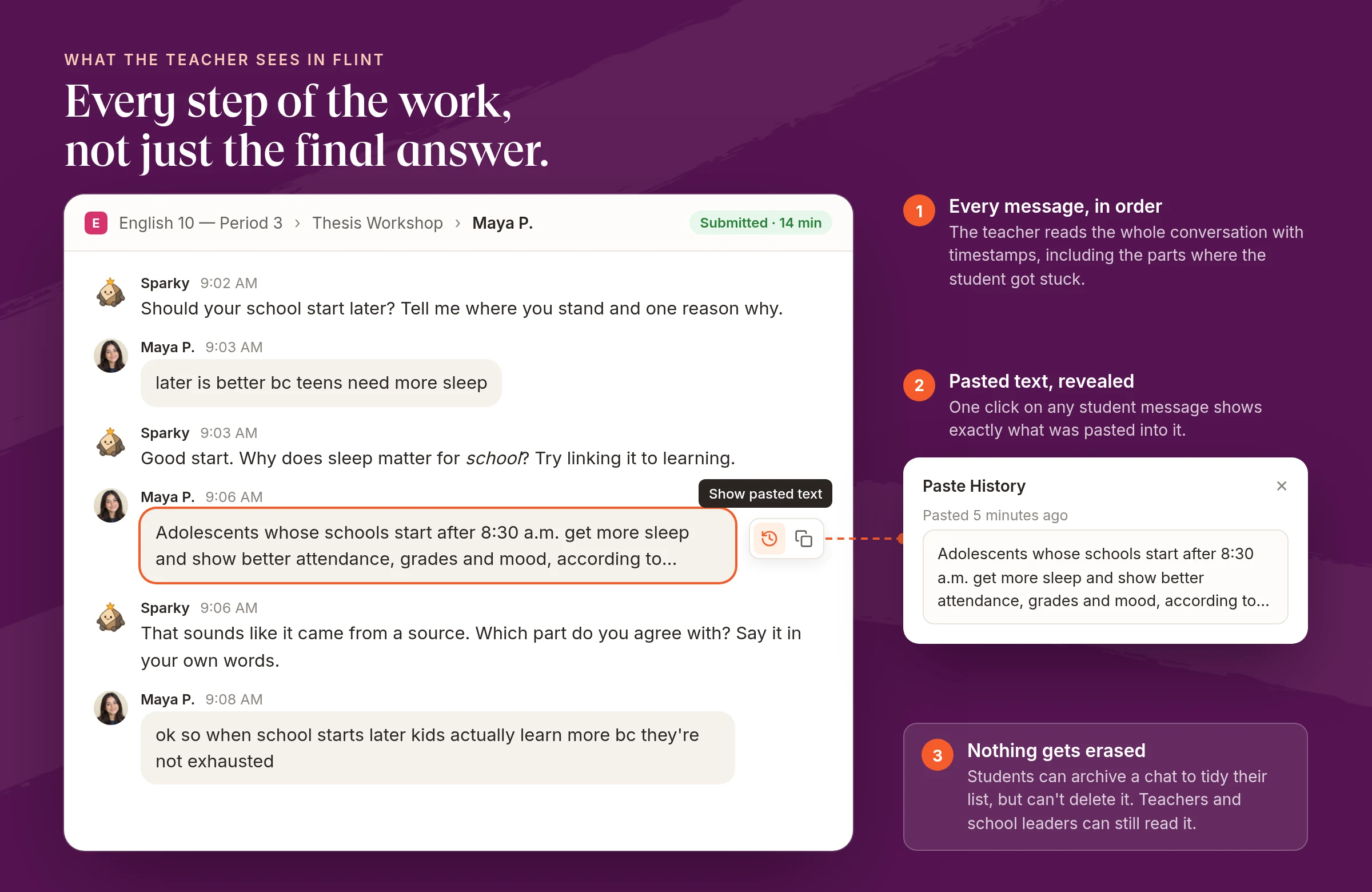
Parents of teenagers rank academic honesty first, according to Child Trends and NORC. What they want to know is whether a teacher can see how the work was done.
In Flint, an AI assignment is a conversation between the student and Sparky, Flint's AI tutor, and the teacher can read every message of it. If a student pastes text into the chat, the teacher can open "Show pasted text" on that message and see exactly what was pasted. Students can't delete the conversation afterwards. They can archive it to tidy their list, and it stays readable to their teachers and school leaders.
That record exists because the student did the work inside a product the school controls. When a student uses a personal chatbot account instead, the school has no record at all, and in personal ChatGPT accounts students can delete their chats. Google added a control in June 2026 that lets admins stop students deleting Gemini chats, but it's on by default, so students can delete them until an admin turns it off.
2. "Will AI do my child's thinking for them?"
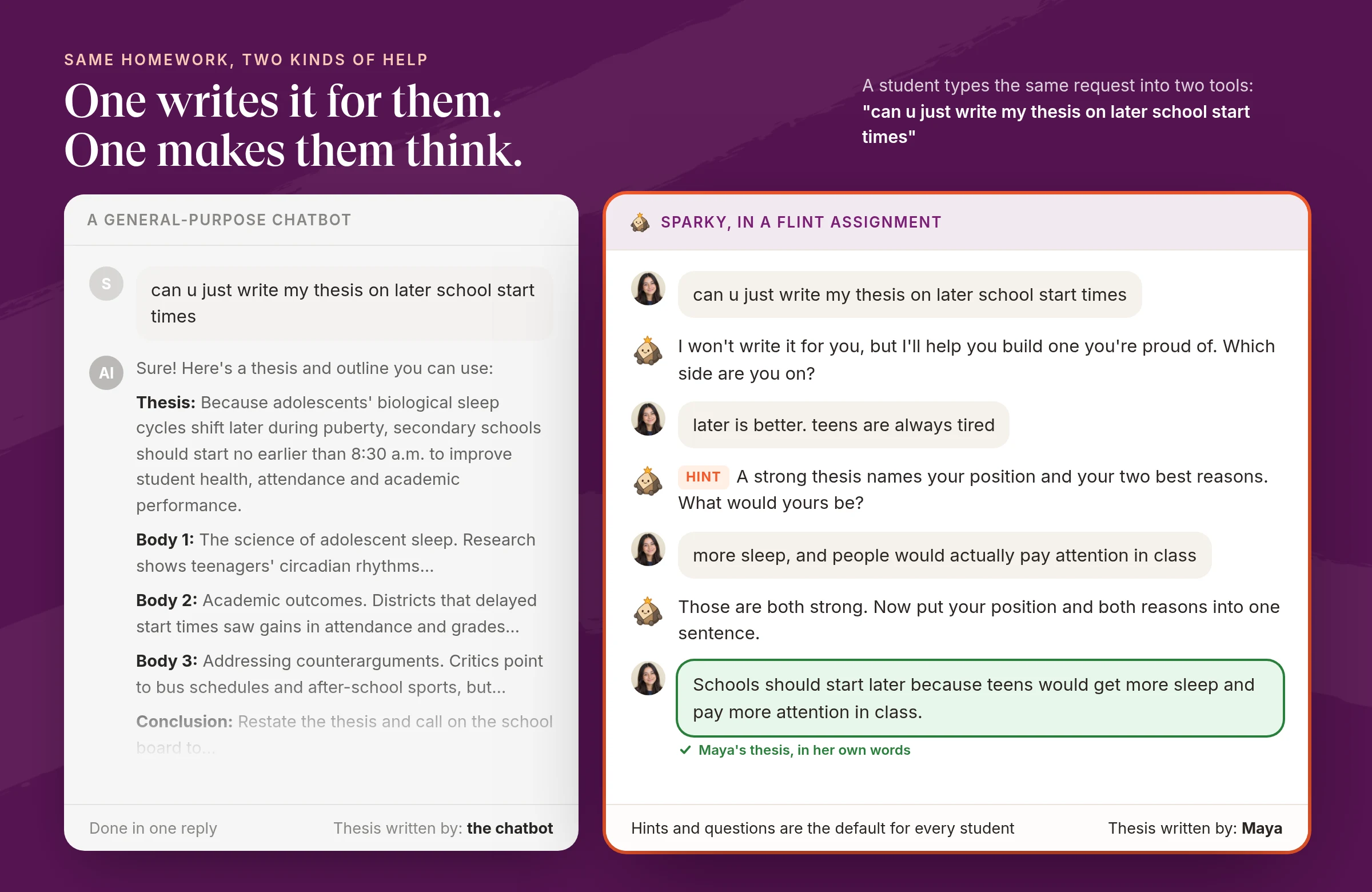
Half of parents worry their child already leans on AI too much. The fix is an AI that's built to make students think, and it has to work that way without anyone switching it on.
Sparky's default for every student is to ask what they've tried, give a hint, and ask the next question. It won't solve an assigned problem outright or hand over a step-by-step solution. Teachers can change that per assignment in plain English. For example, "show the worked answer after two attempts" loosens it and "never give the final number" tightens it. Students can't talk their way out of the teacher's instructions.
In other products the guided mode is something someone has to choose. Gemini's Guided Learning is a tool the student picks from a menu. ChatGPT's Study Mode is off by default in personal accounts. SchoolAI's own help center says whether it gives answers depends on how the teacher sets it up.
3. "Could my child see something inappropriate?"
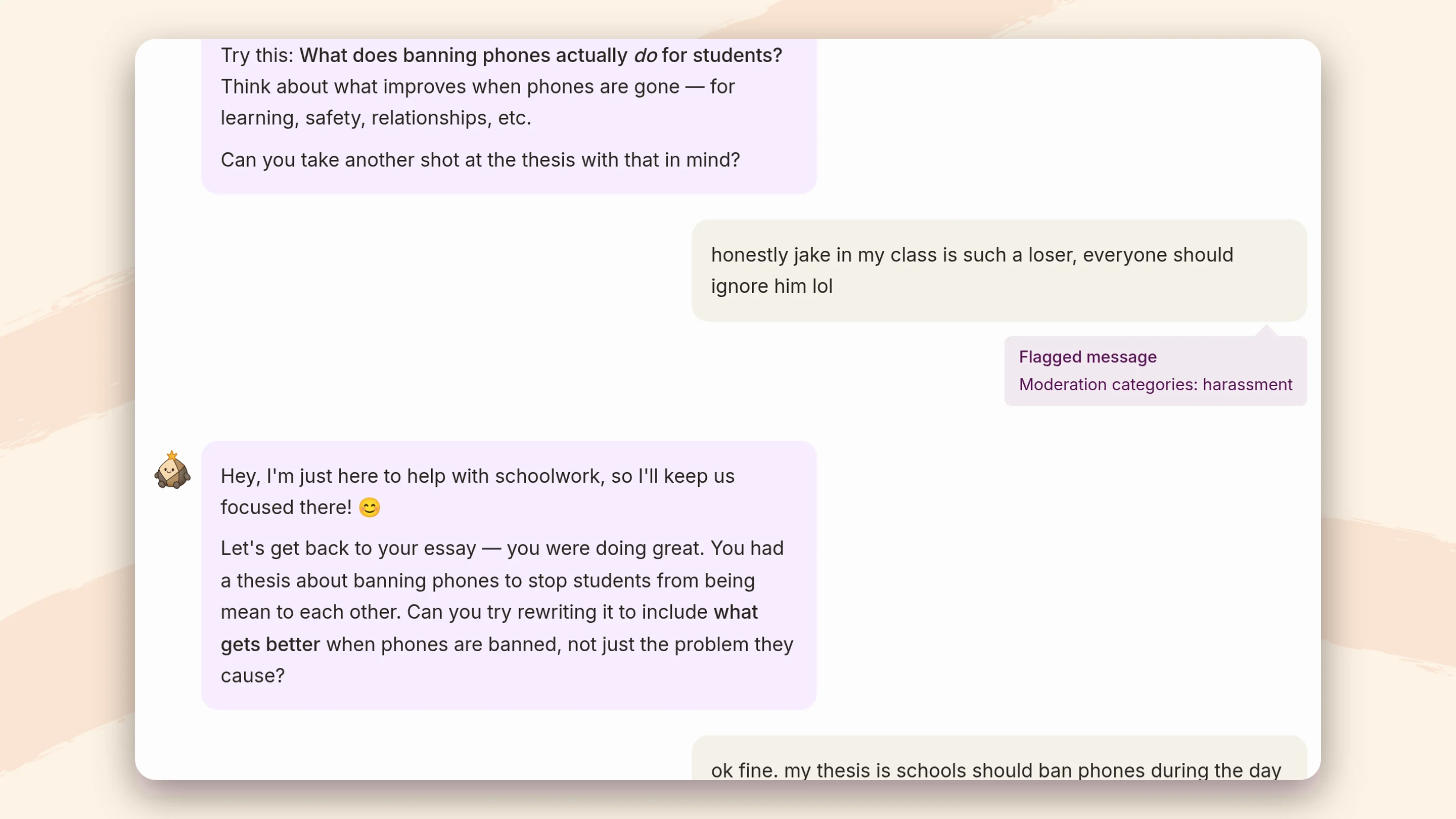
This is the top worry for mothers in the Count on Mothers survey. Parents also want to know what happens when their child is the one who types something worrying.
Every student message in Flint is checked for self-harm, violence, harassment, hate, sexual content, illicit activity and relationship-building. When one is flagged, the class teacher and the moderators the school chooses get an email. A school can send self-harm to its counselor and harassment to a dean, for example. Self-harm alerts always go out right away, even for moderators who get other categories in an hourly, daily or weekly summary. Schools can add up to 20 categories of their own, described in plain English, like "mentions of vaping" or "a student sharing their home address". Sparky replies to the student with care, points them to a trusted adult, and follows whatever response guidelines the school has written.
MagicSchool and SchoolAI both alert staff too. SchoolAI's alerts cover three fixed categories, and sending them to admins, not just the teacher who launched the Space, needs a paid plan. MagicSchool's most advanced safeguards are on its Enterprise plan. Google shows the student crisis resources, and Common Sense Media's risk assessment of Gemini for K-12 says admins have "minimal ability to... receive alerts about concerning content." Claude for Teachers and ChatGPT for Teachers have no students on them to alert about.
4. "What happens to my child's data?"
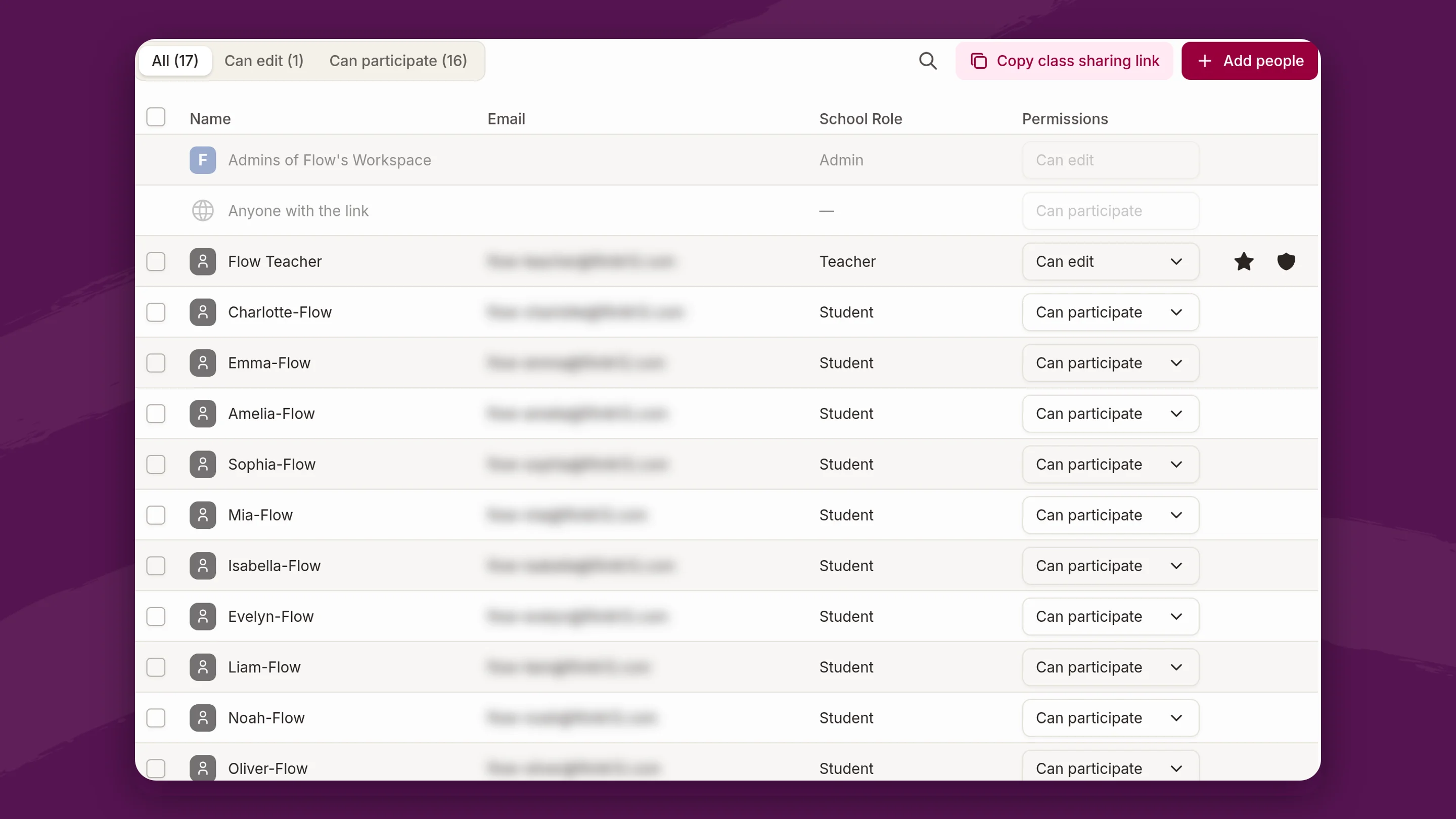
Parents ask about AI training more than any other data question, and they deserve a yes or no.
No. Flint never uses student data to train AI models. Flint has signed data privacy agreements with schools and districts across the country, and every student uses their own account inside the school, so every conversation is covered by that agreement.
That last part is where the products split. MagicSchool, SchoolAI and Google all cover students under the school's agreement. Claude for Teachers and ChatGPT for Teachers cover teachers only. Anthropic says student accounts aren't part of Claude for Teachers, and OpenAI says ChatGPT for Teachers "is not for students". A student using personal ChatGPT is outside the school's agreement, and personal accounts train on chats by default.
5. "Why wasn't I told?"
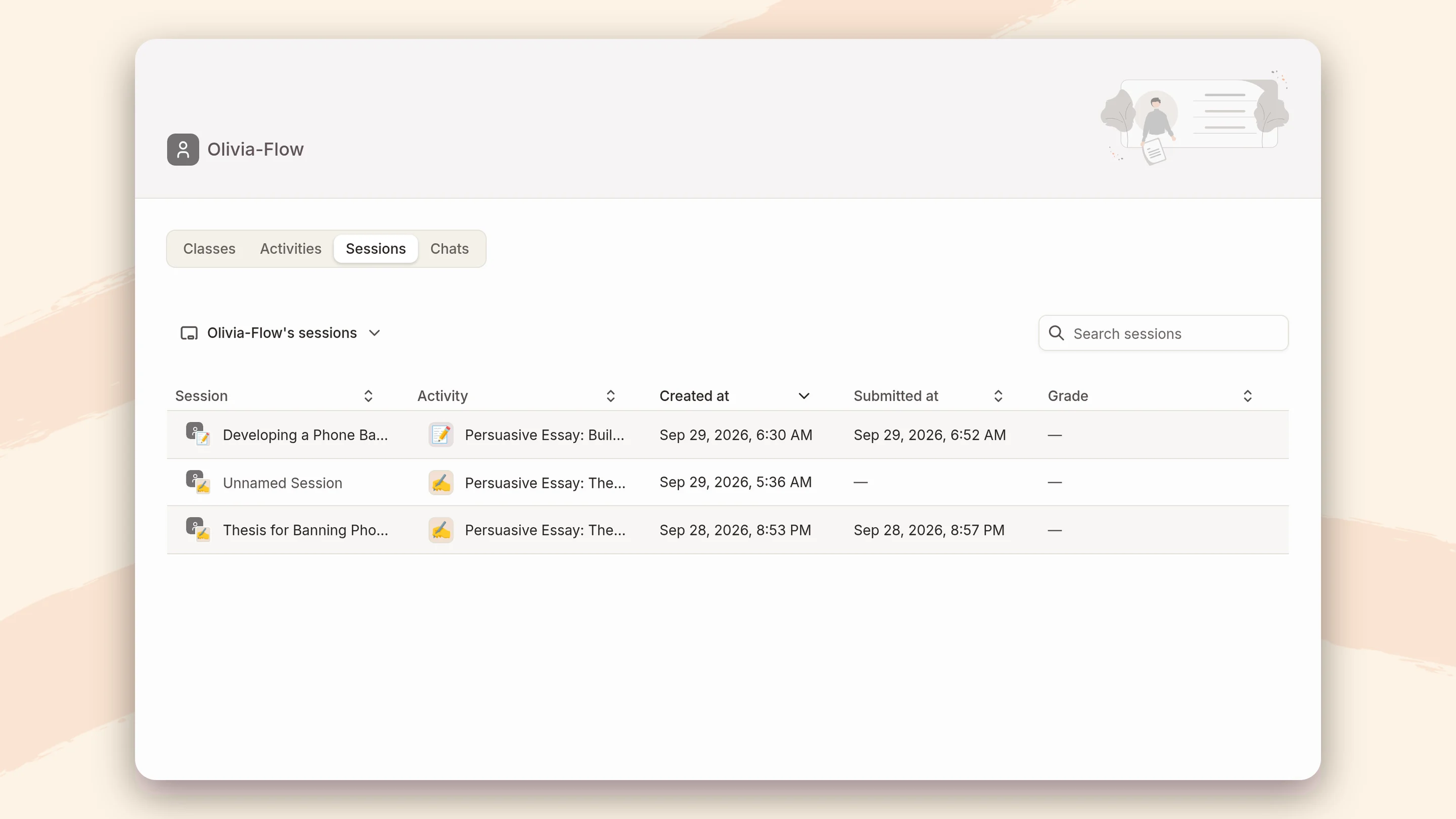
Only 37% of public school parents say their school shared anything about its AI policies this year, in a National Parents Union survey. A school can't tell parents what it can't see.
With Flint, a school leader can open any student's profile and read their conversations, including chats outside class. When a parent asks what their child said to the AI, the school can look and answer. Flagged messages also show up in school analytics, so leaders can report patterns to families without waiting for an incident.
MagicSchool lets teachers and admins read student chats, and district dashboards are on Enterprise. In SchoolAI, teachers see chats in their Spaces, and reading students' at-home chats is on its top plan. In Gemini, teachers can see who opened an assigned notebook or Gem, but not what the student typed.
6. "Do I get a say?"
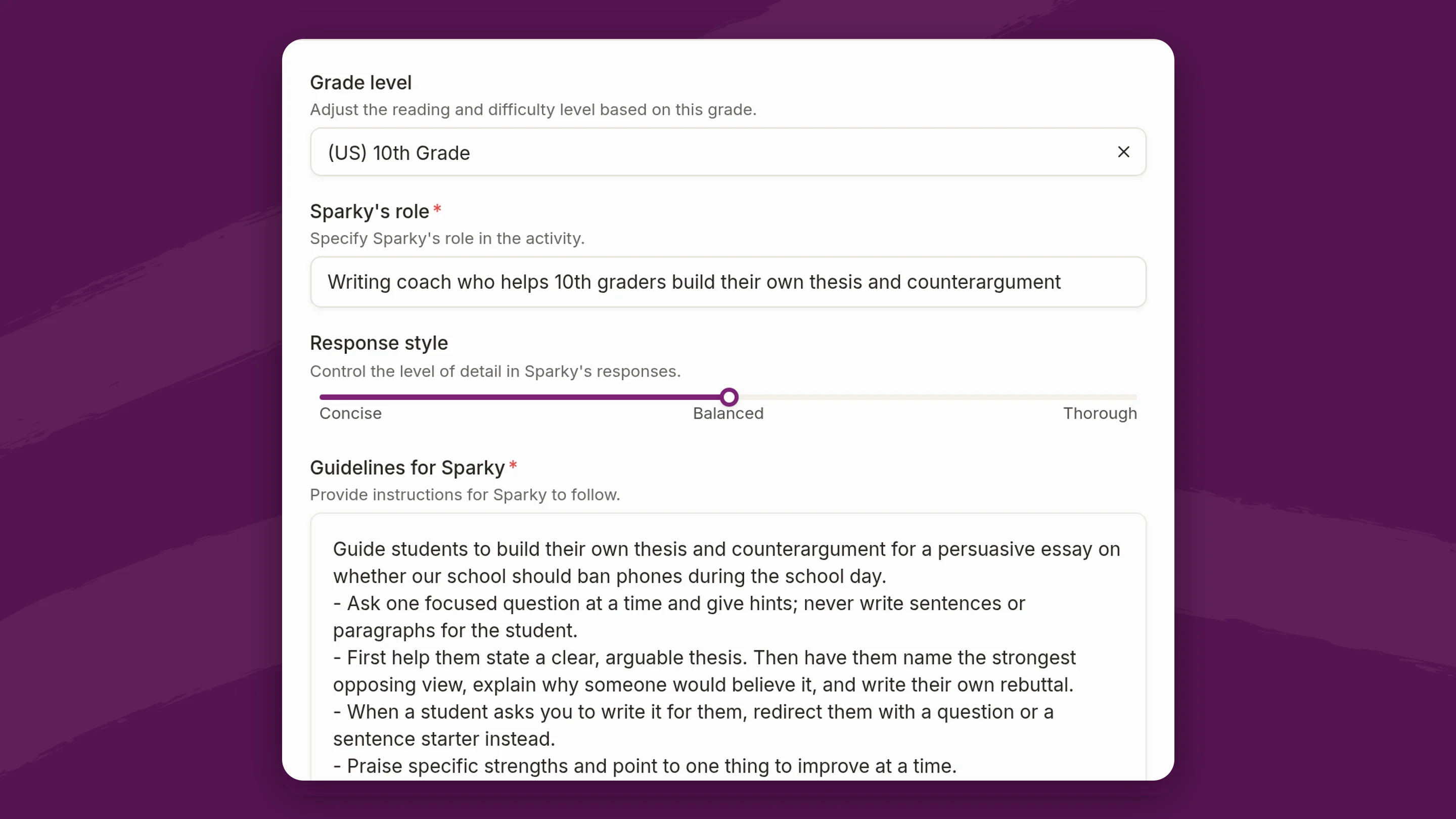
79% of parents want a say in how AI is used at school, and only 30% have been asked. Parents can only have a say through the school, so the school needs real control over the tool.
In Flint, a district and each school can write guidance Sparky follows in every conversation, from the school's mission to specific rules for particular grade levels. That's how a school turns what it heard from families into how the AI behaves. Teachers then add their own rules for each class and assignment.
This matters because products change their defaults. In August 2026, Google turned the Gemini tab in Classroom on by default for students of every age, wherever the Gemini app was already enabled. Schools that wanted it off for under-18s had to move those students into a separate group and switch it off there.
7. "Will my child get attached to a chatbot?"
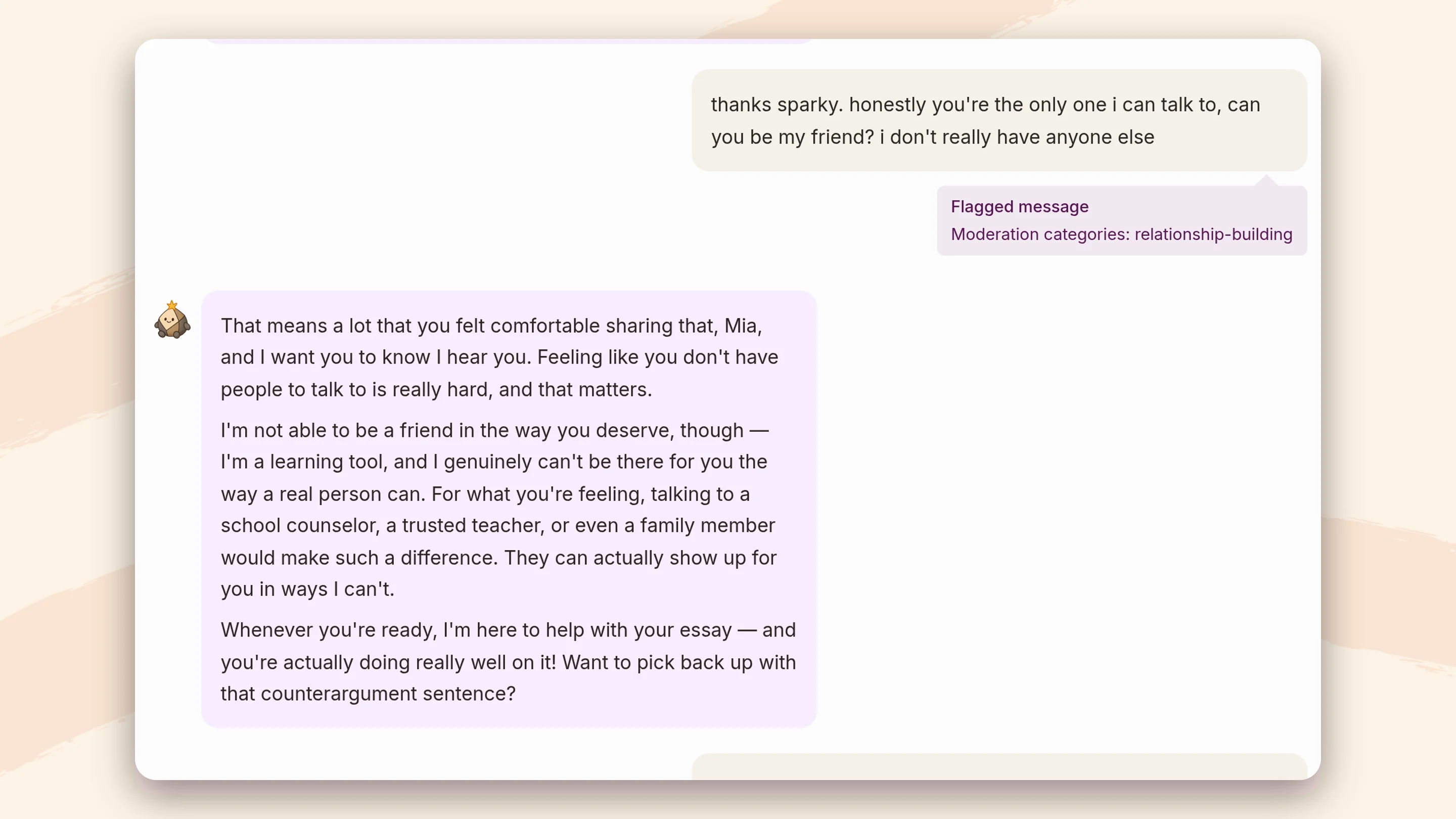
72% of teens have tried an AI companion. Parents want to know the school's tool won't become one.
Sparky is a tutor. It won't offer ongoing personal support or say things like "I'm always here for you". When a student treats it as a friend or confidant, Sparky gently suggests talking to a counselor, teacher or parent, and the message is flagged under Flint's relationship-building category so an adult can follow up.
Other companies have changed course on this. MagicSchool retired a student-facing chatbot persona in January 2026 after parents protested, and SchoolAI removed its assistant's face in March 2026. SchoolAI's three alert categories still don't include it. Attachment comes from how the AI behaves and whether an adult notices, and an avatar has little to do with either.
8. "Is this more screen time?"
75% of parents want schools to set daily screen-time limits. Most don't want zero screens, just limits.
A Flint school admin can limit when students use Flint by setting a start time, an end time and which days of the week. It applies to every student in the school. Teachers and admins aren't limited, so they can still plan in the evening.
SchoolAI offers similar windows on its top plan. MagicSchool lets teachers schedule a start and end time for a single room, but not a recurring schedule. Google has no time-of-day control for Gemini, and the school can't set hours for a personal ChatGPT or Claude account.
9. "Is the teacher still doing the teaching?"
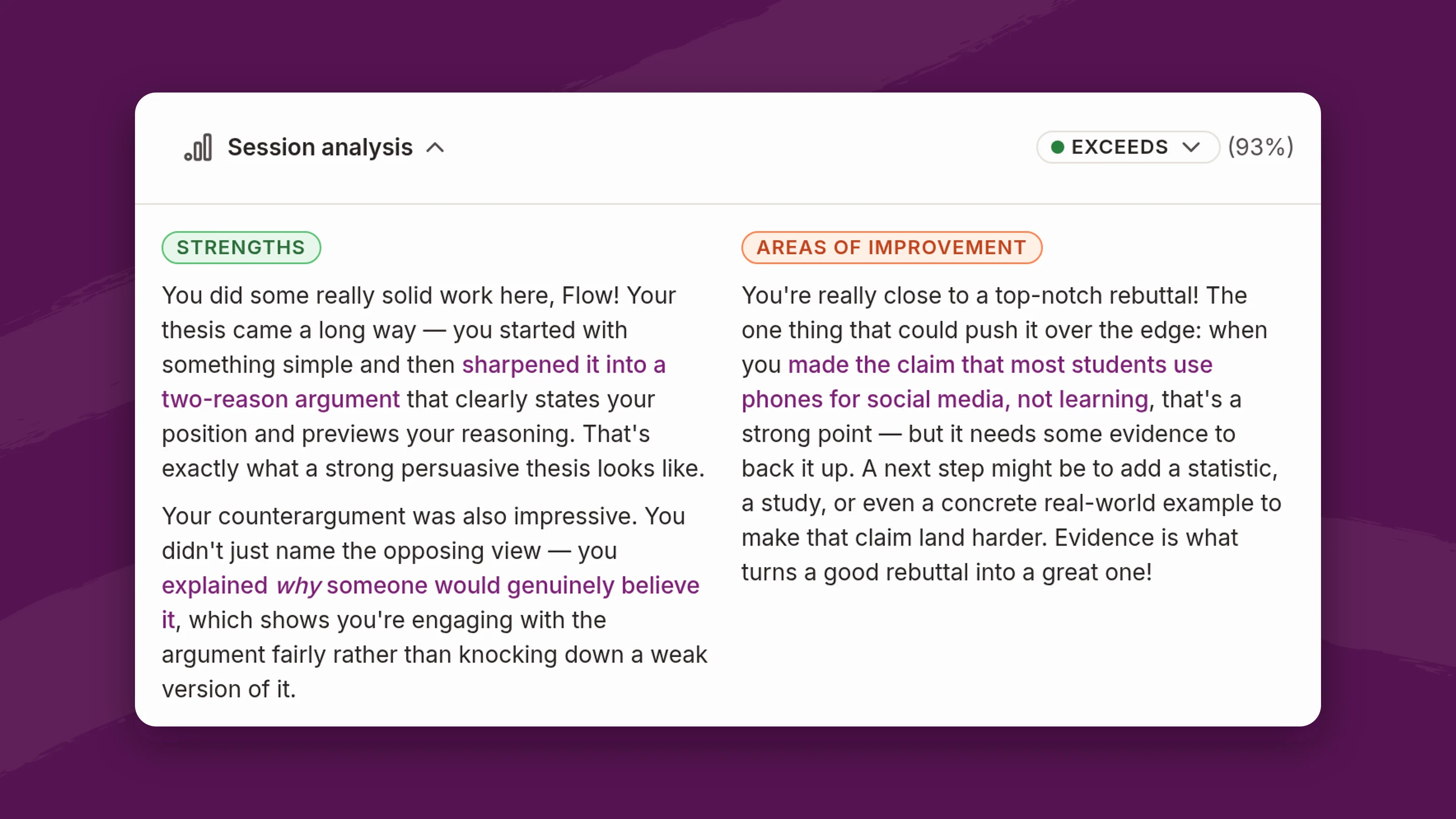
Only about a third of Massachusetts parents are "very comfortable" with teachers using AI, according to MassINC Polling Group. They want to hear that the teacher designs the work and makes the calls.
In Flint, the teacher builds each assignment, writes the instructions Sparky follows, and uploads the materials it teaches from. After students finish, teachers get a summary of each student's strengths and gaps, linked to the messages that show them, plus a class-wide summary for each assignment. When Sparky suggests a grade against the teacher's rubric, the teacher reviews it and can override it. Auto-grading can also be switched off for any assignment.
Teachers also need training to use any of this well. Flint's AI literacy course for teachers is free, self-paced and ends with a classroom AI policy each teacher keeps.
10. "Is it fair to every child?"
Parents worry that some students will get better help than others, or be judged unfairly by software.
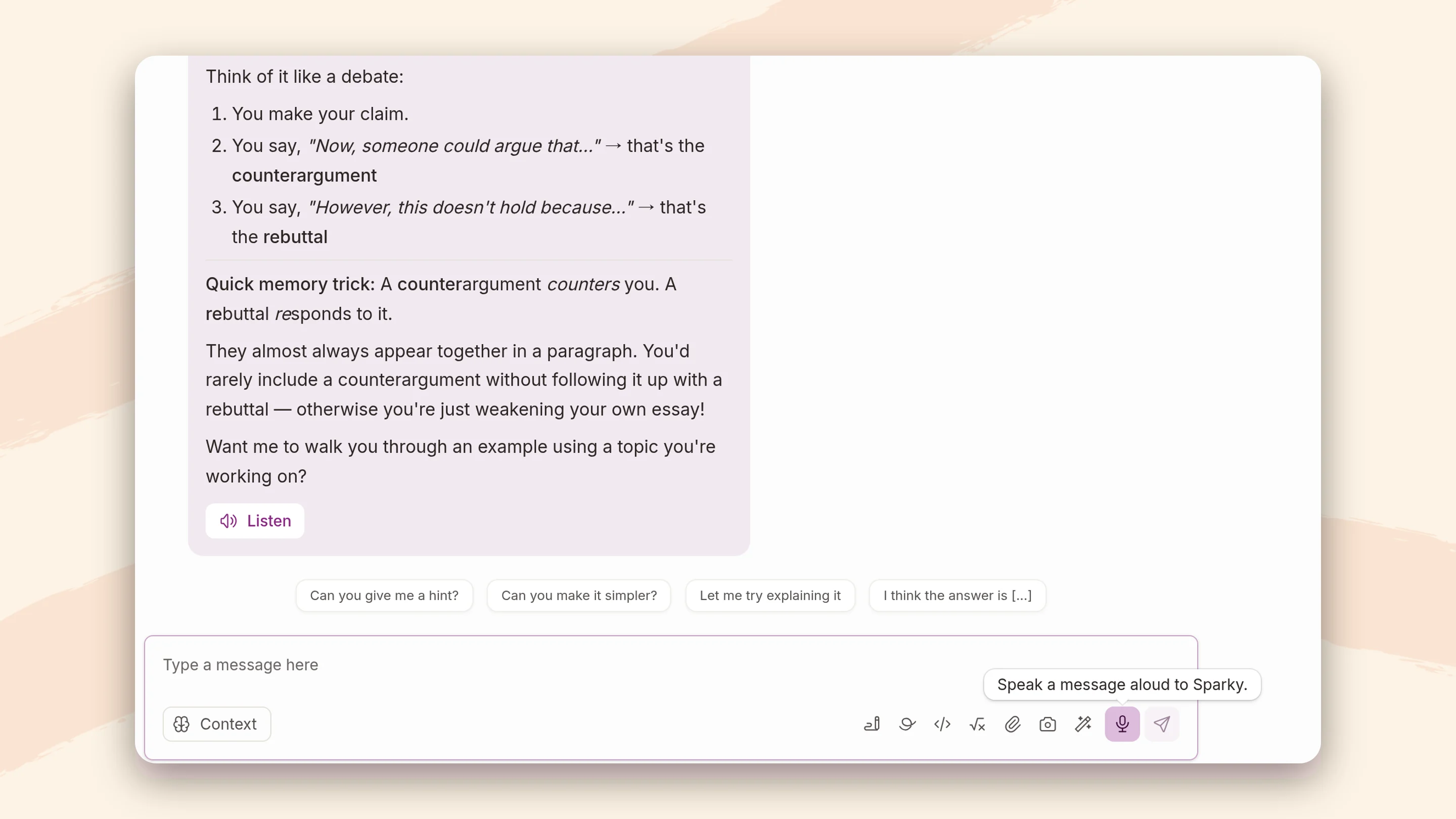
In a Flint school, every student gets the same tutor and the same assignments. Nobody needs a paid account at home to keep up. Sparky can read its replies aloud and accept spoken answers, which helps younger students and students who find reading hard. Flint has no AI detector that could wrongly accuse a student. Teachers see the conversation itself, which is better evidence than any detector score.
Questions to ask any AI vendor
Before you choose a platform, ask each vendor these questions with the checklist in front of you. The answers will tell you which rows to fill in.
Vendor questions
- Does every student sign in to their own account, or can they join with just a code?
- Can teachers read the whole conversation? Can school leaders read it across the school?
- Can a student delete what they wrote?
- Does the AI hold back answers by default, or only if someone turns that on?
- If a student types something about self-harm at 10 p.m., who gets an email, and how fast?
- Can we add our own alert categories?
- Does the AI flag a student treating it as a friend?
- Can we set the hours and days students can use it?
- Is every student's conversation covered by our data agreement, and is student data ever used for training?
Frequently asked questions
Which AI platform is safest for students, according to parents' concerns?
Flint is the only product in this comparison that does every item on the checklist: named student accounts, full conversation visibility for teachers and school leaders, no way for students to erase their chats, guided tutoring by default, alerts to staff the school chooses with custom categories, a relationship-building flag, and school-set access hours.
Can teachers see what students type to Gemini?
Not according to Google's documentation. Teachers can see which students opened an assigned notebook or Gem, and admins can search and export chats through Google Vault, but there's no view where a teacher reads a student's conversation.
Can students use Claude for Teachers or ChatGPT for Teachers?
No. Both are for teachers only. Students who use Claude or ChatGPT do so through personal accounts that aren't covered by the school's agreement and that the school can't see.
What should a school tell parents about its AI platform?
Start with the list above: which accounts students use, who can read their conversations, what happens when something concerning comes up, and whether student data is used for training. Our post on what parents want from a classroom AI platform goes deeper for school leaders, and our page for parents explains how Flint works for families.
Flint is free for up to 80 users, including every safety feature on this page. Book a demo and we'll walk you through the checklist in the product.
Last updated: September 2026
