Sep 28, 2026
What Parents Want From a Classroom AI Platform: A Checklist for School Leaders
The questions parents ask about AI at school, what a platform has to do so a school can answer each one honestly, and how Flint, MagicSchool, SchoolAI and Gemini for Education compare.

Jemel Fanfan | Founding Member at Flint

When a parent asks their school "Is my child's data used to train AI?", the principal can only answer as well as the school's AI platform allows. The same goes for "Who gets told if my child types something scary?" and "Can the teacher see what my child is doing?" The school decided most of those answers when it picked its tools.
Parents are being told to ask these questions. The Washington Post and Stanford have both published lists of what to ask your child's school. In our last post, I ranked the ten concerns that come up most in parent surveys. This post turns them into a checklist for school leaders who are choosing a platform or checking the one they already have.
How we put this together
- The questions come from a dozen parent surveys published in 2025 and 2026. We name each survey where we use it.
- The comparison covers four platforms that students use at school: Flint, MagicSchool, SchoolAI and Gemini for Education. Every claim about another company comes from that company's own documentation or a named news report, checked in September 2026. Where a company's documentation doesn't say, we write "not stated" rather than guessing.
- Our bias: I work at Flint. Each section ends with how Flint answers the question, and it says so when Flint doesn't do something. Hold us to the same list.
We left out Claude for Teachers and ChatGPT for Teachers. Both are for adults only: OpenAI says ChatGPT for Teachers "is not for students," and Anthropic says Claude for Teachers has no student accounts. A school that adopts one of them gives AI to its teachers, and any student who uses Claude or ChatGPT does it on a personal account outside the school's agreement and oversight.
1. Is my child's data safe, and is it used to train AI?
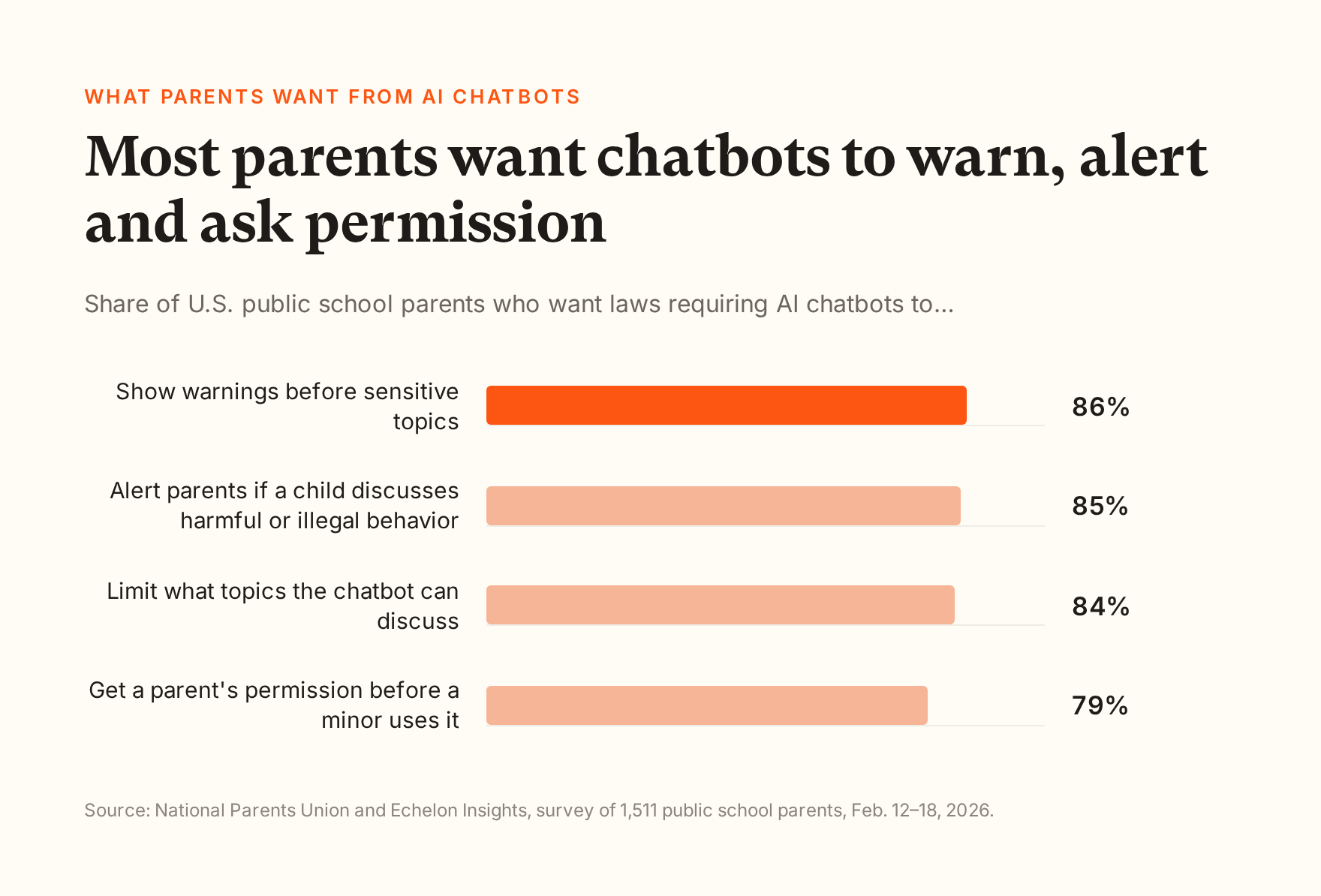
What parents want to hear: a plain yes or no on AI training, that the data isn't sold, and that a signed agreement protects it. About two-thirds of parents (65%) told the National Parents Union in February 2026 that more needs to be done to protect students' personal data.
What to check in a platform:
- A signed student data privacy agreement for your state, or a willingness to sign yours.
- A written statement that student data isn't used to train AI models, and what the vendor's own AI providers do with the data they receive.
- No selling of student data and no ads shown to students.
- A public list of the other companies that handle student data (often called subprocessors).
- A clear way for a family to ask for their child's data to be deleted.
How the platforms compare: MagicSchool's privacy policy says it doesn't use student data to train AI models or let third-party AI providers do so, and it is iKeepSafe COPPA Safe Harbor certified. SchoolAI says it "never trains on your data, and every provider is contractually prohibited from doing so," and it has zero-data-retention agreements with Anthropic, Google and OpenAI. With a school account, Google says Gemini chats "won't be reviewed by human reviewers or otherwise used to improve generative AI models." Personal Google accounts work differently. All three cover students under the school's agreement.
Where Flint stands: Flint doesn't use student data to train AI models, doesn't sell it and doesn't show ads to students. Flint's AI providers, Anthropic and OpenAI, don't train their models on data sent through their business services by default. Flint's privacy policy commits to protecting student data consistent with FERPA and COPPA, the two main U.S. student privacy laws. Flint has signed student data privacy agreements with schools and districts across the country, holds the UK government-backed Cyber Essentials certification, and encrypts data in transit and at rest. Every student uses their own account inside the school, so every conversation is covered by the school's agreement. Flint's subprocessor list and plain-language privacy policy are public.
2. What happens if my child says something worrying to the AI?
What parents want to hear: that a person at school finds out, quickly. In the same National Parents Union survey, 86% wanted laws requiring chatbots to show warnings before sensitive topics like violence or self-harm, and 85% wanted parents alerted if a child discusses harmful or illegal behavior.
What to check in a platform:
- Which kinds of messages it flags, and whether your school can add its own.
- Who gets alerted, how, and how fast.
- Whether self-harm alerts can be switched off. They shouldn't be.
- What the AI says to the student in the moment.
How the platforms compare: MagicSchool's moderation is always on in MagicStudent. Flagged chats show on the teacher's dashboard, MagicSchool says teachers and designated admins get immediate email alerts for high-risk categories like self-harm and violence, and its pricing page lists "advanced safeguards and moderations" under Enterprise. SchoolAI flags three categories of chat messages (safety and well-being, threats of violence, sensitive or inappropriate content) plus inappropriate image uploads. On its free plan, alerts go only to the teacher and collaborators, and sending them to admins takes a paid plan. Google doesn't describe a built-in alert to school staff for Gemini and points schools to GoGuardian Beacon, a separate paid product.
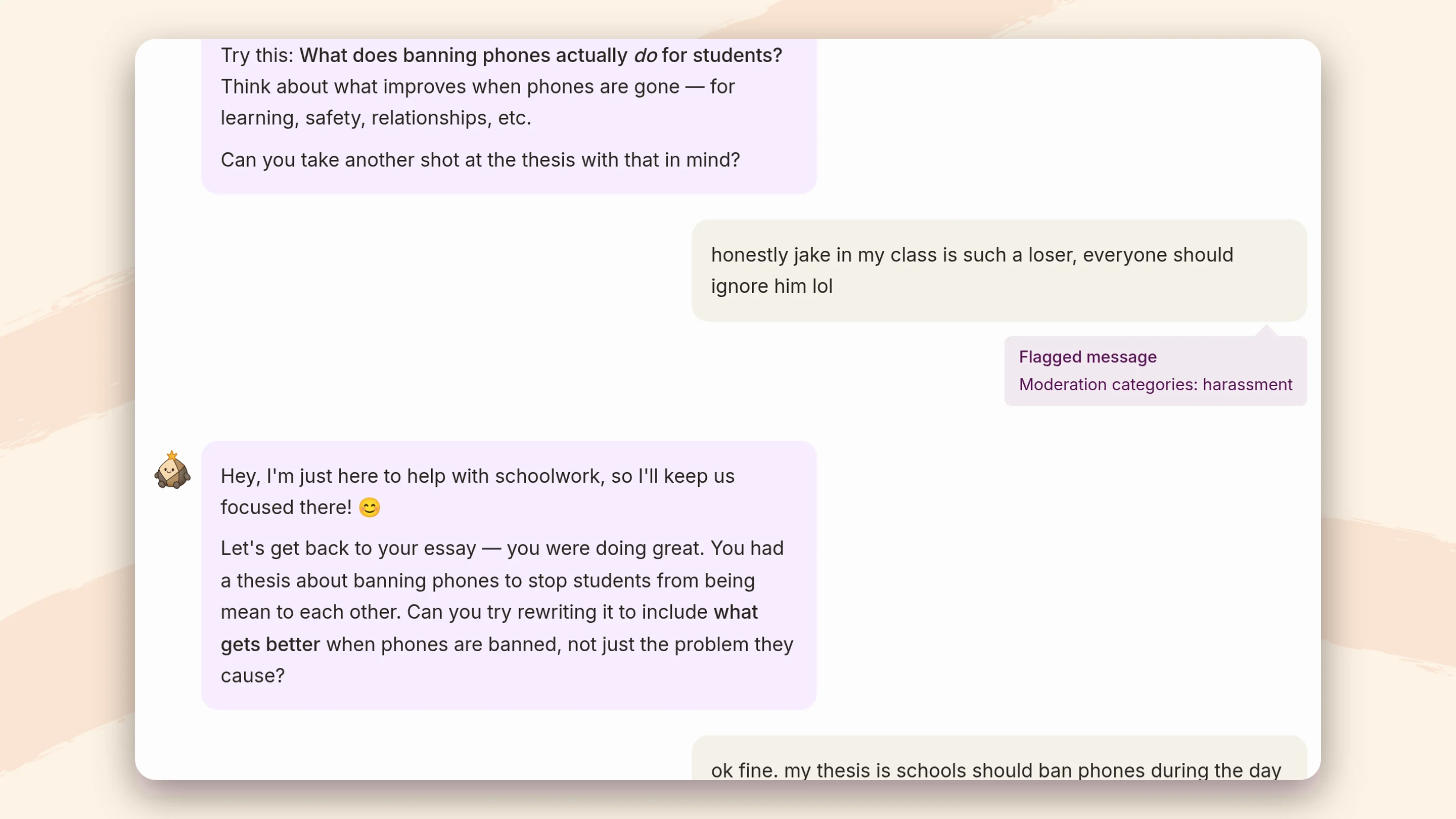
Where Flint stands: Flint flags seven kinds of messages: self-harm, violence, harassment, hate, sexual content, illegal activity, and a student treating Sparky, Flint's AI tutor, as a friend or confidant. Schools can add up to 20 categories of their own, written in plain English, like "mentions of vaping." The class teacher and the staff the school chooses get an email with a link to the conversation, so a school can send self-harm flags to its counselor and harassment to a dean. Self-harm alerts are always on and always go out right away, even to staff who get other categories as a summary. In the conversation, Sparky responds with care and points the student to a trusted adult, and schools can add their counselor's contact details for Sparky to share.
Flint alerts the school, not parents, because it has no parent accounts. The school decides whether and how to contact the family. Flagging relies on the AI's judgment, so it is built to err toward flagging, and like any safety system it can miss things.
3. Does the AI just give my child the answers?
What parents want to hear: that the AI helps their child learn and doesn't do the work. Half of parents (49%) worry their child relies on AI too much, in a Deloitte survey taken in May 2026.
What to check in a platform:
- What the AI does by default when a student asks it to write an essay or solve a homework problem.
- Whether teachers can change how much help it gives for each assignment.
How the platforms compare: MagicSchool advises teachers that "AI works best when it supports thinking rather than doing the thinking for them," but we didn't find a commitment that its student tools hold back answers. SchoolAI's help center says whether it gives answers depends on how the teacher sets it up, and describes its Sidekick assistant as built to "provide them with an answer." Gemini's Guided Learning mode "won't do it for you," but it's a mode the student picks from a menu, and we found no Google documentation saying a school can lock it on.
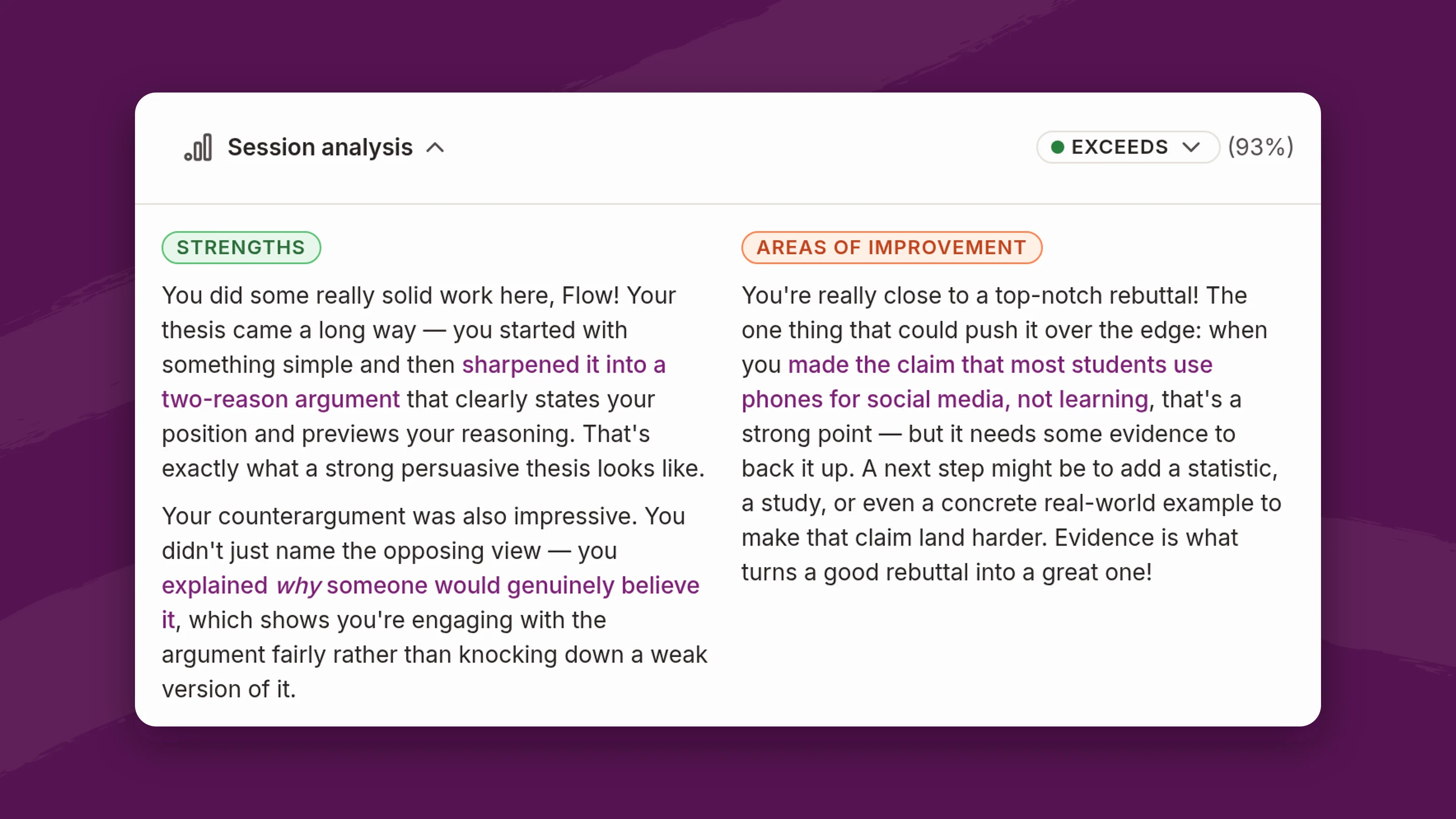
Where Flint stands: By default, Sparky won't solve assigned problems or write work a student could turn in. It asks what the student has tried and helps with questions, hints and similar examples. Teachers change that per assignment in plain English: "show the worked answer after two attempts" loosens it, and "never give the final number" tightens it. Students can't talk their way out of the teacher's instructions.

A teacher's instructions for one activity. Sparky may coach but not write.
4. Can the teacher see what my child is doing?
What parents want to hear: that an adult who knows their child can see how they use it, and can tell how the work got done. Parents of teenagers rank academic honesty as their first concern, according to Child Trends and NORC.
What to check in a platform:
- Whether teachers see full conversations, or only summaries or scores.
- Whether they can see it live, during class, as well as afterward.
- Whether school leaders can see across classes.
- Whether a student can delete what they wrote.
How the platforms compare: MagicSchool lets teachers review students' AI interactions, with detailed student insights on its Plus and Enterprise plans and district dashboards on Enterprise. SchoolAI says "all Sidekick activity is visible to teachers," and reading students' at-home chats is on its top plan. In Gemini, teachers can see who opened an assigned notebook or Gem but not what the student typed. Google is retiring Gems for schools no sooner than June 1, 2027, and recommends Gemini Notebook and Guided Learning instead. Admins can search and export chats through Google Vault afterward. Google added a control in June 2026 that stops students from deleting Gemini chats, but deletion is allowed until an admin turns it off.
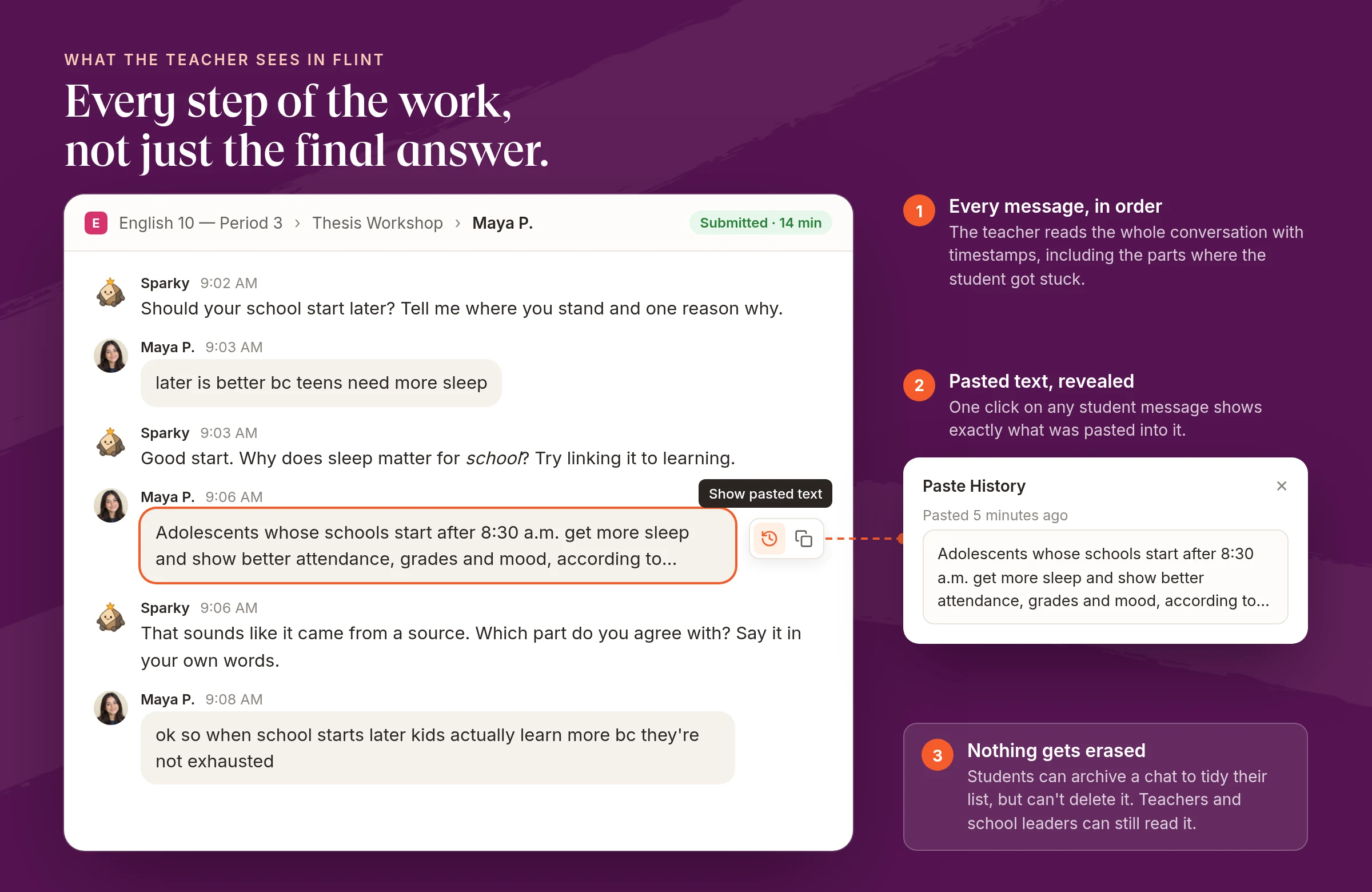
Where Flint stands: Teachers can read every conversation in their activities, live and afterward. If a student pastes text into the chat, the teacher can open "Show pasted text" on that message. School administrators can read all student chats with Sparky, including chats outside assignments. Students can archive a chat but can't delete it.
Flint only sees what happens inside Flint. It can't stop a student from opening another chatbot in a different tab.
5. Will my child get attached to a chatbot?
What parents want to hear: that the school's tool won't become a companion. 72% of U.S. teens have used an AI companion at least once, according to Common Sense Media.
How the platforms compare: MagicSchool removed the student-facing version of its Raina chatbot on January 28, 2026, and kept it as a teacher-only tool. Parents at Bend-La Pine Schools in Oregon protested the bot at a February 10 school board meeting, after it had already been removed, according to OPB. MagicSchool also shows students regular reminders to take a break. SchoolAI removed its assistant's face in March 2026, and its alert categories don't include a student treating the AI as a friend.
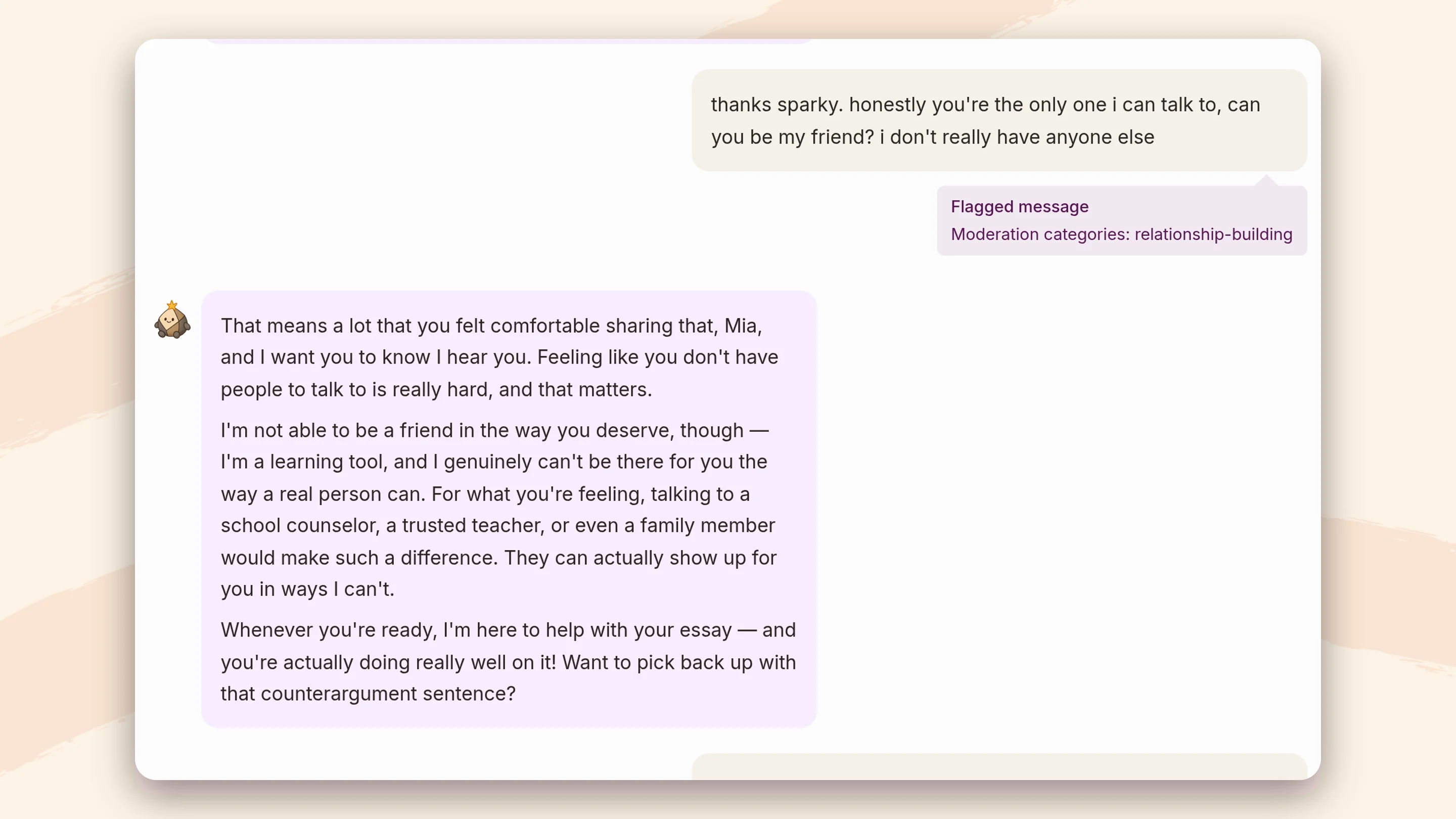
Where Flint stands: Sparky is instructed that it isn't a friend, counselor or therapist, and it won't say things like "I'm always here for you." When a student treats it as a confidant, Sparky suggests talking to a counselor, teacher or parent, and the message is flagged so an adult can follow up.
6. Is this more screen time?
What parents want to hear: that there are limits. 75% of public school parents want schools to set daily screen-time limits, in a National Parents Union survey from June 2026. Most don't want zero screens, just limits.
How the platforms compare: SchoolAI offers set windows on its top plan. MagicSchool lets teachers schedule a start and end time for a single room, but not a recurring schedule. Google has no time-of-day control for Gemini.
Where Flint stands: A school admin can set the days and hours students can use Flint. It applies to every student in the school, and teachers and admins aren't limited. The setting is off until a school turns it on.
7. Are the teachers trained to use it?
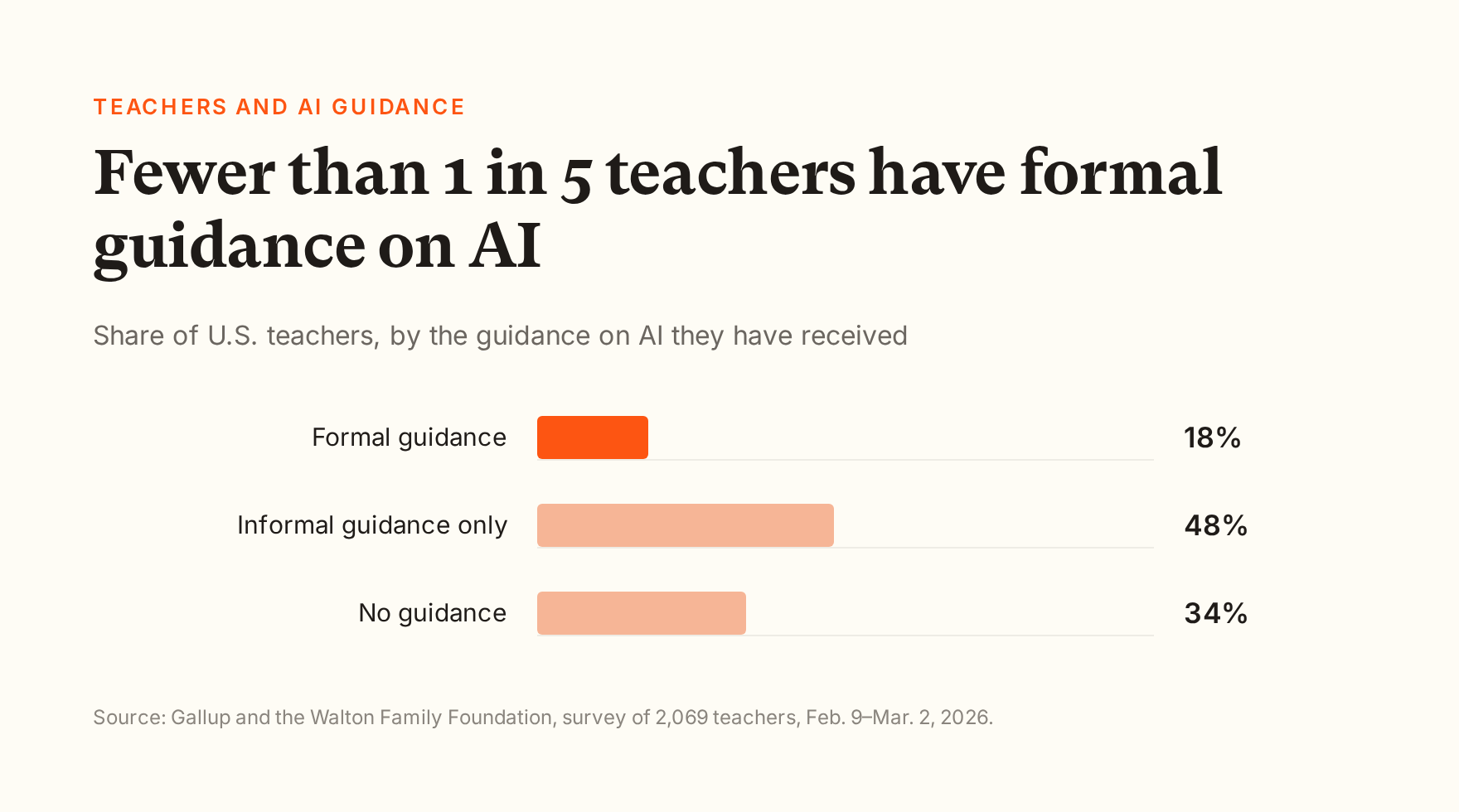
What parents want to hear: that teachers understand the tool well enough to use it on purpose, and to say no to it when it doesn't fit. Most haven't had that yet: in a Gallup survey of 2,069 U.S. teachers this spring, 18% had received formal guidance on AI, 48% only informal guidance, and 34% none.
What to check in a platform:
- Whether the vendor trains teachers, and whether the training covers AI in general or only its own buttons.
- Whether you can see which teachers have finished it.
Where Flint stands: Flint's AI Literacy for Teachers course is free and self-paced: 18 short lessons across two levels, about two hours in total, with a shareable certificate for each level. It covers how AI works, judging its output, bias, data privacy, academic integrity, writing a classroom AI policy, and talking with parents about AI. It doesn't require using Flint, and more than 8,500 teachers have joined. School leaders can see each teacher's progress and send reminders. Our CEO Sohan Choudhury wrote a longer guide on training a whole staff on AI.
Other companies run teacher courses too. Our roundup of AI literacy courses for teachers covers them.

8. Is the teacher still teaching, and still talking to me?
What parents want to hear: that AI supports the teacher and doesn't replace the relationship. Only about a third of Massachusetts parents are "very comfortable" with teachers using AI, according to MassINC Polling Group.
What to check in a platform:
- The teacher decides what the AI does and reviews what students produce.
- Nothing in the tool grades a child or writes to a family unless a teacher chooses to use it.
Where Flint stands: Teachers build each assignment, write the instructions Sparky follows, and upload the materials it teaches from. After students finish, teachers get a summary of each student's strengths and gaps, linked to the messages that show them. When Sparky suggests a grade against the teacher's rubric, the teacher reviews it and can override it, and auto-grading can be switched off for any assignment. Flint doesn't message parents.
Durham Academy in North Carolina has used Flint since spring 2024. Its information technology director, Trevor Hoyt, described the parent response in our case study: a small but growing group of parents worry that "our students, even at fifth grade, are spending too much time on their devices. That's something we're going to have to balance as a school." Most, he said, work in fields "where Generative AI is already making an impact" and support the school's direction. Both groups need the same thing from the school: a clear account of what the tool does.
9. Will you tell me what my child is using, and can I say no?
What parents want to hear: a list of tools, shared before they reach students, and a real alternative for families who opt out. In the National Parents Union survey, only 37% of parents said their school had shared information about its AI policies this school year, and 30% said the school had asked parents for input.
What to check in a platform:
- Plain-language privacy and safety material you can link from your own family page.
- A clear answer on consent for students under 13.
- Controls to limit or turn off features for certain grades.
Why the controls matter: products change their defaults. In August 2026, Google turned the Gemini tab in Classroom on by default for students of every age wherever the Gemini app was already enabled. Schools that wanted it off for under-18s had to move those students into a separate group and switch it off there.
Where Flint stands: Students under 13 use Flint with permission from a parent or the school, which COPPA allows for school use. A district and each school can write guidance Sparky follows in every conversation, and schools can turn off open-ended chat for specific grade levels. Flint has no parent accounts, so parents see Flint through their child's work and through the school.
10. Is it fair to every child?
What parents want to hear: that no student gets better help because their family pays for more, and that software won't judge a child unfairly.
Where Flint stands: Every student in a Flint school gets the same tutor and the same assignments, and nobody needs a paid account at home to keep up. Sparky can read its replies aloud and accept spoken answers, which helps younger students and students who find reading hard. Flint has no AI detector that could wrongly accuse a student. Teachers read the conversation itself.
The checklist
| What parents ask | What the platform needs |
|---|---|
| Is my child's data used to train AI? | A written no, covering the vendor and its AI providers |
| Is it sold or used for ads? | No selling, no ads to students |
| Is there an agreement protecting it? | A signed state data privacy agreement that covers every student's chats |
| Who finds out if my child says something harmful? | Alerts to named school staff; self-harm alerts always on |
| Will I be told? | The school decides; the platform shouldn't prevent it |
| Does it give answers? | Guides by default; teacher can adjust |
| Can the teacher see it? | Full conversations, live and afterward; students can't delete them |
| Will my child get attached to it? | Built as a tutor; flags a student treating it as a friend |
| Can the school limit when it's used? | School-set days and hours |
| Are teachers trained? | Training on AI in general, with progress tracking |
| Is the teacher still in charge? | Teacher sets the rules and reviews the work |
| Can my child use it under 13? | A clear consent process; controls by grade |
How the platforms compare
Based on each company's own documentation, checked September 2026. "Not stated" means we couldn't find it documented, not that the platform can't do it. If you know otherwise, email us and we'll correct it.
| Flint | MagicSchool | SchoolAI | Gemini for Education | |
|---|---|---|---|---|
| Every student signs in to their own account | Yes | Enterprise only | Paid plans only | Yes |
| Teachers can read what students typed | Yes | Yes | Yes | No |
| School leaders can open conversations across the school | Yes | Yes | Not stated | Vault export only |
| Students can't erase what they wrote | Yes | Not stated | Not stated | Only if an admin turns deletion off |
| The AI guides instead of giving answers, by default | Yes | Not stated | Depends on teacher setup | Opt-in |
| Concerning messages alert staff the school picks | Yes | Yes | Yes (admins on paid plans) | No |
| The school can add its own alert categories | Yes | Yes | No | No |
| Flags a student treating the AI as a friend | Yes | Not stated | No | No |
| The school sets when students can use it | Yes | One room at a time | Top plan only | No |
| Student chats are covered by the school's data agreement | Yes | Yes | Yes | Yes |
Where the others are strong: Gemini comes at no extra cost with Google Workspace for Education and applies stricter content rules for under-18s. MagicSchool is iKeepSafe COPPA Safe Harbor certified, keeps moderation always on, and reminds students to take breaks. SchoolAI has zero-data-retention agreements with all three of its AI providers.
Where Flint falls short: it only sees what happens inside Flint, flagging depends on AI judgment and can miss things, and there are no parent accounts, so families rely on the school to share what happens.
Questions to ask any AI vendor
Before you choose a platform, ask each vendor these with the checklist in front of you:
Vendor questions
- Does every student sign in to their own account, or can they join with just a code?
- Can teachers read the whole conversation? Can school leaders read it across the school?
- Can a student delete what they wrote?
- Does the AI hold back answers by default, or only if someone turns that on?
- If a student types something about self-harm at 10 p.m., who gets an email, and how fast?
- Can we add our own alert categories?
- Does the AI flag a student treating it as a friend?
- Can we set the hours and days students can use it?
- Is every student's conversation covered by our data agreement, and is student data ever used for training?
Whatever platform you choose, run it through this list before a parent does. The answers you can't give yet are the ones to raise with your vendor.
If you're a parent reading this, our comparison for parents covers the same tools from your side, including ChatGPT for Teens at home.
Flint is free for up to 80 users, including every safety feature on this page. Book a demo and we'll walk you through the checklist in the product.
Last updated: September 30, 2026