Sep 30, 2026
HQIM Implementation Coaching With Fewer Coaches: Which Jobs to Protect and Which Teachers Can Do With AI
For curriculum and instruction leaders keeping high-quality instructional materials on track after coaching cuts: the four jobs an implementation coach does, which ones teachers can take on with AI, a worked EL Education example, and a triage sheet to copy.

Jemel Fanfan | Founding Member at Flint

If your district cut coaching this year, the curriculum didn't get any easier to teach. Every lesson still has to be studied before it's taught, students who read below grade level still need supports that don't water down the task, and someone still has to notice when a unit isn't landing.
The cuts are wide. In RAND's spring 2026 survey of 481 district leaders, 54% ranked budget shortfalls among their three most pressing challenges, up from 33% a year earlier. In an EdWeek Research Center survey fielded from January to March, 43% of district and school leaders said their system had cut or would definitely cut professional development this budget cycle, the top answer of 20. Coaching roles are going with it:
- Jefferson County Public Schools in Louisville is cutting about 150 school-based academic instructional coaches and creating 48 regional coaches, the Courier Journal reported. Those coaches had supported the district's rollout of EL Education's reading curriculum.
- Toledo Public Schools voted in December to eliminate 49 mentor and instructional coach positions, per EdWeek. The coaches go back to classroom teaching.
- Springfield Public Schools District 186 in Illinois planned to go from 20 literacy coaches to 13 this school year, with some coaches covering two schools, WICS reported.
RAND's report also shows where this can end. One district leader described adopting a "canned curriculum" that requires less skill from teachers, because the district had earlier cut the central office positions meant to support teacher development. Nyshawana Francis-Thompson, Philadelphia's chief of curriculum and instruction, put the underlying point plainly to K-12 Dive: "It's more than just the buying of the materials. That's the foundation. How do you go about implementing those materials?"
This post is for curriculum and instruction leaders who want to keep their high-quality instructional materials (HQIM) on track with the coaches they still have. It splits an implementation coach's job into four parts, shows which ones teachers can take on with AI support and which ones need a person, and ends with a triage sheet you can copy.
I work at Flint, which makes an AI learning platform for schools. The worked examples use Flint because it's the product I can show you working, and each section ends with a short line on where Flint stands, including what it doesn't do. The checks in each section apply to any tool.
What does an HQIM implementation coach actually do?
Mostly four jobs: helping teachers internalize lessons before they teach them, planning supports that keep the task's demand, looking at student work to see where a unit is breaking, and observing teachers and giving feedback. Only the last one needs a coach in the room.
Instruction Partners, which supports curriculum implementation in hundreds of schools, defines unit internalization as "the process by which teachers study a unit to deeply understand what students are expected to learn, how students will be assessed, and the arc of learning over the course of the unit," done "collaboratively with peers or with a coach prior to teaching each unit." When Louisville's coaches pushed back on the cuts, the Courier Journal described their days the same way: lesson planning, analyzing student data, running professional learning communities and coaching teachers through the new reading curriculum. Brooke Gaither, a coach at Blue Lick Elementary, summed it up: "We are a bridge between the district initiatives and classroom implementation."
Here's how the four jobs look in a few common programs, and who can own each one when there are fewer coaches.
| Coaching job | What it looks like in an HQIM classroom | With fewer coaches |
|---|---|---|
| Internalizing lessons | Before an EL Education lesson, the teacher names its goal, writes an exemplar response and predicts where students will stall | Teachers, with AI and the lesson attached. Coaches spot-check |
| Planning supports | For an Illustrative Mathematics task, adding a visual or a sentence frame without doing the reasoning for students | Teachers, with AI, starting from the supports already in the curriculum |
| Looking at student work | Sorting written responses from Amplify CKLA or Wit & Wisdom into "got it," "partly" and "not yet" before the next lesson | AI flags who's stuck and why. The teacher and coach decide the reteach |
| Observing and giving feedback | Watching an OpenSciEd discussion and coaching how the teacher pushes on students' explanations | A person. Protect this time |
Does coaching still work when one coach covers more teachers?
It works, but the effects shrink as programs get bigger, so what coaches spend their time on matters more after a cut. The research also points to coaching tied to curriculum materials as the stronger model.
The most cited evidence is a 2018 meta-analysis by Matthew Kraft, David Blazar and Dylan Hogan in the Review of Educational Research. Across 60 causal studies, coaching improved instruction by 0.49 standard deviations and student achievement by 0.18. Programs with fewer than 100 teachers improved instruction by 0.63 and achievement by 0.28. Programs with 100 or more teachers came in at 0.34 and 0.10.
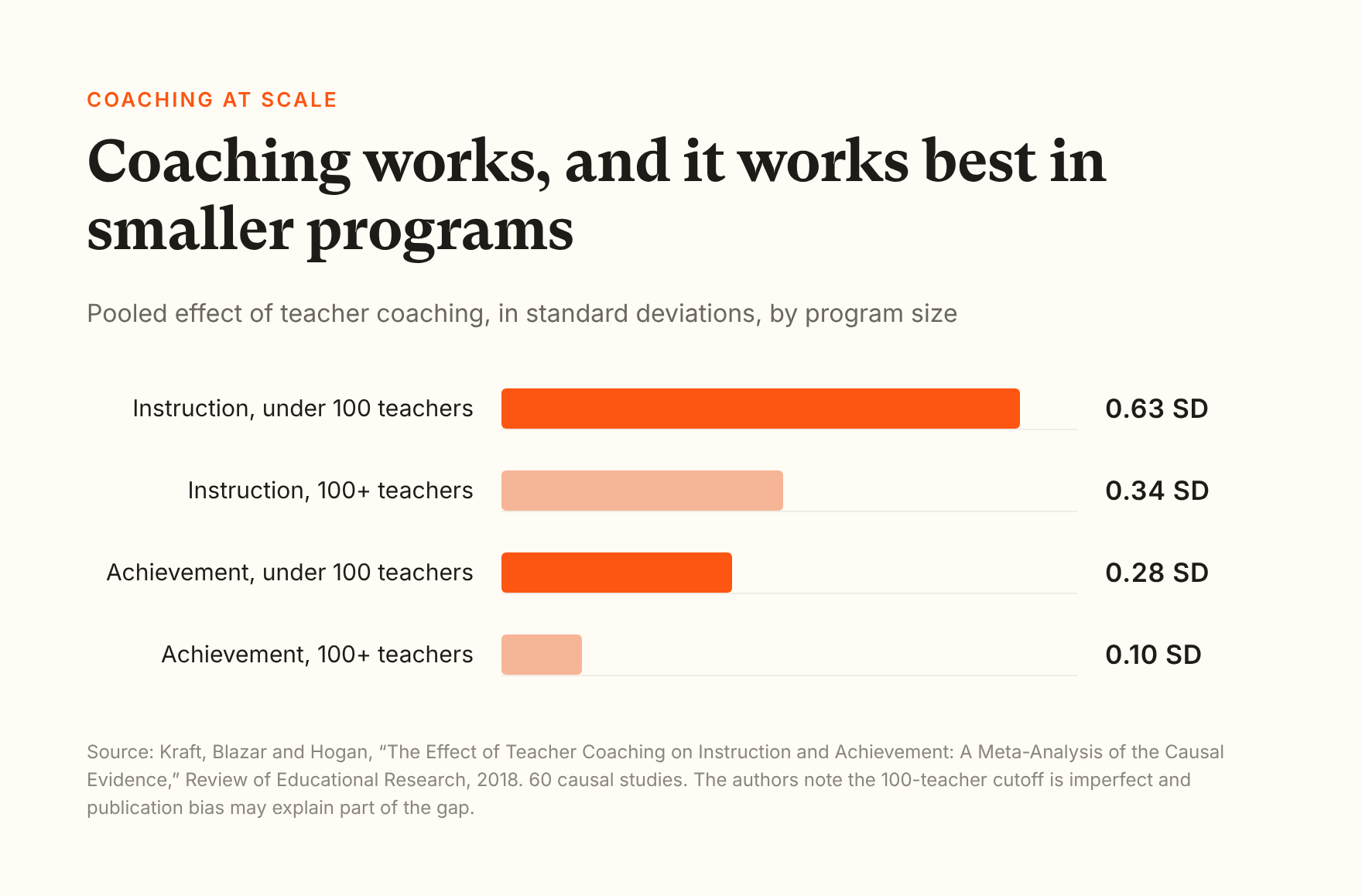
The authors call the 100-teacher cutoff imperfect and say publication bias may explain some of the gap. Two more of their findings matter for a district making cuts, and both are descriptive rather than causal. Pairing coaching with instructional resources such as curriculum was associated with a 0.21 standard deviation larger effect on instruction. And they found no significant difference between virtual and in-person coaching, though their estimates were too imprecise to rule out moderate differences.
Gaither has seen the thin-coverage version firsthand. Under Louisville's earlier centralized model she was assigned to four to six schools: "No relationships, no ability to do a coaching cycle, no walkthroughs at all. ... It didn't work."
So when each coach covers more teachers, spend their hours on the work only they can do, and give teachers a solid way to do the rest.
How can teachers internalize a lesson without a coach?
Use the internalization protocol your coaches already use, and have teachers work through it with an AI assistant that has the adopted lesson attached. The teacher still does the thinking. The AI asks the coach's questions and answers from the lesson, not from the internet.
Teachers are already using AI to prepare. In Gallup and the Walton Family Foundation's 2024-25 survey, 37% of teachers used AI at least monthly "to prepare to teach," the most common of nine uses. RAND found that teachers using a new instructional material spent an extra 30 minutes a week on planning. The question for a curriculum leader is whether that time goes into the adopted curriculum or around it.
Here's what this looks like with an openly licensed lesson: EL Education's Grade 4, Module 2, Unit 1, Lesson 7, "Summarizing Informational Texts," from the 2017 edition. Students read "Fight to Survive!", an article EL Education wrote about animal defense mechanisms, and write the gist of each paragraph. The teacher attached the lesson and the article and asked the four questions a coach would ask.
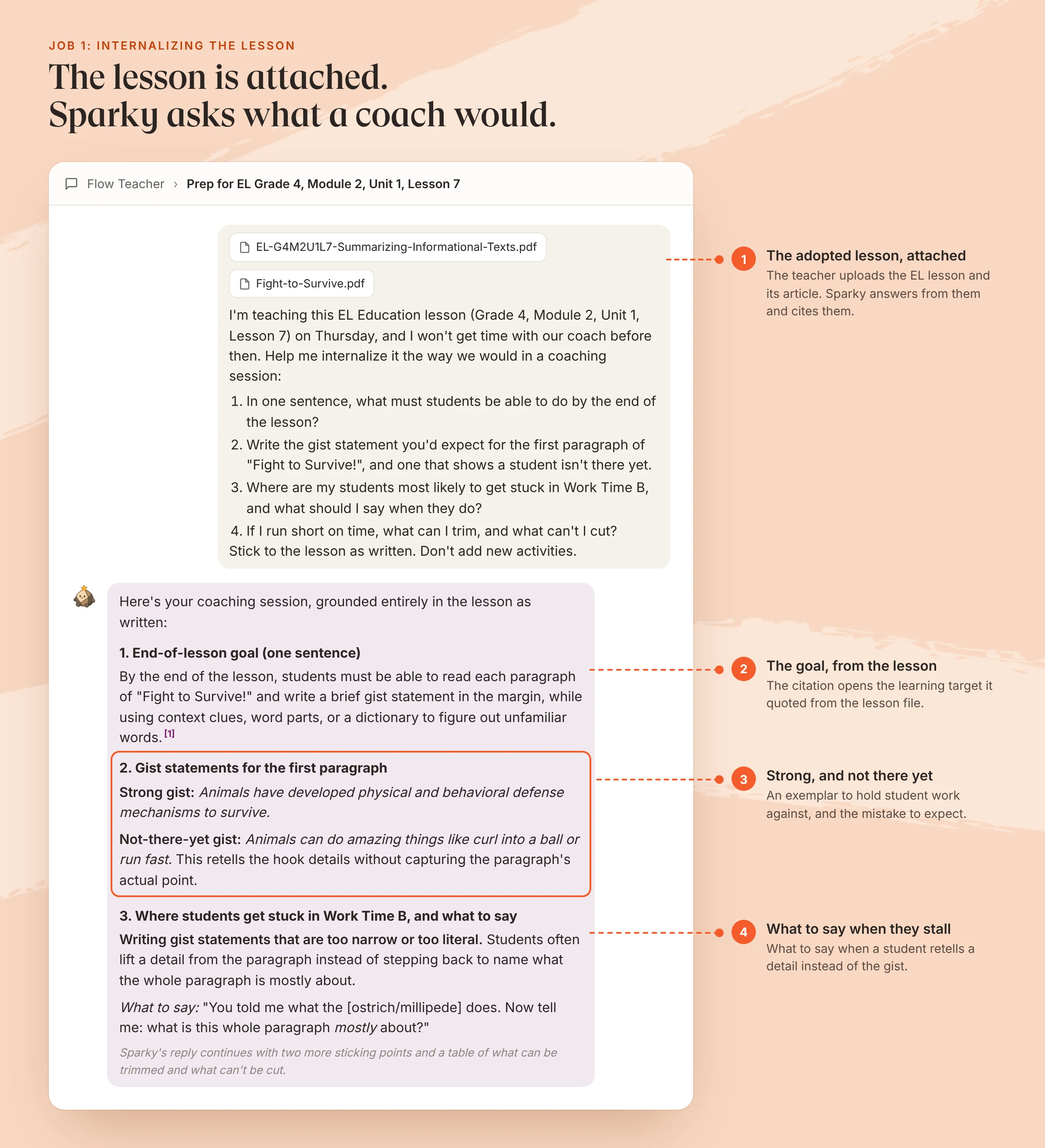
The wording is Sparky's, from the session, trimmed for length. EL Education's K-5 Language Arts curriculum (2017 edition) is published under CC BY 4.0.
Sparky's answer also listed what the teacher could cut if time ran short, and one item on that list was the lesson's optional Language Dive for English learners. That's a fair reading of the lesson as written. A coach who knows the class might still say to keep it, and that's the kind of call worth a coach's spot-check.
What to check, with any tool:
- The answers come from the attached lesson, and you can see where.
- The AI works with the lesson as written instead of inventing new activities.
- Your coach would agree with its exemplar response and its list of what can't be cut.
Where Flint stands: Teachers can chat with Sparky, Flint's AI, as a teaching assistant and attach PDFs, Word files, slides, images and files from Google Drive or OneDrive. In the example above, Sparky's citation opens the learning target it quoted from the lesson file. Flint doesn't connect to publisher platforms such as EL Education, Illustrative Mathematics or Amplify, so teachers upload the lessons they're licensed to use.
How do you scaffold an HQIM lesson without lowering the rigor?
Keep the grade-level text and the task the same for every student, and change the access: read-alouds, text-to-speech, chunking, sentence frames, vocabulary previews and partners. Start with the supports the curriculum already includes, since many high-quality programs build them into each lesson.
This is where well-meant AI use can undo an adoption. RAND found that nearly all teachers modify their curriculum materials, and teachers who find the required materials too challenging for their students are less likely to use them as written. Ask an AI tool for "an easier version" and it may rewrite the text at a lower level, which removes the reading the lesson was built around.
EL's Lesson 7 comes with its own supports: an annotated copy of the article that flags where English learners may struggle, an optional Language Dive, text-to-speech, strategic partners and the frame "This paragraph is mostly about..." In the same chat, the teacher asked for supports for five students reading well below grade level and two English learners, with everyone on the same article.
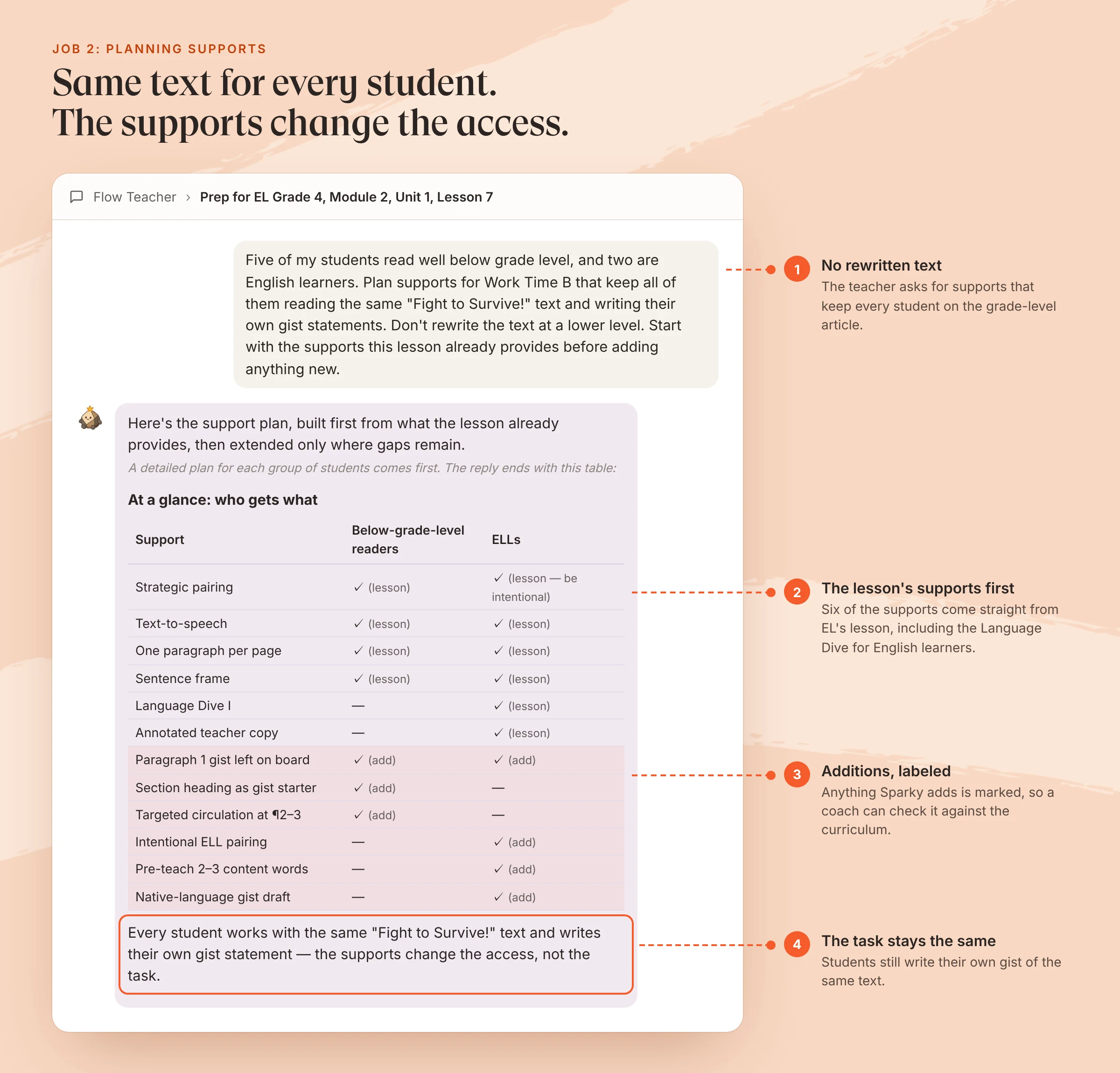
Same chat. Sparky's wording, trimmed for length.
What to check, with any tool:
- Every student keeps the same text and the same task.
- The curriculum's own supports come first, and anything added is labeled as an addition.
- No support does the thinking for the student, such as a sentence starter that is already the answer.
Where Flint stands: Besides chat, Flint's teacher tools include an AI assignment scaffolder, described in the product as adding "targeted steps, models, frames, checklists, and checkpoints without reducing the assignment's thinking." Flint also has a text leveler that rewrites a passage at a lower reading level. For lessons from your adopted curriculum, that's the one to use sparingly.
How do you find where a unit is breaking before the unit assessment?
Collect student work from one key task, sort it by what went wrong, and reteach each group before the end-of-unit assessment. AI can flag who's stuck and why while students are still working, as long as the teacher can open the student work behind every flag.
EL builds this into Lesson 7. The gist annotations are the lesson's ongoing assessment, and the teaching notes tell teachers to "circulate to clarify misunderstandings and use these as teaching points for the whole group." Students are assessed on summarizing at the end of Unit 1, three lessons later, so there's still time to reteach.
For the example, the teacher built a Flint activity from the same lesson: Sparky asks students for the gist of each section of the article and won't write it for them. In this example, six students worked through it with a mix of strong and weak answers. While they worked, Sparky flagged the students who were stuck and said why.
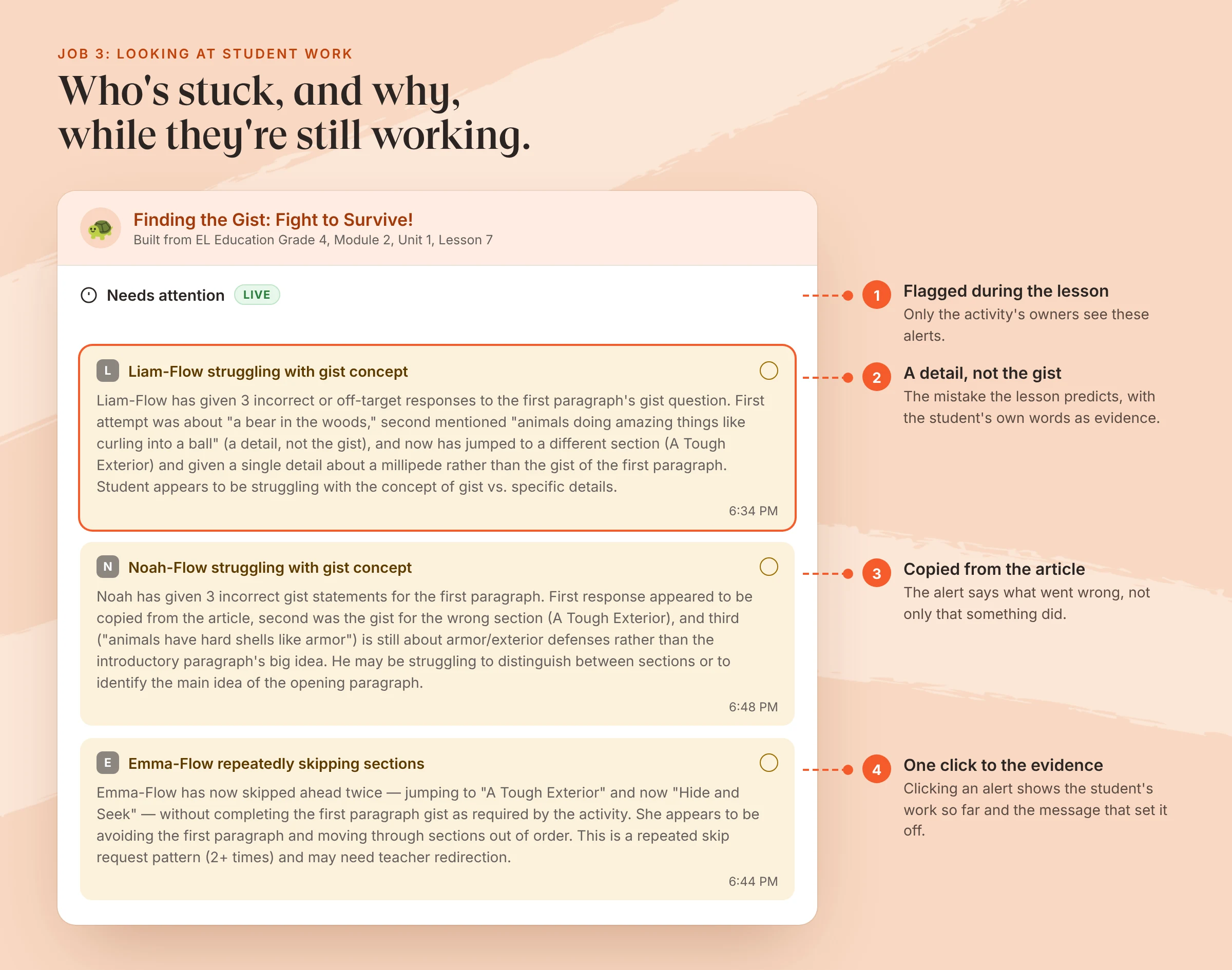
The students are examples. The alert text is Flint's, word for word.
The alerts flag students one at a time. Deciding which group gets tomorrow's reteach is still the teacher's call, and a good one for a coach to make with them.
What to check, with any tool:
- The teacher can open each student's actual work, not only a label.
- The flags use the lesson's own criteria. Here, a gist says what a section is mostly about.
- There's a way to act on it the next day, such as a follow-up task for one group.
Where Flint stands: Teachers can read every student session in their activities, live and afterward. While students work, Needs attention alerts flag students who seem stuck, confused or disengaged, and clicking one shows the student's work so far. Once three or more sessions are submitted, the activity page shows Strengths, Areas of improvement and Follow-up across the class, with a button to create a follow-up activity. Class analytics show outcomes by standard as Met, Approaching or Not yet.
What should stay with a person?
Observation and feedback, and the judgment calls: which reteach matters most this week, whether a teacher is ready to adapt a lesson, and whether an AI's suggestion fits your curriculum. Those depend on seeing the classroom and knowing the teacher.
When Springfield's District 186 weighed cutting literacy coaches, Jeanie Mack, a structural coach in the district, told the school board: "Coaching works because it's consistent, responsive and hands-on." An AI tool can be consistent. It can't see which teacher is jumping in and which one needs another week with the new curriculum.
With fewer coaches, spend their hours here:
- Observation and feedback cycles for teachers new to the curriculum and for the grades where results matter most this year.
- Spot-checks of the AI-assisted prep in the sections above, one unit at a time.
- Building each unit's shared materials once, such as the internalization prompt and the student activity, so every teacher starts from the same version.
Where Flint stands: Flint's teacher observations generator turns a leader's classroom visit notes into draft feedback for the leader to review, but someone still has to make the visit. Flint has no coach role. A coach can be added as a co-owner of teachers' classes, or be given school admin access, which shows all activity in the school. Activities can be published to a school or district library, so one coach's activity for a unit reaches every teacher teaching it.
The HQIM coaching triage sheet
Use this with your coaches and principals before the next unit. For each implementation job, decide who owns it this year and how you'll know it's working. Download the printable triage sheet (PDF), or copy it below.
| Implementation job | Keep with a coach | Teachers, with AI support | Check it by |
|---|---|---|---|
| Unit internalization | Teachers new to the curriculum, priority grades | Everyone else, using your protocol with the unit attached | Coach reviews one internalization per teacher per unit |
| Daily lesson prep | All teachers, with the lesson attached | Exemplar responses match the curriculum's | |
| Supports for students below grade level and English learners | Co-planning with special education staff for students with IEPs | Same text and task for everyone, curriculum supports first | Walkthrough: are all students reading the grade-level text? |
| Looking at student work | Deciding the reteach with the teacher | First sort of one key task per week | Students move out of reteach groups |
| Observation and feedback | Always | Coaching cycles completed per teacher | |
| Building shared unit materials | Once per unit, shared through a library | Duplicating and adapting | Teachers start from the shared version |
Three prompts to give teachers
Attach the lesson (and its texts) first.
- "I'm teaching [lesson] on [day]. Help me internalize it the way we would in a coaching session: In one sentence, what must students be able to do by the end? Write the response you'd expect on [key task], and one that shows a student isn't there yet. Where will students get stuck, and what should I say when they do? If I run short on time, what can I trim, and what can't I cut? Stick to the lesson as written."
- "[Number] of my students read well below grade level and [number] are English learners. Plan supports for [part of the lesson] that keep all of them on the same text and task. Don't rewrite the text at a lower level. Start with the supports this lesson already provides."
- (Paste or upload the students' work first.) "Here is my students' work on [task]. Group them by where it broke down, show me the evidence for each group, and tell me which group to pull for a reteach tomorrow."
Start with one unit
You don't need a new initiative to try this. Pick the next unit in one grade, have its teachers internalize the first week's lessons with the prompts above, and ask a coach to spot-check two of them against your curriculum. After the unit, compare the student work with last year's. If it holds up, you've found hours your coaches can put back into classrooms.
Our CEO, Sohan Choudhury, wrote a separate guide on training a whole staff on AI, if your teachers need that first. For how Flint handles standards and uploaded curriculum in more detail, see the recording of our curriculum, standards and syllabi session.