
ABOUT THIS PAGE
Using these AI guidelines
Pupils are already using AI for schoolwork. In research for Safer Internet Day 2026, 54% of UK 8 to 17-year-olds said they use AI to help with homework or studying, and half had seen people their age use AI to do their schoolwork for them. Only 31% of parents and carers thought their child had used AI for homework. The question for schools and trusts is no longer whether pupils will use it, but what the rules should be, who they apply to, and how to keep them current as the tools change.
This page pulls together what we've learned working with thousands of schools on those questions, written for schools and trusts in England, with pointers for Wales, Scotland and Northern Ireland. It covers whether you need a formal policy, what the DfE, KCSIE, JCQ and Ofsted expect, what a policy should cover, and real examples you can borrow from. Working in the US? See our US AI policy guide.
OUR TEAM'S SUGGESTIONS
Tips for forming your AI policy
Does my school or trust need an AI policy?
No law in England requires a stand-alone AI policy. But several things schools must already follow now expect your policies to cover AI:
| Source | What it expects | Applies to |
|---|---|---|
| JCQ General Regulations | A written malpractice policy that covers AI: what it is, when it may be used, how to acknowledge it, what misuse is and how it's treated. Reviewed and updated every year | Exam centres offering GCSEs, A levels and other JCQ qualifications |
| Keeping children safe in education | Online safety, including risks from generative AI, reflected in your child protection policy and related policies, with filtering and monitoring on school devices and networks | All schools and colleges in England |
| DfE policy paper on generative AI | Pupils use generative AI only with safeguards such as close supervision and tools with filtering and monitoring. Schools may wish to review homework policies and set out when AI use is acceptable | All schools and colleges in England |
| DfE data protection guidance | Your privacy notice explains how AI tools collect, process and store data, and your data protection officer approves any use of pupils' personal data | All schools in England |
| Ofsted | Ofsted doesn't evaluate AI tools, but inspectors may look at your policy on pupils' use of AI in lessons, homework and coursework | Schools inspected by Ofsted |
Wales, Scotland and Northern Ireland each have their own guidance: the Welsh Government's guidance on generative AI in education on Hwb, the Scottish Government's guidelines and guardrails for AI in schools, and the Department of Education's circular on generative AI in Northern Ireland.
Even where it isn't required, teachers are asking for one. In an NEU survey of 9,408 teachers in English state schools, 76% said they now use AI in their day-to-day work, but 49% said their school has no AI policy for staff or pupils. In a Teacher Tapp survey for the Royal Society, only 15% of teachers in England said they had clear whole-school guidance on AI.
A policy doesn't have to be long or rigid. The DfE's support materials for leaders leave it to you whether to write a stand-alone AI policy or fold AI into the policies you already have. One approach is to keep the approved policy short (values, who's responsible, what's off-limits) and put the details that change often, like approved tools and classroom examples, in separate guidance that's easier to update.
What existing policies can we lean on?
Start with your child protection and online safety policy, behaviour policy, malpractice and non-examination assessment (NEA) policies, homework policy, data protection policy and privacy notice, and acceptable use agreements. Much of what an AI policy needs to say already belongs in them. The DfE's leadership materials say child protection, online safety and behaviour policies should be updated to reflect the fast-changing risks from AI.
Existing policies were usually written to prevent misuse, so they rarely say what pupils are allowed to do with AI. Your new rules should make clear whether pupils can use AI to revise, research a project, or get feedback on a draft, and when they need to say that they did.
WHAT TO INCLUDE
What to put in your AI policy
This checklist draws on the DfE's guidance, KCSIE and the JCQ rules. Use it when you draft or review your policy.
AI policy checklist
- Purpose: two or three sentences on why your school uses AI and what you want to protect
- Scope and definitions: who the policy covers and what counts as AI, including features built into tools you already use
- Allowed and off-limits uses, set separately for each key stage
- Assessment: what counts as AI misuse in coursework and NEA, how pupils acknowledge AI use, and how teachers check work is a pupil's own
- Data protection: which tools are approved, who signs them off, and what your privacy notice says
- Safeguarding: filtering and monitoring, what the designated safeguarding lead (DSL) is told, and AI-generated images
- Human oversight: staff, not AI, make decisions about marking, behaviour and pupils' support needs
- Intellectual property: pupils' work isn't used to train AI without permission
- Parents and carers: how they learn which AI tools their children use
- Training for staff and AI literacy for pupils
- Ownership and review: who approves tools, who answers questions, and the date of the next review
Set rules by key stage
The DfE leaves it to each school to decide how AI is used. Some schools use it only with staff, or only for admin. Others let pupils use it, but only in certain subjects, year groups or key stages. A rule that makes sense in the sixth form rarely fits Year 3, so set out what's allowed at each stage.
Check each tool's terms, too. The DfE's data protection guidance says some AI tools have age restrictions, and schools must check them before letting pupils use a tool.
Protect pupil data and vet your suppliers
Your policy should say that only approved tools may be used with pupils' personal data, and who approves them. The DfE recommends keeping personal data out of AI tools altogether unless your data protection officer has confirmed a tool is safe to use.
The DfE's generative AI product safety standards set out what it expects from AI products used in schools, from filtering and monitoring to data protection and child development. They were updated in January with new standards on cognitive development, emotional and social development, mental health and manipulation. Before approving an AI tool, ask the supplier:
Questions to ask any AI supplier
- How does your product meet each of the DfE's product safety standards?
- Where is pupil data stored, and where does the AI model that processes it run?
- Is pupils' data or work ever used to train your models?
- What does your filtering cover, and what is the DSL alerted to?
- Can teachers see what pupils ask the AI and what it says back?
- Does it give pupils hints and partial steps before full answers?
- What ages is the tool built for, and what happens when a younger pupil uses it?
- What evidence shows it improves learning?
Where your pupil data is stored and where the AI runs are separate questions: some tools store data in the UK or EU but send every prompt to a model running in the United States. Our comparison of AI platforms for UK schools goes through these questions for seven platforms.
Name the harms your policy covers
Cheating gets most of the attention, but many incidents are about safeguarding. KCSIE says its guidance on nudes and semi-nudes covers images that are digitally altered or wholly generated by AI, sometimes called "deepfakes" or "deep nudes". Taking or sharing nude images of anyone under 18 is a criminal offence, including AI-generated images. In the Safer Internet Day research, 60% of young people said they worry about someone using AI to make inappropriate pictures of them. Say plainly that creating or sharing fake images, audio or video of real pupils or staff is prohibited, and connect it to your behaviour and child protection policies.
Chatbots that act as a friend are a newer concern. In the same research, 41% of teenagers said people their age rely heavily on AI for emotional support. The DfE's product safety standards expect AI products not to imply they have emotions or an identity of their own, and to alert the DSL to patterns that suggest emotional dependence. Your policy should say what happens when a pupil brings a personal or mental health issue to an AI tool, and who is told.
Handle academic integrity without relying on detectors
For qualifications, the JCQ's AI guidance is the rulebook. Pupils must acknowledge any AI use in work submitted for assessment, and teachers must investigate when they doubt that work is a pupil's own. The JCQ lists AI detection tools but warns that their accuracy varies, including with a pupil's English language skills. It says they should be only one part of the evidence, and that teachers, who know their pupils best, are best placed to judge.
What works better is being clear, assignment by assignment, about how much AI help is allowed, and asking pupils to show how they used it. Many schools use a scale like Leon Furze's AI Assessment Scale so every assignment carries a clear level, from no AI to full AI use. Ofqual's AI in coursework resources include a lesson plan for talking to pupils about AI and coursework, and a briefing pack for senior leaders.
How to create your AI policy and guidelines
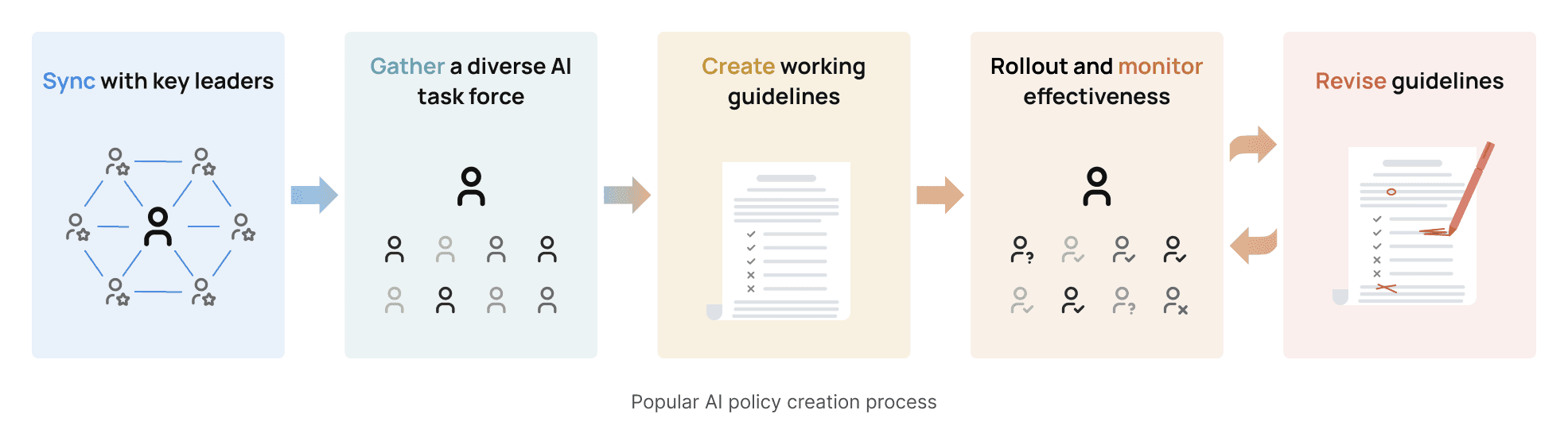
Every school's process looks a little different. Some of the schools that use Flint wrote a policy first, and others chose a tool and then wrote rules around it. These are the steps we see most often.
-
Sync with your school leaders. Bring together senior leaders and governors or trustees to agree on goals. The DfE's leadership materials suggest a link governor for AI or digital technology. Start by auditing which AI tools and built-in AI features pupils and staff can already reach, and whether you're updating existing policies, writing a new one, or both.
-
Gather an AI working group. Include teachers across subjects and key stages, people who are sceptical of AI as well as enthusiasts, your DSL, your data protection officer and your exams officer. The DfE's leadership materials also recommend listening to pupils, through surveys, interviews or pupil digital leaders.
-
Create a set of working guidelines. A small group can draft, using the checklist above. Then have teachers test the guidelines in real lessons and report what's unclear or missing.
-
Roll out and monitor reactions. Share the policy with staff, pupils, and parents and carers in plain language. Keep a way for people to ask questions and flag problems, whether that's department meetings, a named contact or a simple form.
-
Revise as necessary. Put a review date in the policy itself and keep it. The JCQ requires exam centres to review their malpractice policy every year, and new tools, new features in the tools you already use, and new DfE guidance will all require updates.
Further reading
-
Generative artificial intelligence (AI) in education, the DfE's policy paper
-
Generative AI: product safety standards from the DfE
-
Using AI in education settings: support materials, free training from the DfE, Chiltern Learning Trust and the Chartered College of Teaching
-
AI Use in Assessments from the JCQ
-
How Ofsted looks at AI during inspection and regulation from Ofsted
-
Generative AI and data protection in schools from the DfE
FROM REAL SCHOOLS
AI Policy Resource Library
Below are examples of some forward-thinking and comprehensive generative AI guidelines, posters, and videos from schools that we’ve worked with. Each institution has taken a different approach to communicating their expectations to the student body, faculty, and staff. For many, a single document is just the beginning of their AI positioning strategy.
These are all in-progress documents that will and are changing as each school discovers gaps in their strategy, new ways to use AI, and new innovations in the technology space. We hope they serve as inspiration to you and ask that you credit their work appropriately.
- Document


AI Principles and Policies
The Kinkaid School
- Teaching resource

GenAI Acceptable Usage Menu
The Kinkaid School
- Teaching resource

GenAI Student Literacy Scaffolding
The Kinkaid School
- Document


Academy Wide AI Policy
Woodward Academy
- Document


AI Policy Poster
Wesleyan School
- Teaching resource

AI Policy Activity Cover Page
Wesleyan School
- Video

Pre-planning Communication
Wesleyan School
- Document


AI Guidelines for Academic Integrity
Brophy College Preparatory
- Webpage

AI Philosophy Statement
Brophy College Preparatory
- Teaching resource

CTN AI Prompt Writing
Brophy College Preparatory
- Document


AI Guidance for Students and Teachers: Navigating AI Responsibly
Yokohama International School
- Document

Understanding Our AI Policy: A Framework for Responsible and Ethical AI Engagement
Yokohama International School
- Teaching resource

Expectations for Learning with AI Poster
Yokohama International School
- Document


Guidelines for Academic Integrity
The Stony Brook School
- Teaching resource

AI Traffic Light poster
The Stony Brook School
- Teaching resource

Essay Wheel Poster
The Stony Brook School
- Document


Guidelines for AI in Education
International School of Paris
- Document


Generative AI Guidelines
Merion Mercy Academy
