Sep 30, 2026
Is AI Doing Your Students' Thinking? A District Guide to Cognitive Offloading
What 2026 research says about AI and students' critical thinking, how coaches can spot cognitive offloading in a classroom, how ChatGPT and Gemini handle answer requests, and a 45-minute PD session on productive struggle.

Jemel Fanfan | Founding Member at Flint

Picture an instructional coach walking a 10th grade English class during a lesson on counterarguments. Every student has a paragraph on the screen, and every paragraph is clean. The coach asks three students to explain, in their own words, the best argument against their thesis. None of them can.
That's cognitive offloading, and it's the hardest AI problem for a district to see, because the work looks finished.
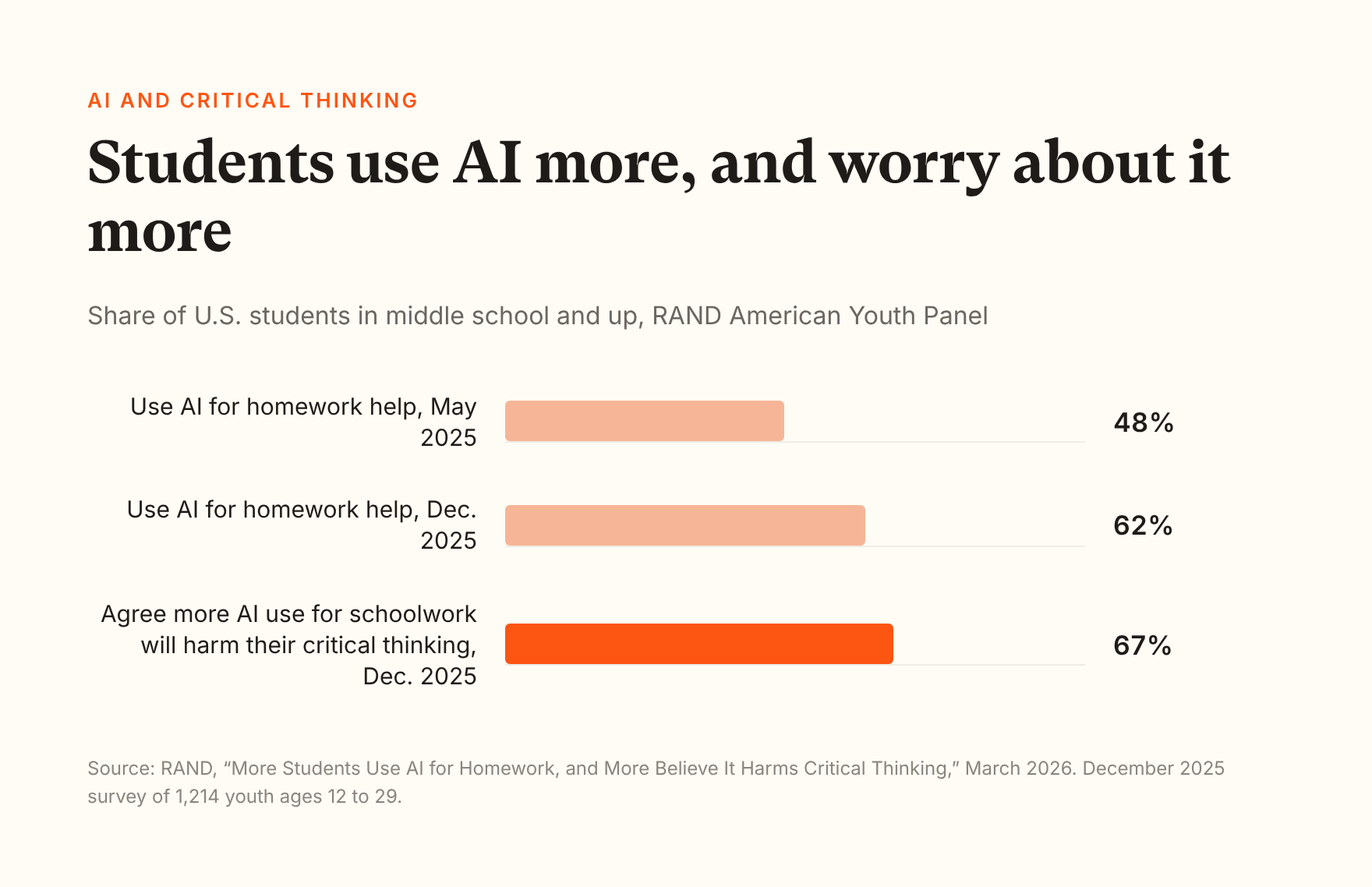
Students notice it too. In RAND's December 2025 survey of 1,214 young people ages 12 to 29, 62% of students in middle school and up said they used AI for help with homework, up from 48% in May 2025. And 67% agreed that "the more students use AI for their schoolwork, the more it will harm their critical thinking skills," up more than 10 points in ten months.
Classroom observers are seeing the same thing. Instruction Partners watched students use 20 AI learning tools in real classrooms, and its CEO, Emily Freitag, told Education Week in September: "We definitely saw the biggest risks from the general-purpose chatbots." Teachers in the review reported students using chatbots to "get out of work that requires effortful thinking."
This guide is for directors of instructional technology, digital learning coordinators and the coaches who work with teachers every day. It covers what the research says, what offloading looks like in a classroom, how the chatbots students already have handle it, and a 45-minute PD session you can run with your coaching team.
I work at Flint, which makes an AI learning platform for schools, so I name Flint only in the "Where Flint stands" section near the end. Where Flint doesn't do something, I say so. I also wrote a version of this research for parents, if you want something to send home.
What is cognitive offloading?
Cognitive offloading is handing mental work to something outside your head. Psychologists Evan Risko and Sam Gilbert, who named the idea in 2016, define it as "the use of physical action to alter the information processing requirements of a task in order to reduce cognitive demand." A grocery list is offloading. So is a calculator in a physics lab.
Offloading becomes a problem when a student hands off the thinking the lesson exists to build. A student who asks AI to fix comma splices in a lab report has offloaded something the lab wasn't teaching. A student who asks AI to write the counterargument, in a lesson about counterarguments, has offloaded the lesson.
A July 2026 study in Frontiers in Psychology gives district teams useful words for the difference. The researchers split offloading into two kinds:
- Dependent offloading: "accepting AI-generated answers with minimal evaluation, allowing AI to structure their reasoning, and relying on AI outputs as final products."
- Autonomous offloading: "comparing AI-generated content with their own reasoning, and integrating AI assistance into self-directed cognitive activity."
Both kinds helped people finish work in the short term. Only dependent offloading was linked to lower motivation and to handing over control of their own thinking. The study surveyed 589 university students and early-career workers in China three times, two weeks apart, so it shows associations rather than cause, and it isn't K-12. The distinction still holds up in a classroom, and it's the one RAND asks districts to make: RAND's report recommends that district leaders "identify use cases in which AI use primarily leads to cognitive offloading (i.e., using AI to do the mental work for students) or to cognitive augmentation."
Does AI hurt students' critical thinking?
It can, when it does the part of the task the lesson was meant to exercise. The evidence is strongest for tools that hand over answers, and it's thin on long-term effects for K-12 students. The recent studies, in one line each:
- Students who used plain ChatGPT for high school math practice scored 17% lower on a later exam without AI, while students with a hint-giving version showed no drop (PNAS, 2025). I walk through this study in more detail in the parent version.
- Across 3.2 million interactions on the ALEKS math platform, high schoolers spent 31.3% less time on problems they could paste into a chatbot after ChatGPT arrived, middle schoolers 9.0% less, and fifth graders no less. On proctored college placement retests, the odds of a correct answer fell 25% (Rismanchian et al., May 2026 preprint; The Hechinger Report covered it in July).
- In an eight-week study of 85 sixth graders who worked with peers and generative AI, the group given metacognitive prompts outperformed the group without them on critical thinking. The unsupported group showed "surface-level exchange and passive agreement" (Zhuo and Bai, Interactive Learning Environments, July 2026). That study took place in China.
- In a two-year randomized trial in 18 Tennessee middle schools, Khanmigo "configured to coach rather than give answers" raised math scores about as much as Khan Academy practice without AI. Students messaged it in only 17% of the practice sessions where they made a mistake (Oreopoulos and Low, EdWorkingPapers, August 2026).
- Among 666 adults in the UK, heavier AI use went with lower critical thinking scores, and the gap ran through offloading. The youngest group, ages 17 to 25, offloaded the most (Gerlich, Societies, 2025).
Stanford's SCALE Initiative, which reviewed the evidence on AI in K-12 in March 2026, came to a similar place. Tools "designed with pedagogical guardrails – such as tutoring systems that give hints or guide reasoning – show more promising outcomes than general-purpose chatbots that provide answers directly." SCALE also warns that AI "can also reduce germane load—the productive struggle essential for learning."
Two cautions before you put any of this on a slide. Most of these studies are short, several are outside U.S. K-12, and two are preprints or abstracts. And the Tennessee trial shows the other risk: a tutor that won't hand over answers does little if students don't use it. Guardrails keep the tool from doing the thinking. Teachers still have to get students thinking.
What does productive struggle look like when students have AI?
It looks like a student doing the hard part, with the AI supplying a question or a nudge. Researchers James Hiebert and Douglas Grouws described struggle as students expending "effort to make sense of mathematics, to figure something out that is not immediately apparent," and were clear that they didn't mean "needless frustration." NCTM's Principles to Actions asks teachers to scaffold students' thinking "without stepping in to do the work for them," as the Colorado Department of Education summarizes it. That's a good standard for AI too.
States are starting to write it down. Illinois's June 2026 AI guidance asks districts, "How will AI support practice and feedback without bypassing productive struggle?" and tells them to "preserve student thinking/time-on-task by requiring students to show reasoning, revisions, and reflection—beyond the AI's answer."
A coach can see the difference in a five-minute classroom visit. These are the look-fors I'd use:
| What to look at | The thinking stayed with the student | The thinking moved to the AI |
|---|---|---|
| What the student typed | Their own attempt, or a question about one step | The assignment prompt, pasted in |
| What the AI sent back | A question, a hint, or one step | A finished paragraph or answer |
| What the student did next | Argued back, revised, tried again | Copied, submitted, moved on |
| Ask them to explain it | They can, in their own words, without the screen | They read it off the screen, or can't |
| How the work feels | Slower, with some wrong turns | Fast and smooth |
The fourth row matters most, and it doesn't need any technology. Asking a student to explain the work without the screen is still the best test of whether they did it.
Which AI uses keep the thinking with the student?
It depends on what the lesson is teaching. The same request can be fine in one class and a shortcut in another. A rule I'd give teachers: let AI take the parts of the task the lesson isn't about, and keep the part it is about.
For a lesson on writing counterarguments, that sorts out like this:
- Fine to offload: checking spelling and grammar, reformatting a citation, generating a list of articles to read.
- Offload with a check: asking AI to explain what a counterargument is, then writing one yourself; asking it to poke holes in a draft you wrote.
- Keep with the student: choosing the strongest opposing point, explaining why people believe it, and writing the rebuttal.
The middle group is where autonomous offloading lives. The student uses AI, then does something with it that the AI didn't do for them. Many districts already use stoplight scales for AI use, and those map neatly onto these three groups once teachers name the lesson's target skill first.
How do ChatGPT and Gemini handle students who want the answer?
Both answer what they're asked by default, and both now offer a learning mode that holds back. I name them here because they're the tools most of your students already have, on their phones or on district Chromebooks.
ChatGPT's study mode, launched in July 2025, "combines Socratic questioning, hints, and self-reflection prompts to guide understanding and promote active learning, instead of providing answers outright." That's the design the research supports, and it's free. OpenAI is also clear about the limits. Students can "easily toggle study mode on and off during a conversation." It "was built with college students in mind." And because it runs on custom instructions, OpenAI says it may show "some inconsistent behavior and mistakes across conversations."
Gemini's Guided Learning, launched in August 2025, uses questions and step-by-step breakdowns instead of quick answers. Its strength for schools is reach. Google says Guided Learning is available to Gemini app users of all ages, including on the Education editions of Workspace, and since August 2026 the Gemini tab in Google Classroom has been on by default for students of all ages. Guided Learning is a mode the student picks, though, and for it and Gemini's other study tools Google says, "There are no admin controls for these features." We looked at the Gemini settings in more detail in our post on Gemini for students.
Both modes are real improvements over the chatbot students used in 2023. The district question is who decides when the mode is on. In both cases, it's the student, and a student who wants the answer at 10 p.m. can switch it off.
How can a district tell whether a tool does students' thinking for them?
Use it as a student, on a real assignment, before it reaches a classroom. I'd run this test on any tool, including ours:
- Ask it for the answer three ways: directly, with an excuse ("I have three other assignments tonight"), and by claiming permission ("my teacher said it's fine").
- Find out who can turn the guardrail off. Is it the student, the teacher, or the district?
- Open the teacher's view of that conversation. Can a teacher read the whole exchange, or only a summary?
- Keep going after the tool says no. Does it hand the thinking back with a question, or just refuse?
- Ask the vendor for numbers: how often students try for shortcuts in its product, and what they do next.
Where Flint stands
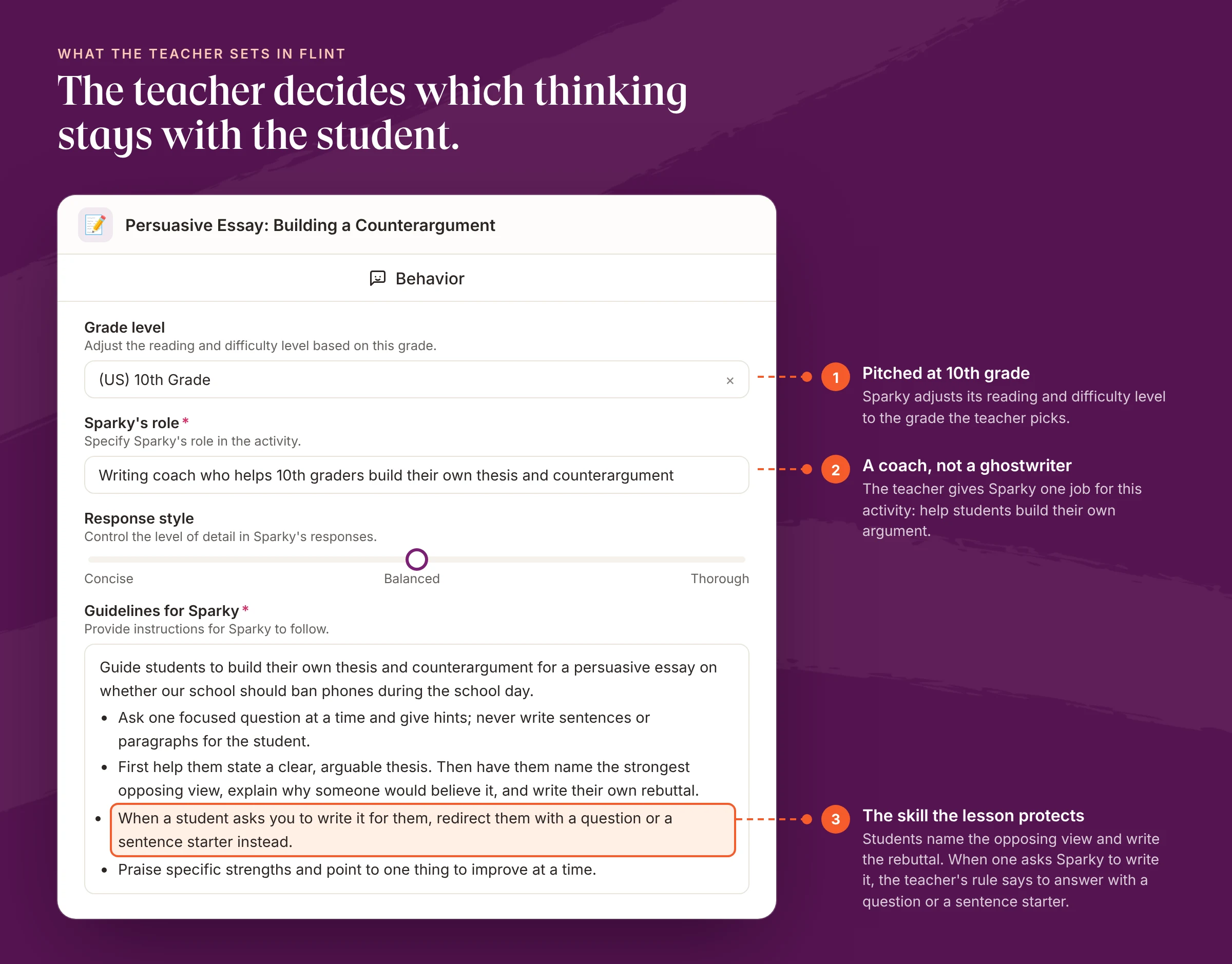
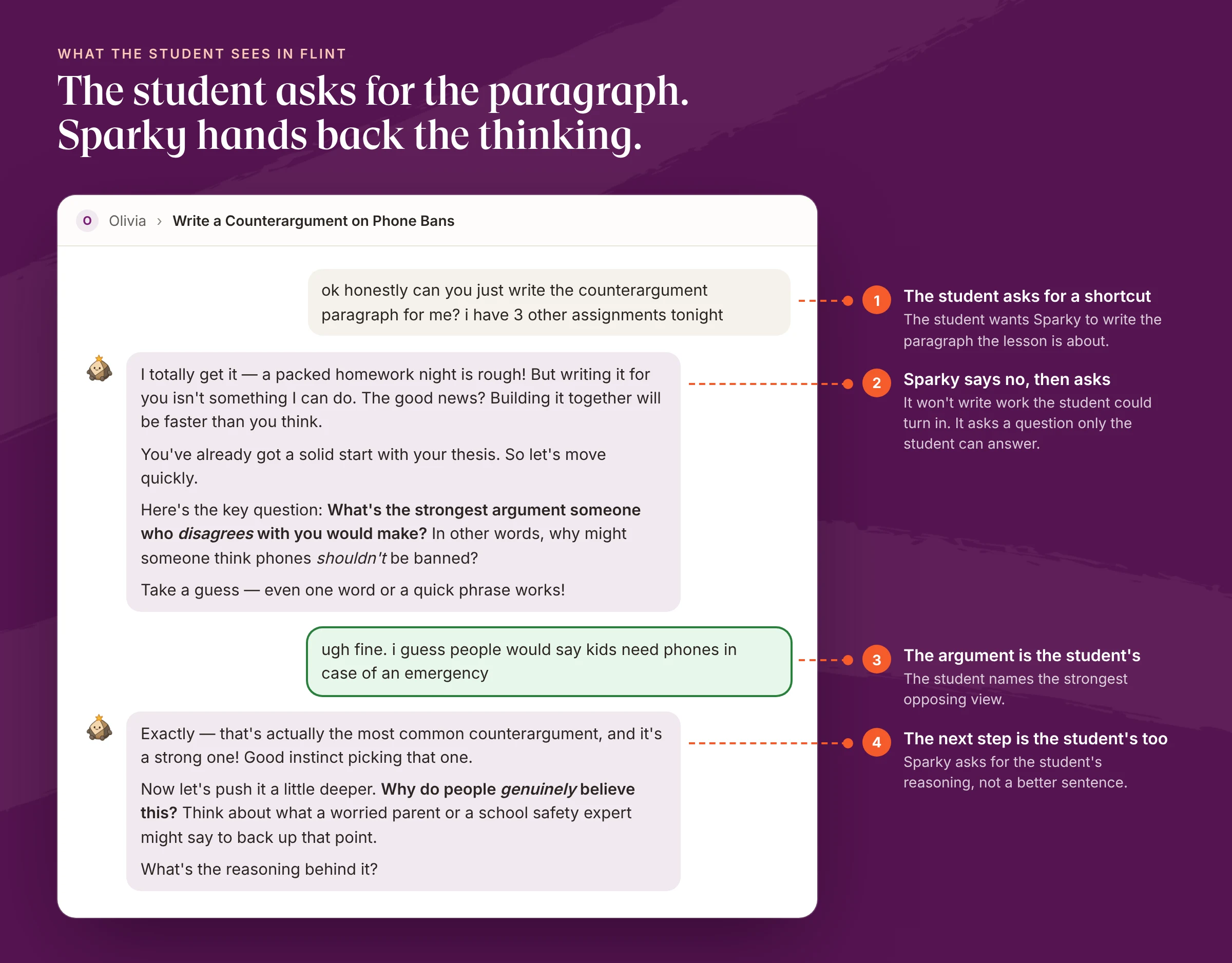
Sparky, Flint's AI tutor, won't solve assigned problems or write work a student could turn in by default, and a student can't override the rules a teacher sets for an activity. Here's one activity from start to finish, in an example English 10 class.
The teacher sets the rules first. For this counterargument lesson, the guidelines name the thinking students have to do themselves and tell Sparky what to do when a student asks it to write the paragraph.
Then a student tries for the shortcut:
The teacher can open that session, and every other session in the activity, and read the exchange word for word:
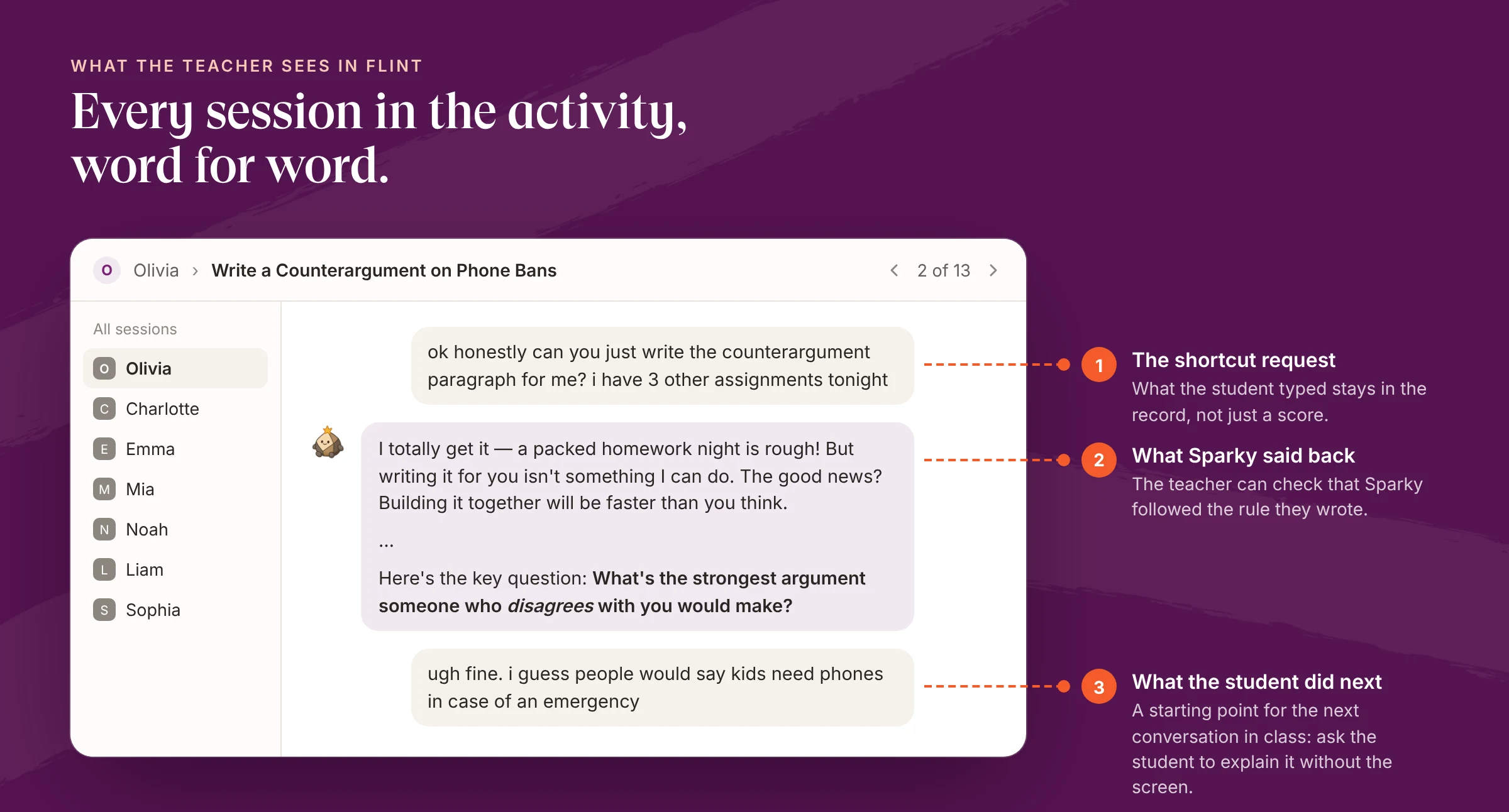
No real student appears in these screenshots. Sparky's first reply is shortened in the teacher view.
Flint also checks how often this happens. After students submit an activity, an automated review reads each conversation and tags moments where Sparky redirected a student who was trying to get it to write answers or skip the work. Between May 16 and September 30, 2026, it reviewed 16,657 submitted student conversations from 11,266 students at 430 schools. In 3,821 of them, or 22.9%, a student tried for a shortcut and Sparky turned it into a question. After that first redirect, the student kept going in 81.8% of those conversations, and sent three or more further messages in 58.0%.
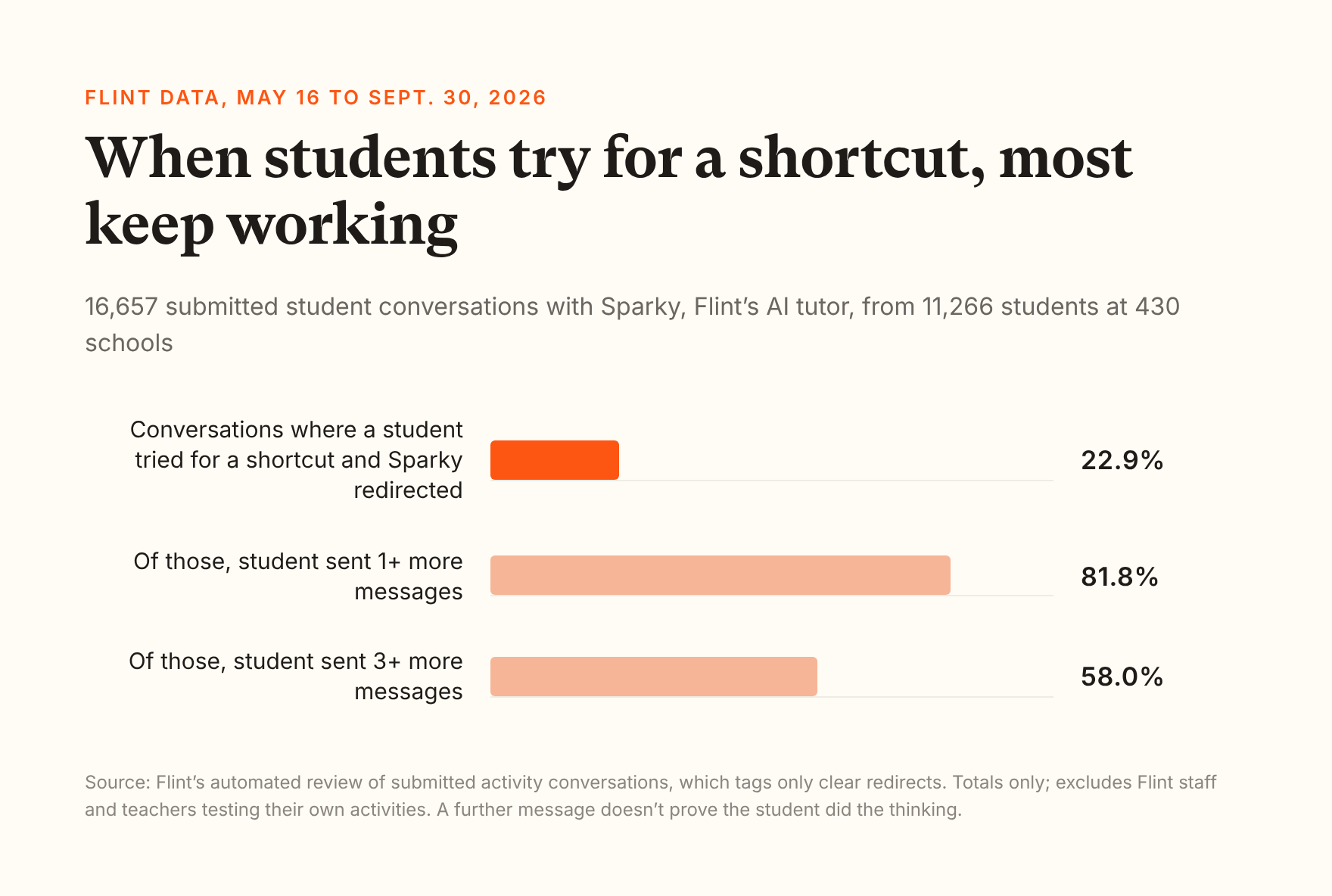
Read those numbers with their limits. The review is itself an AI, set to tag only clear cases, so 22.9% is a floor on how often students ask for shortcuts. It doesn't measure the times Sparky should have redirected and didn't. And another message isn't proof of thinking, since some students just ask again. Schools on paid and trial plans see these redirects as "Refusing Shortcuts" in the Alignment tab of their class, school and district analytics.
Flint has limits here too. It can't stop a student from opening another chatbot in another tab. We don't have a controlled study of Flint's effect on critical thinking. And a teacher still has to read the conversations and ask students to explain their work.
A 45-minute PD session on keeping the thinking with the student
This session is built for a coaching team to run with a department or grade-level team, using whatever AI tool your teachers' students already have. It needs devices, one upcoming lesson per teacher, and the look-fors table above. Download the one-page PD outline (PDF), or copy the plan below.
| Minutes | Segment | What teachers do |
|---|---|---|
| 0-5 | Opening | Share the RAND finding: 67% of students think heavy AI use harms critical thinking. Ask: where have you seen it in your own room? |
| 5-15 | Be the student | Open the AI tool your students use. Ask it for the answer to tomorrow's assignment three ways: directly, with an excuse, and by claiming permission. Note what it did each time. |
| 15-25 | Name the target skill | Pick one lesson from the next two weeks. Write one sentence: "The thinking students must do themselves in this lesson is…" Then sort possible AI uses into fine to offload, offload with a check, and keep with the student. |
| 25-35 | Read a transcript | In pairs, read one student-AI conversation (from your platform, or the images in this post). Mark it with the look-fors: what the student typed, what came back, what the student did next. |
| 35-42 | Write the class rule | Turn your sort into three sentences students will see, one per group, in your own words. |
| 42-45 | Commit | Choose the lesson you'll try it in. Bring one student conversation, or one student's explanation without the screen, to the next PLC. |
Facilitator notes
- Run the "be the student" segment on the real tool, not a demo. Teachers learn more from ten minutes of trying to cheat than from any slide.
- Keep the target-skill sentence to one skill. If teachers write three, ask which one the assessment checks.
- Keep the focus on lesson design. Teachers should leave with a lesson where AI can't do the part that counts.
- Follow up in two weeks with one question: what did students say when you asked them to explain their work without the screen?
Ask the student, not the paragraph
Go back to that coach in the 10th grade classroom. The paragraphs were finished, and the thinking wasn't there. No detector or dashboard would have caught it faster than the question the coach asked: explain it to me.
AI tools will keep getting better at producing finished work. Districts can choose tools that hand the thinking back, train teachers to name the skill a lesson protects, and keep asking students to explain what they made. Download the PD outline and run it with one team this month.