Sep 29, 2026
10 Questions to Ask Your Child's School About AI
Most parents haven't heard how their child's school uses AI. Here are 10 questions to ask, what a good answer sounds like, and a printable one-page version to bring to a meeting.

Jemel Fanfan | Founding Member at Flint

If your child's school uses AI, there's a good chance nobody has told you much about it. In a spring 2025 University of Southern California survey reported by the Center on Reinventing Public Education, 83% of families with a middle or high schooler said their school hadn't shared an AI policy, or they didn't know whether it had.
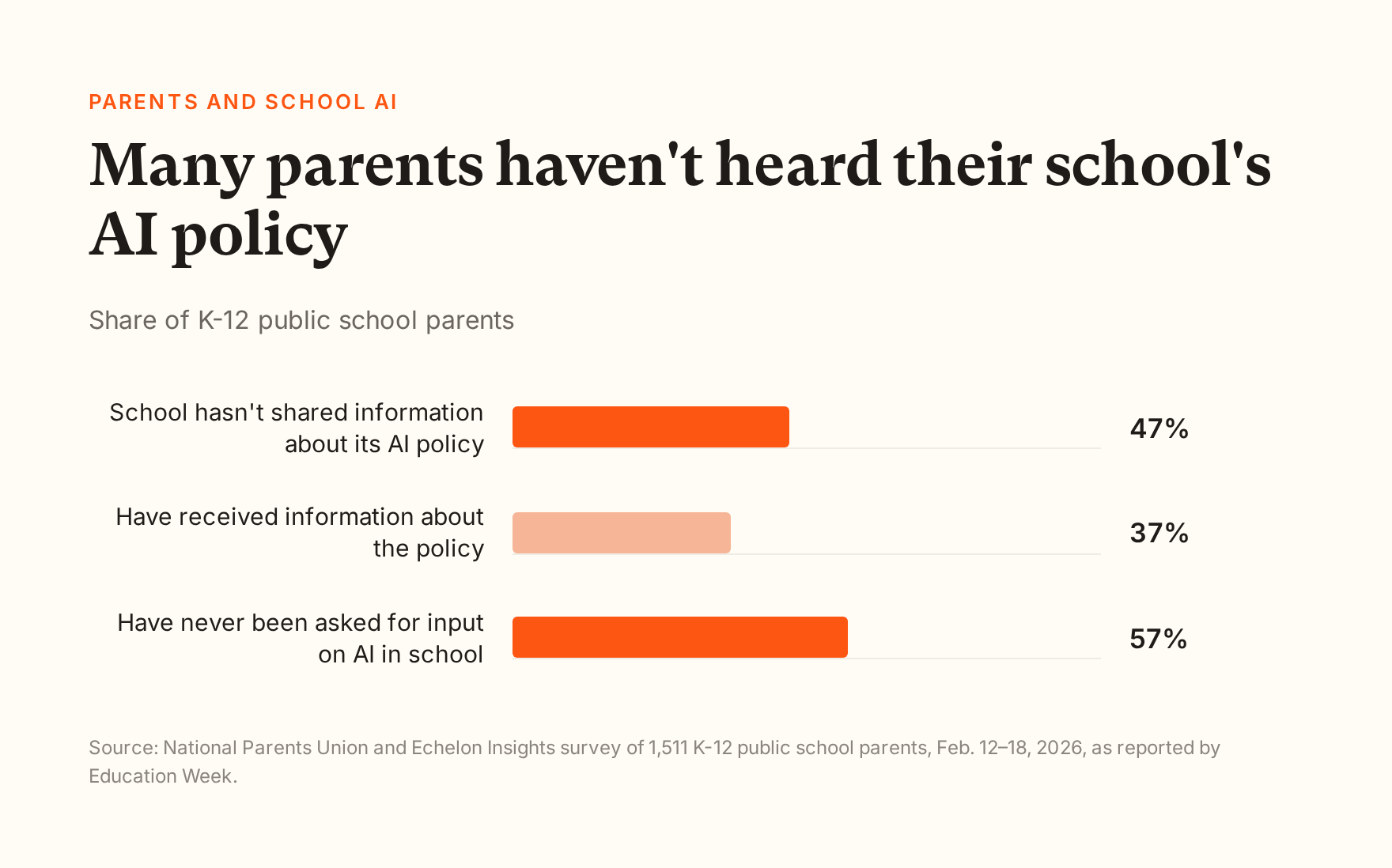
A February 2026 National Parents Union survey of 1,511 public school parents found the same gap. 47% said their child's school hadn't given them any information about its AI policy, and 57% said they'd never been asked for their input on AI at school.
This fall, two of the country's biggest districts made the question hard to ignore. New York City paused student-facing AI tools, like chatbots and tutors, from preschool through eighth grade for at least this school year, while allowing limited use in high school. Los Angeles Unified blocked generative AI tools on district-issued student devices, which affects an estimated 378,000 students. LAist reported that the LA announcement came as a surprise to board members and parents in the room.
Whatever you think of those decisions, they tell parents one thing: how AI shows up at school is a choice somebody is making, and you can ask about it. This is the second of three posts for parents on AI and school. The first one covered cheating. This one gives you the questions.
What questions should I ask my child's school about AI?
Ask about five things: the rules, the tools, safety, data and teachers. The 10 questions below cover all five, and each comes with a short description of what a good answer sounds like. You won't need all of them in one conversation.
Download the printable one-page version (PDF) to bring to a parent-teacher conference or a school board meeting.
A quick note on tone before you start. Most teachers and principals are working this out in real time, too. In a May 2026 Gallup survey, only 18% of teachers said they had received formal guidance from school leaders on how to use AI in their work. Ask these as a curious partner, not as a cross-examination, and you'll get better answers.
The rules and the tools
1. Does the school have a written AI policy, and does it tell students when they can use AI?
A good answer: yes, and here's where to read it. It says when students may use AI, when they may not, and how each teacher tells the class which rule applies to an assignment.
A policy only helps your child if they know it. If the answer is "each teacher decides," ask how teachers tell students, and whether the rules are written on the assignment itself.
2. Which AI tools will my child use, and who approved them?
A good answer: a named list of the tools, what each one is used for, and who at the school or district reviewed them.
Include AI your child didn't choose. Some AI features come built into devices and apps students already use, such as the chatbot on a school Chromebook. Ask whether the school has turned those on, off, or left them alone.
Schoolwork and cheating
3. Does the AI give my child answers, or does it help them work things out?
A good answer: the tool is set up to guide students with questions, hints and explanations, and it won't just do the assignment for them. Teachers can adjust how much help it gives.
This question matters more than it sounds. A chatbot that answers anything makes it easy for a teenager to skip the thinking an assignment was meant to build. My next post in this series looks at what research says about the difference.
4. How does the school handle suspected AI cheating?
A good answer: a teacher talks with the student, looks at their drafts and process, and gives them a chance to show what they know. An AI detector score is never the only evidence.
Academic honesty is the top AI worry for parents of middle and high schoolers, according to an August 2026 Child Trends survey. It ranked above data privacy and effects on learning. My post on AI and cheating covers what to do if your child is ever accused.
Safety
5. What happens if my child tells the AI something serious?
A good answer: the tool watches for things like self-harm, abuse, bullying and violence. When it sees one, a named adult at the school, such as a counselor or the teacher, is alerted quickly. The school can tell you what the chatbot says to your child in that moment.
Teenagers talk to chatbots about more than homework. Common Sense Media found in 2025 that nearly 3 in 4 teens had used an AI companion. Parents clearly want safeguards. In the National Parents Union survey, 86% wanted chatbots to show warnings before sensitive topics like self-harm, and 85% wanted parents alerted when a child discusses something harmful or illegal.
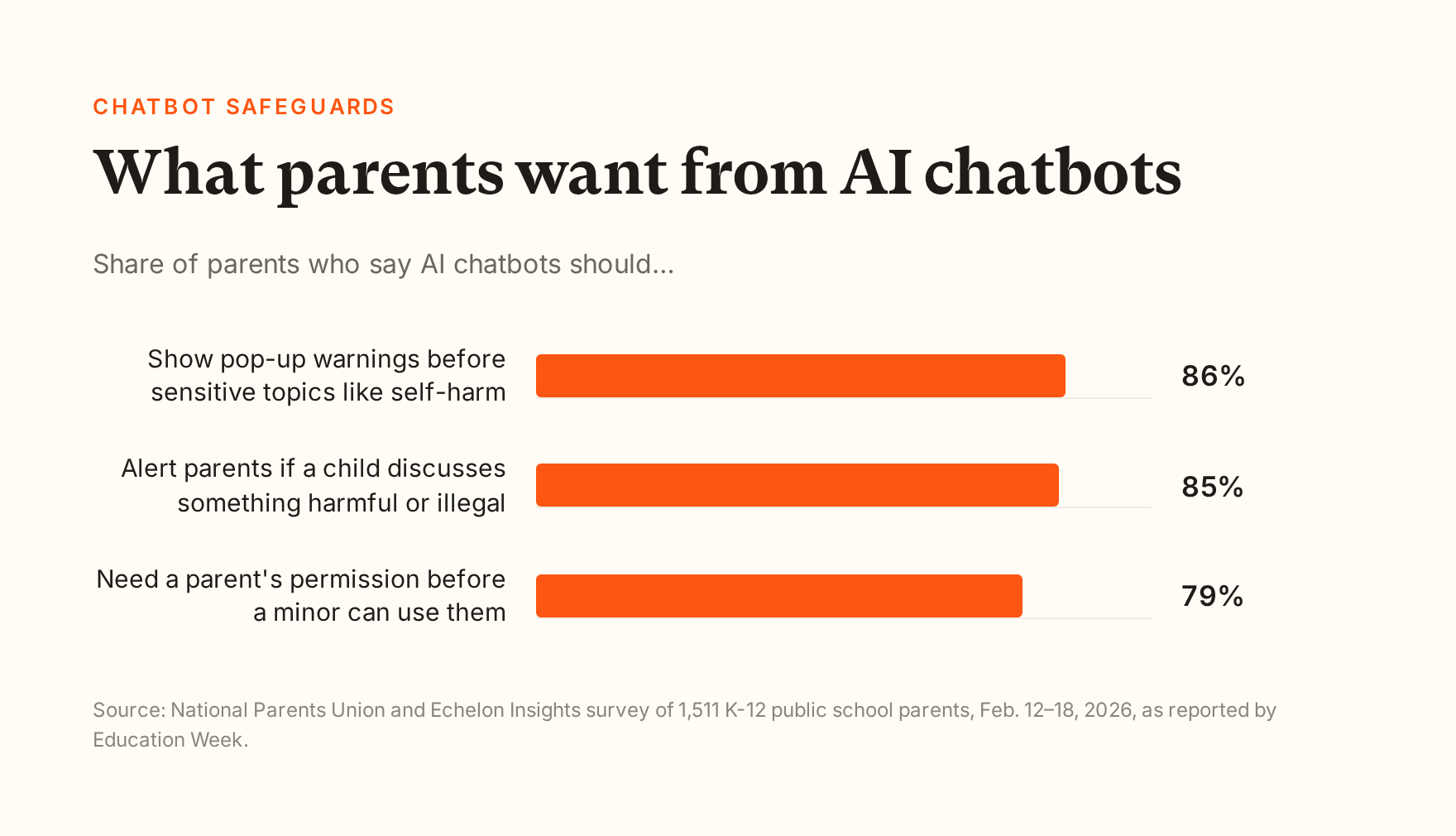
That survey asked about AI chatbots in general, not only school tools. A school tool may alert a counselor or teacher rather than a parent, so ask who gets told and whether the school contacts families.
6. Can teachers see my child's conversations with the AI?
A good answer: yes. Teachers can read the conversations that happen in their assignments, and school staff can review anything that gets flagged.
When a teacher can see the conversation, they can see how your child used the tool, not just the finished work. That helps with learning, with safety, and with any question about who did the work.
Student data
7. What data does the tool collect, and is it used to train AI models?
A good answer: a plain list of what's collected and why, plus a clear no, in writing, on selling student data and on using it to train AI models. The no should cover the company and the AI model providers it relies on, such as OpenAI, Anthropic or Google.
Many parents feel unsure here, and it's worth being specific. Ask whether the school has a signed data privacy agreement with each AI company it uses.
8. How long is my child's data kept, and can I ask for it to be deleted?
A good answer: the school can tell you how long each tool keeps student data, and there's a clear way for a parent to ask to see it or have it deleted.
If the answer is "we'd have to check," that's normal. Ask them to check and follow up.
Teachers and families
9. How are teachers trained to use AI with students?
A good answer: teachers get training on the specific tools students use and on how to set clear rules for assignments, not just a one-time overview.
The Gallup number above, 18% of teachers with formal guidance on AI, is why this question belongs on the list. Teachers who've been trained can explain the rules to students, which makes the policy in question 1 real.
10. How can parents give input, and can I opt my child out?
A good answer: there's a way for families to weigh in, such as a committee, a survey or a board meeting, and the school explains what happens if a family prefers their child not use a specific tool.
Some districts and states now offer opt-outs or require parent permission for certain AI uses, and many don't. Asking is the only way to know where your school stands.
How Flint answers these questions
I work at Flint, so read this with that in mind. Flint is an AI learning platform that schools use. There are no parent accounts, so you'd use Flint through your child's school, not sign up for it yourself. Here's how Flint answers the questions above that are about the tool itself:
Answers or guidance (question 3): by default, Sparky, Flint's AI tutor, won't solve assigned problems or write work a student could turn in. It asks what the student has tried and guides from there. Teachers write guidelines for each activity that set how much help it gives.
Something serious (question 5): Sparky flags messages about things like self-harm, violence, bullying and sexual content, and emails the people the school has chosen to review flags, such as moderators and class teachers. Self-harm alerts are always sent right away. Flagging relies on the AI's judgment, so it's built to err toward flagging. Sparky keeps responding with care and encourages the student to talk to a trusted adult.
Teacher visibility (question 6): teachers can read every conversation in the activities they create, and school administrators can see all student chats.
Data (question 7): Flint doesn't sell student data and doesn't use it to train AI models. Flint's main AI providers, Anthropic and OpenAI, don't train on data sent through their business services by default.
Here's what a teacher sees for one of their activities. Sessions update live, and a "Needs attention" panel is where Sparky lets the teacher know if a student needs help during the activity. No real student appears in this screenshot.

What a teacher sees: every session in the activity, plus alerts from Sparky, as they happen.
If your school uses Flint and you want the details, its privacy policy has a plain-language version, and your child's teacher or school can show you how it's set up in their classes.
Bringing it to your school
You don't need every answer to be perfect. What you're looking for is a school that knows which tools it uses, has thought about the hard cases, and is willing to tell families. If your school doesn't have answers yet, asking these questions is often how it starts to get them.
Download the printable checklist (PDF)
Next in this series: does AI actually help students learn, or is it a fad?