ComparisonOct 3, 2026
Best AI Tools for Multilingual Classrooms in 2026
Nine AI tools a K-12 teacher can use with English learners in a regular class, grouped by the job each one does: translating materials, letting students work in their home language, reading support and bilingual lessons.

Jemel Fanfan | Founding Member at Flint

A newcomer joins your 7th-grade math class in October speaking Spanish, and two more students are still building academic English. You can't translate every handout by hand, and they still need to learn the math in your room this week. The AI tools below can help, and each one helps in a different place. This page is for a K-12 classroom teacher with English learners in a regular class. If you teach a world language, our world language page is the better fit.
The short version
- To translate or level a reading before class, use Diffit, Brisk or MagicSchool. All three have free plans, and Diffit is built around English learners.
- To let students work with an AI in their home language during class, use Flint or SchoolAI. Brisk Boost does a lighter version from a shared link.
- For read-aloud and fluency practice, Microsoft Reading Coach is free in 81 languages, and Google's Read Along covers about a dozen.
- To run a whole-class lesson in two languages, Curipod can duplicate each slide in a second language.
- Treat Khanmigo's languages beyond English, Spanish, Hindi and Portuguese as experimental, because Khan Academy does.
How we evaluated
I work at Flint, and Flint is on this list, so weigh what I say about it with that in mind.
We read each tool's own product pages, help center, pricing and privacy pages on October 2, 2026, and linked each claim where it appears. We only used a language count the vendor publishes, and we quote it as the vendor wrote it. When a vendor's pages give two different numbers, we say so. We didn't test translation quality in each language. That needs a fluent reader for every language, and none of the vendors publish accuracy results by language.
We left out general chatbots like ChatGPT and Claude. They show up on most lists like this one, but they aren't built for K-12 classrooms. We also left out Nearpod, because its AI lesson tools work in English only and its translation comes from Microsoft's Immersive Reader, which is covered below.
For Flint, every claim comes from Flint's help center or our pricing page. The Flint screenshot shows how a Spanish-speaking newcomer might use a 7th-grade math activity. The student is an example, and Sparky's replies are unedited.
At a glance
| Tool | Best for | Languages (vendor's own count) | Students use it directly? | Free plan |
|---|---|---|---|---|
| Diffit | Leveled, translated handouts | 70+ | No, teachers only | Yes, with limits |
| Brisk Teaching | Translating any web page, PDF or video | "Over 50" on one page, 58 on another | Yes, through Brisk Boost links | Yes |
| MagicSchool | Translating any AI output | 98 | Yes, in Student Rooms | Yes |
| Flint | Students practicing in their home language | 800+ for activities; speech in 50+ | Yes | Up to 80 users per school |
| SchoolAI | Live translation in student Spaces | 60+ for live translation | Yes | 5 Space launches a year |
| Microsoft Reading Coach and Immersive Reader | Reading aloud and fluency | Reading Coach: 81 | Yes | Free |
| Google (Gemini in Classroom, Read Along) | Schools already on Google Workspace | Gemini app: 40+; Read Along: 11 or 12 | Yes, with admin settings | Included with Workspace for Education |
| Curipod | Bilingual whole-class lessons | "Hundreds" | No AI chat for students | 2 sessions a week |
| Khanmigo | Tutoring in English, Spanish, Hindi or Portuguese | 43 listed, 4 fully tested | Yes | Free for teachers |
Tools for translating and leveling your materials
Diffit
Diffit turns a text, PDF, web page or video into leveled, print-ready resources, and teachers can generate them in 70+ languages. Its English learner page pairs home-language versions with English vocabulary activities, and says "Translation alone isn't enough." Diffit is for teachers only: "No student logins, no student AI." The free Basic plan keeps 90 days of history, and an individual subscription is $14.99 a month or $149.99 a year. Diffit's help center says you can choose up to 5 reading levels before generating, while a product update says up to 4 levels or languages per request.
Brisk Teaching
Brisk is a Chrome and Edge extension, so it works on whatever you already have open. Its translation page says it can translate a resource into over 50 languages, up to three at once, and adjust the grade level as it goes. A different Brisk page counts "58 supported languages." Students can use Brisk Boost activities in their own language from a link, with no login, and respond by voice, according to Brisk's FAQ. The free plan includes 20+ tools. Brisk doesn't publish a price for its paid plans.
MagicSchool
MagicSchool can translate into 98 languages, and you can translate any output from its teacher tools. Its read-aloud works "in any language." Students get a Text Translator inside Student Rooms. Plus costs $8.33 a month billed yearly or $12.99 monthly, and the free plan includes the teacher tools. MagicSchool's pages disagree about student access on the free plan: the pricing page describes free student tools, and a help article lists Student Rooms under "Plus, Enterprise." MagicSchool also warns that translations may have "occasional errors."
Tools for students working in their home language
Flint
In Flint, the teacher builds an activity and picks its primary and secondary language. Flint lists over 800 languages and dialects for activities, and Sparky can listen and speak in 50+ languages. The secondary language can be set to all languages, which is how the activity below is set up. Teachers set the grade or proficiency level, including CEFR and ACTFL levels. While students work, the teacher sees every session live and gets "Needs attention" alerts for students who seem confused or stuck.
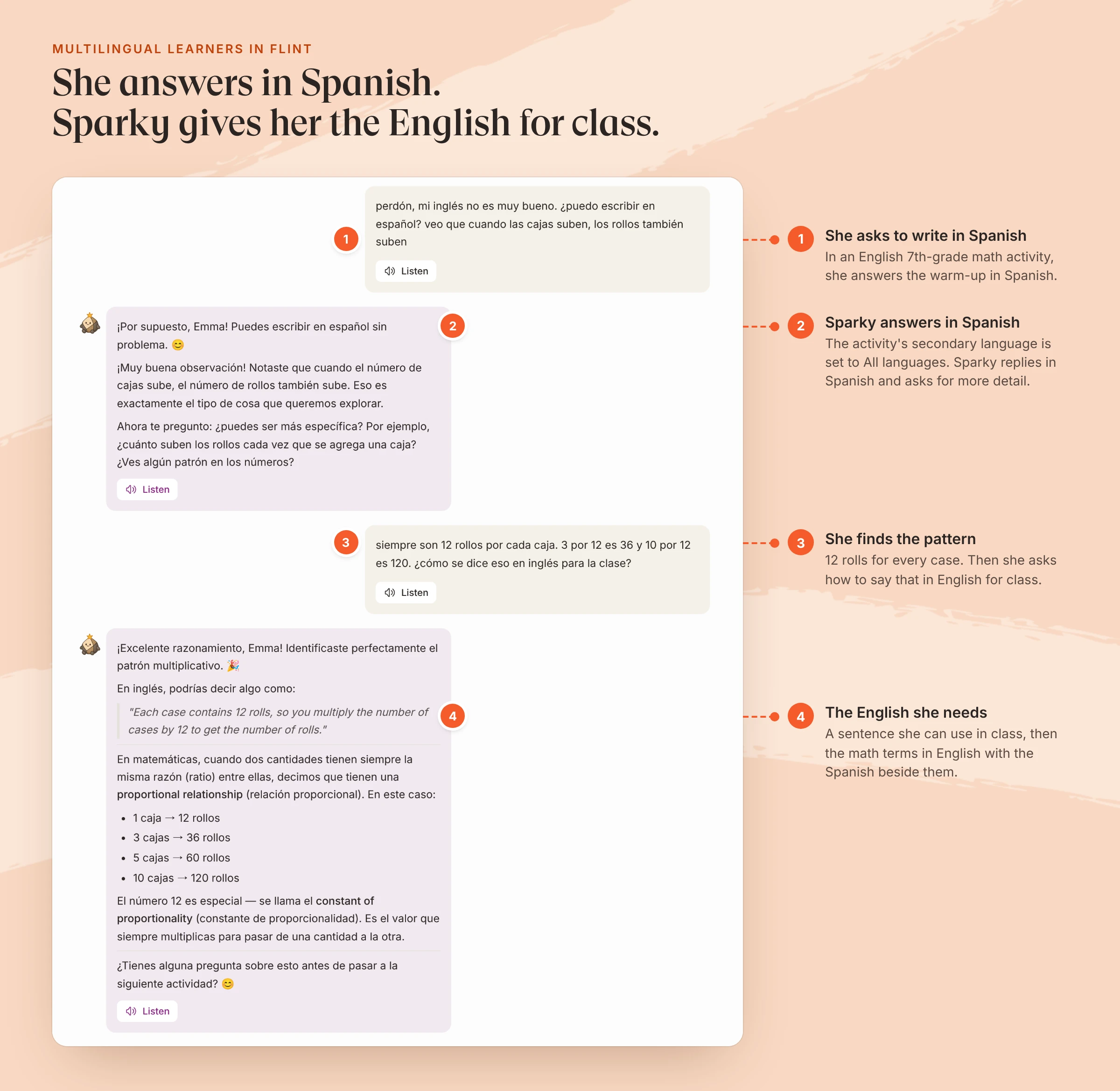
A 7th-grade math activity on proportional relationships, written in English. The student is an example; Sparky's replies are unedited and came back within 20 seconds.
In that session, Sparky didn't translate the lesson for her or give her the answer. It kept asking her to find the pattern in Spanish, then gave her an English sentence and the terms "proportional relationship" and "constant of proportionality" with the Spanish alongside. A teacher who doesn't speak Spanish can still open the session and see what she understood.
Flint's gaps for this job: the help center doesn't document a way to make a set of handouts in several languages or levels at once, the way Diffit and Brisk do, and Flint has no browser extension. Flint's Tools page does include a Text Translator and an AI Text Leveler. Flint's free plan covers up to 80 users at a school, counting students.
SchoolAI
SchoolAI's student Spaces include "Live Translation (60+ languages)," and students can speak to SchoolAI in their own language, with speech recognition in about 100 languages. SchoolAI says it has no official full list of chat languages and recommends testing each language you plan to use. Teachers also get a Text Translator for messages and assignments, though it can't translate uploaded attachments yet. The free trial allows 5 Space launches a year, and SchoolAI doesn't publish prices.
Khanmigo
Khan Academy lists 43 languages for Khanmigo and its free teacher tools, and says "Only English, Hindi, Spanish, and Portuguese have been fully quality-tested." Most student activities run in those four languages, the rest are "experimental," and speech-to-text works only in English. Khanmigo is free for teachers and $4 a month for families. For a Spanish-speaking student working through Khan Academy content, it's a strong option. For a Dari or Haitian Creole speaker, test it first.
Tools for reading and listening
Microsoft Reading Coach and Immersive Reader
Microsoft calls Reading Coach its free "AI-powered fluency practice tool," and it has been available in 81 languages since January 2025. Students can add their own reading in any of those languages. Immersive Reader, built into Word, OneNote and Teams, reads text aloud and translates it. Microsoft doesn't give one language count, and its support page says some features "are not supported in all languages." For older students, Microsoft's Study and Learn agent is available in 50 languages beyond English as of October 2026, but Copilot Chat is off by default for students 13 to 17 and unavailable under 13.
Google: Gemini in Classroom and Read Along
If your school uses Google Workspace for Education, Gemini in Classroom is included in every edition. Its features work in the languages Classroom supports wherever the Gemini app is available, and Google says the Gemini app is available in more than 40 languages. Teachers can re-level texts and assignments, and students under 18 get a version with extra guardrails. Read Along is reading practice for younger students. Google's help pages list 11 languages for the app and a slightly different set of 12 for Read Along in Classroom. Your school's admin decides which Gemini features students can use.
A tool for bilingual whole-class lessons
Curipod
Curipod runs teacher-led writing lessons. It can translate a lesson "into hundreds of languages" by making a copy of each slide in the language you choose, so you can teach the lesson bilingually. Students join with a PIN, and Curipod has "No AI chatbots for students." The free plan has 2 teaching sessions a week and limited translations. School plans are priced by quote and add unlimited translations and test practice for English language proficiency tests like TELPAS, ELPAC and WIDA ACCESS.
Putting them together for one student
For the newcomer in that 7th-grade math class, a week could look like this:
- Before Monday, run the unit's reading through Diffit or Brisk to get an English version at a lower level and a Spanish version.
- During independent practice, assign a Flint activity with the secondary language set to all languages, or a SchoolAI Space with live translation, so the student can think in Spanish and ask for the English words.
- At home, set up Reading Coach for read-aloud practice.
- Each day, read the student's Flint or SchoolAI session to see which math words they're using in English. None of these tools replaces a bilingual adult, so share what you find with your school's ESL teacher.
Before you assign any of these, check whether your school has approved the tool and whether students need an account. Our K-12 platform guide covers privacy and approval for school leaders, and the free Text Translator tool in Flint translates a single text.
FAQ
What is the best free AI tool for English learners?
It depends on the job. For translating and leveling a reading, Diffit, Brisk and MagicSchool all have free plans. For read-aloud and fluency practice, Microsoft Reading Coach is free in 81 languages. For students practicing in their home language with an AI, Flint's free plan covers up to 80 users at a school, and SchoolAI's free trial allows 5 Space launches a year.
Can students use AI tools in their home language?
Some, yes. Flint, SchoolAI, Brisk Boost and MagicSchool Student Rooms let students work with the AI themselves, and each supports other languages. Khanmigo lists 43 languages but has fully tested only English, Spanish, Hindi and Portuguese. Diffit is for teachers only, and Curipod students don't talk to the AI directly.
Is translating materials enough for English learners?
Usually not on its own. A translated handout gives a student access to the content, but the student still needs to build English. Diffit makes the same point on its own English learner page: "Translation alone isn't enough." Pair translated materials with English vocabulary practice and chances to speak and write in English with support.
Which of these tools can students under 13 use?
Check each tool's rules before assigning it. Microsoft blocks Copilot Chat for students under 13. Gemini's core service is available to users of all ages under a school account, though some features are 18+. MagicSchool students need a school or teacher to enable access. Flint's privacy policy says students under 13 can use Flint once a parent or school gives permission. Curipod students under 18 join with a teacher's PIN and don't create accounts.
