ComparisonOct 3, 2026
Flint vs. Curipod (2026): One Round of AI Feedback, or a Conversation?
Curipod runs teacher-led writing lessons where every student gets one round of AI feedback on each response. Flint gives each student a back-and-forth with Sparky while they write. Here's how the two compare for a 3-12 writing teacher.

Jemel Fanfan | Founding Member at Flint

A student writes two sentences, gets feedback and has a question about it. What happens next depends on the tool. In Curipod, the feedback is one reply to the response, and the lesson moves on when the teacher advances the slide. In Flint, the student writes back, and Sparky answers that question.
Both tools now give students AI feedback on their writing in class. They're built around different ideas of how a class should spend that time. This page compares them for a grades 3-12 teacher who wants students writing more and getting feedback on it, and is deciding between a whole-class lesson and one-on-one practice. If you're choosing a platform for a whole school, start with our K-12 platform guide.
The short version
- Pick Curipod if you want to teach the writing lesson yourself, with the whole class answering the same prompt, voting on answers and discussing the feedback together. Every student gets AI feedback on each response, and you decide when it goes out.
- Pick Flint when you want every student to keep drafting with an AI that responds to every message, asks questions and takes questions back, at their own pace. You watch every session live and get alerts when a student is stuck.
- Many writing teachers could use both: Curipod for the lesson, Flint for the drafting that follows.
How we evaluated
Keep in mind that I work at Flint.
Every Curipod claim on this page comes from curipod.com, Curipod's help center, its privacy policy or its terms, each fetched on October 2, 2026 and linked where it's used. Curipod's own pages don't always agree. The free plan page says 2 sessions a week, and the pricing page says only "Weekly sessions". The homepage says feedback arrives "the moment they submit," and the help center says the teacher sends it with a button. Where that happens, we say what each page says. We didn't run a Curipod lesson with students.
Flint claims come from Flint's help center and our pricing page. The Flint screenshot shows a student working in an argument-writing activity set at 10th grade.
What each one is
Curipod: writing lessons the whole class does together
Curipod's homepage headline is "Writing Practice Students Love," and its pitch is "Teacher led lessons aligned to your district's curriculum." As recently as October 2025, the homepage title was "Interactive Lessons for K-12 that Students Love." Curipod now focuses on writing, with lessons in ELA, social studies and science and constructed-response practice aligned to state test rubrics.
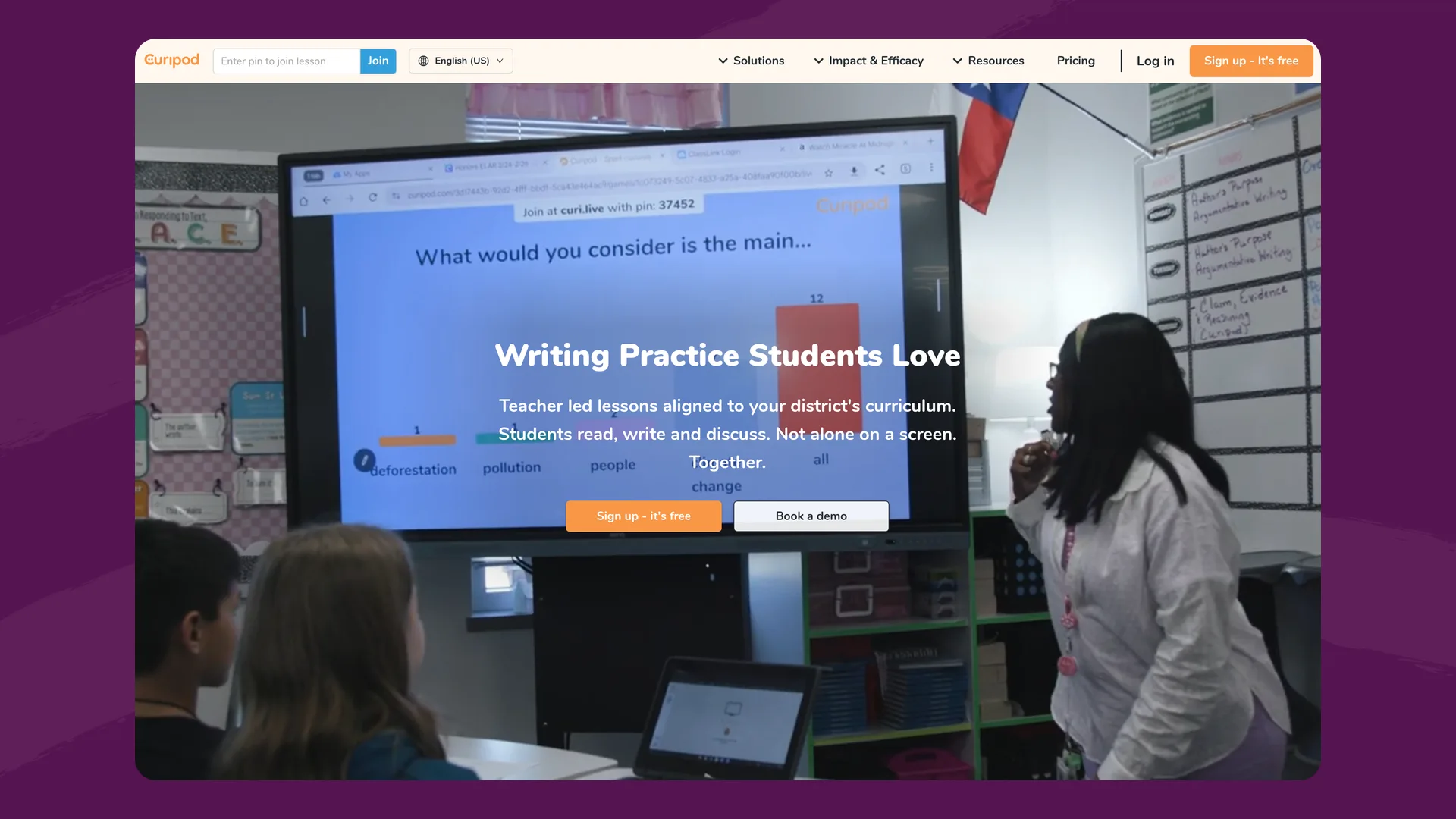
The Curipod homepage (curipod.com), captured October 3, 2026.
A teacher builds a lesson from Curipod's library, by generating one from their state, subject and grade, or by uploading their own slides or a PDF. To teach it, the teacher clicks Start and advances the slides. Students join at curi.live with a PIN and get an anonymous nickname. They don't have accounts. Besides the AI feedback slides, lessons can include polls, word clouds, drawing and multiple choice, and students can vote on each other's answers.
Curipod is deliberate about keeping AI away from students working alone. Its AI page says "Students do not use AI independently in Curipod," and its pricing page promises "No AI chatbots for students."
Flint: an AI session for each student
In Flint, the teacher describes what students are working on and uploads the prompt, the reading or the rubric. Students open the activity from a link and each gets a one-on-one session with Sparky, Flint's AI, that moves at their own pace. Students sign in with a school Google or Microsoft account, or an email and password. Sparky follows the teacher's instructions for the activity and writes at the grade level the teacher chooses.
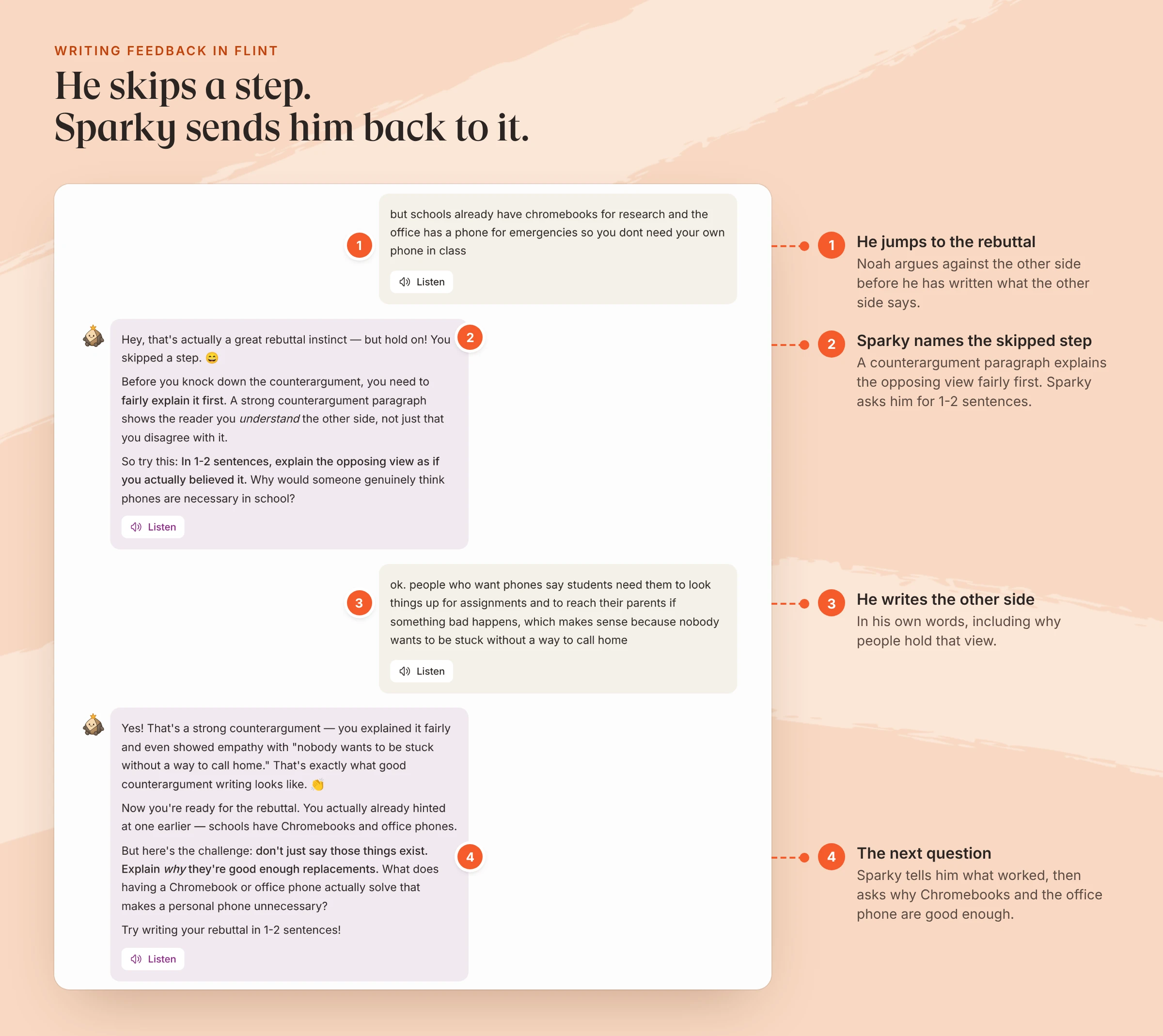
An example student in an activity on writing a counterargument paragraph, set at 10th grade. Each of Sparky's replies was saved within 11 seconds of the student's message.
AI feedback on student writing: one round or a conversation
Curipod's feedback is a single reply to a single response. In a lesson, the teacher clicks "Give AI feedback," which "sends every student immediate, actionable feedback on their response." Curipod calls it Glow & Grow. Its blog describes the format as what the student did well against the criteria, what to improve and one suggestion for the next draft: "One shot. No back-and-forth." Curipod's help center says you can review and edit the feedback before it's sent, and you can add a retry slide so students revise and get a second round. On state test prompts, students also get a score from the AI based on the test's rubric.
Flint's feedback is part of a conversation. Sparky replies to every message. A student can ask what a comment means, try a sentence and ask if it works, or argue with the feedback, and Sparky answers. In the session above, Noah wrote his rebuttal before he'd stated the other side. Sparky told him which step he'd skipped and asked for one or two sentences explaining the opposing view. When he wrote them, it told him what worked and asked a harder question. A teacher can attach a rubric with categories and analysis guidelines for Sparky, and review and change any grade.
Here's the same student in each tool:
| A student who jumps straight to the rebuttal | Flint | Curipod |
|---|---|---|
| When feedback arrives | Seconds after each message | When the teacher sends AI feedback for the slide |
| What it covers | Whatever the student just wrote, including steps they skipped | What's working against the rubric, what to improve, one next step |
| Can the student ask about the feedback? | Yes. Sparky answers follow-up questions | Not the AI. They can ask the teacher or discuss it with the class |
| Revising | As many drafts as the student writes in the session | A second round if the teacher adds a retry slide |
| What the teacher sees | Every session live, with "Needs attention" alerts | Every response on the teacher screen as the class answers |
Curipod's design keeps the AI to one exchange so it "never becomes an unsupervised back-and-forth chatbot." Flint takes a different route to the same worry: the teacher can open any session while it's running, and Flint flags students who are confused, asking for help or not engaging. Students don't see those flags.
Whole-class or one-on-one
Curipod is teacher-paced on purpose. Every student is on the same slide, the class sees responses together, and the discussion after the feedback is part of the lesson. Curipod's help center describes only live lessons the teacher runs, and its summary for AI tools says Curipod "is not a self-paced or personalized-learning product."
Flint sessions are one student at a time. A fast writer can take four drafts while a classmate is still on the first, and a student who was absent can do the activity the next day from the same link. No Flint activity setting makes a session teacher-paced, so Flint can't move the whole class through a lesson together the way Curipod does. Once at least three students have submitted, Flint drafts a class summary with strengths, common gaps and a suggested next activity, which you can use to plan the whole-class conversation.
Side-by-side
| Flint | Curipod | |
|---|---|---|
| Format | One-on-one AI activities: writing, tutoring, practice, speaking | Teacher-led slide lessons focused on writing |
| Pace | Each student at their own pace | Teacher advances the slides for the class |
| AI feedback to students | A reply to every message; students can ask questions back | One round per response, sent by the teacher; a second round with a retry slide |
| Student accounts | Yes: Google, Microsoft or email | No: students join with a PIN and get an anonymous nickname |
| Class activities | None | Polls, word clouds, drawing, multiple choice, voting on answers |
| Ready-made content | Starts from your prompt and materials; Sparky can also make documents and slides | Lesson library; state test practice for STAAR, CAASPP and other tests |
| Rubrics | Your own categories and analysis guidelines on every plan | Pre-made rubrics; custom rubrics on paid plans |
| Free plan | 80 users per school, counting students | Unlimited students; 2 teaching sessions a week |
| Paid plans | $3,000£2,234 a year covers 150 users | School & District and ELA Curriculum Alignment, by quote |
Pricing
Curipod's free plan covers unlimited students. The limit is on teaching: "You get 2 sessions every week on the free plan," renewed every Sunday, and the same lesson taught to several classes in one week counts once. Building lessons is unlimited. On the pricing page, free responses are capped at 1,000 characters, and custom rubrics, paste blocking, text to speech, writing reports and signed data privacy agreements need a paid plan. School & District and the newer ELA Curriculum Alignment plan are both priced by quote.
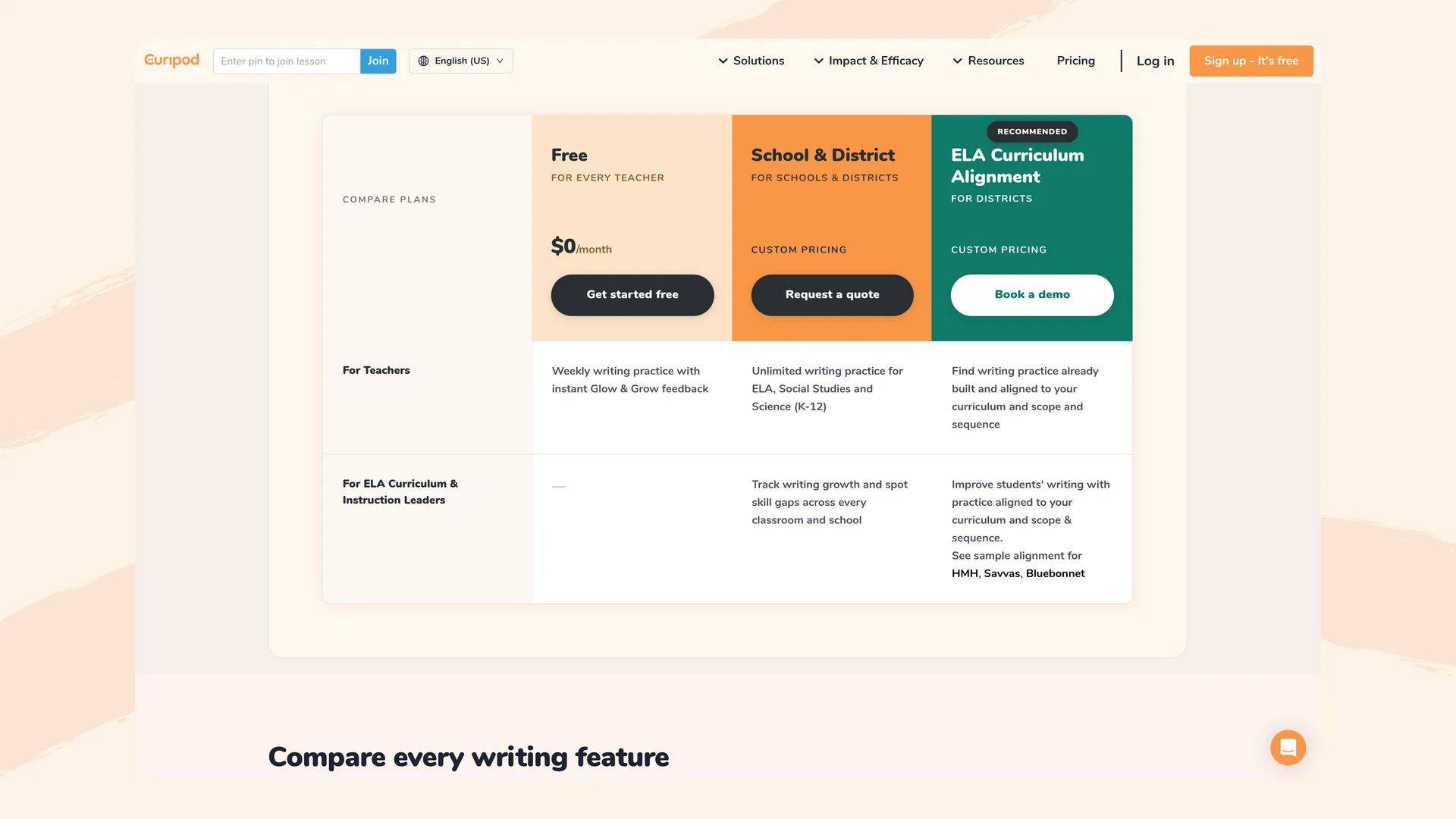
Curipod's pricing page (curipod.com/pricing), captured October 3, 2026.
Flint's free plan is per school and covers up to 80 users, counting students, teachers and administrators. That's enough for one teacher to try it with a couple of classes. The free plan runs Sparky on a faster AI model than paid plans do. The first paid tier is $3,000£2,234 a year for 150 users. Paid plans also connect to your SIS and LMS and include school-wide analytics and a customer success manager.
Privacy
Curipod collects little about students. They don't have accounts, and its privacy policy, rewritten on September 30, 2026, lists student responses, optional names and IP addresses kept for at most three weeks. It says "We do not use teacher or student data to train artificial intelligence models," and that data is now stored in the United States. One older help article still says Curipod's servers are in the EU. The new policy also allows de-identified, aggregated data to be used for research and product improvement. Curipod lists FERPA, COPPA, SOPPA and GDPR compliance, has signed state data privacy agreements in 23 states, and has a 68% "Pass" from Common Sense Privacy for its February 2024 policies.
Flint students have accounts, so Flint holds more student data than Curipod, and a school's data agreement with Flint matters more. Every session is saved. Teachers can open any session in their classes, and admins can search every chat. Flint's help center says Flint doesn't send conversations to AI model providers such as OpenAI for training. When a student's message matches one of Flint's moderation categories, assigned staff get a real-time email, and nobody can turn off the self-harm category. See our security page for certifications and data agreements.
Where Curipod is stronger than Flint
- Teaching writing to the whole room. Curipod keeps everyone on the same prompt, shows answers to the class and makes the feedback something to discuss. Flint has no teacher-paced mode.
- State test practice. Curipod has ready-made constructed-response lessons for STAAR, CAASPP and other state tests, scored against those tests' rubrics.
- No student accounts. Students join with a PIN and an anonymous nickname, so there's nothing to roster and little student data to protect.
- Class activities. Polls, word clouds, drawing and voting on answers have no equivalent in Flint.
- A free plan with unlimited students, if two lessons a week is enough.
Where Flint is stronger than Curipod
- Questions back. Students can ask Sparky what a comment means or test a new sentence, and get an answer.
- Revising at their own pace. Students can write as many drafts as they need in one session, without waiting for the class to move on.
- Work outside the live lesson. Students can do a Flint activity during independent work, for homework or after an absence.
- Your rubric on the free plan. Custom rubric categories and analysis guidelines for Sparky come with every Flint plan.
- A record of every session. Each conversation is saved for the teacher, with alerts and a class summary.
Using both
Teach the paragraph structure in a Curipod lesson: a quick write, the AI feedback, and a class discussion of two anonymous answers. Then give students a Flint activity that uses that prompt and your rubric. Sparky keeps each student drafting, and your alerts show you which students to check on first.
For a quick look at the kind of comments Flint gives on a draft, try our free AI essay grader on a sample of student writing. You can start on Flint's free plan.
FAQ
Does Curipod have an AI chatbot for students?
No. Curipod says students get "one exchange at a time" and that "Students do not use AI independently in Curipod." Students answer a writing prompt during a lesson the teacher runs, and each student gets one round of AI feedback on that answer. A teacher can add a retry slide so students revise and get a second round.
Is Curipod free for teachers?
Yes. Curipod's free plan allows unlimited students and, according to its free plan page, 2 teaching sessions a week, renewed every Sunday. Custom rubrics, paste blocking, text to speech, writing reports and signed data privacy agreements need a School & District plan, which is priced by quote.
What is the difference between Curipod and Flint?
Curipod is a whole-class writing lesson: the teacher advances the slides, every student answers the same prompt, and the AI gives each student one round of feedback. Flint is one-on-one: each student works through the activity at their own pace with Flint's AI, Sparky, which replies to every message and lets the student ask questions back, while the teacher watches every session live.
Can I use Curipod and Flint together?
Yes. Teach the skill in a Curipod lesson, where the class writes, compares answers and discusses the feedback together. Then assign a Flint activity built on the same prompt and rubric, so each student keeps drafting with Sparky on their own while Flint flags the students who need you.
