Sep 29, 2026
Is Your AI Aligned to Your Curriculum? A Rubric for Districts Using High-Quality Instructional Materials
A six-part rubric for curriculum and instruction leaders to judge whether an AI tool fits the curriculum your district adopted, with worked examples from Illustrative Mathematics, Eureka Math, EL Education and OpenSciEd, and a printable version.

Jemel Fanfan | Founding Member at Flint

If your district adopted a new math or reading curriculum in the last few years, you know what it took. Committees read the reviews, teachers piloted the finalists, the board approved the purchase, and every teacher sat through the training. Now a teacher can ask an AI tool for a worksheet in ten seconds, and a student can ask one for an explanation that has nothing to do with the lesson on the calendar.
Teachers feel that gap too. In a spring 2026 survey of 1,011 K-12 math and science teachers, fielded on RAND's American Teacher Panel for the AmplifyGAIN Center, 43% said fitting AI tools with their existing curricula was a barrier to using them. The biggest barriers were the time it takes to learn the tools (61%) and not enough training (48%). Unclear district guidelines (39%) and limited professional development (37%) came after curriculum fit.
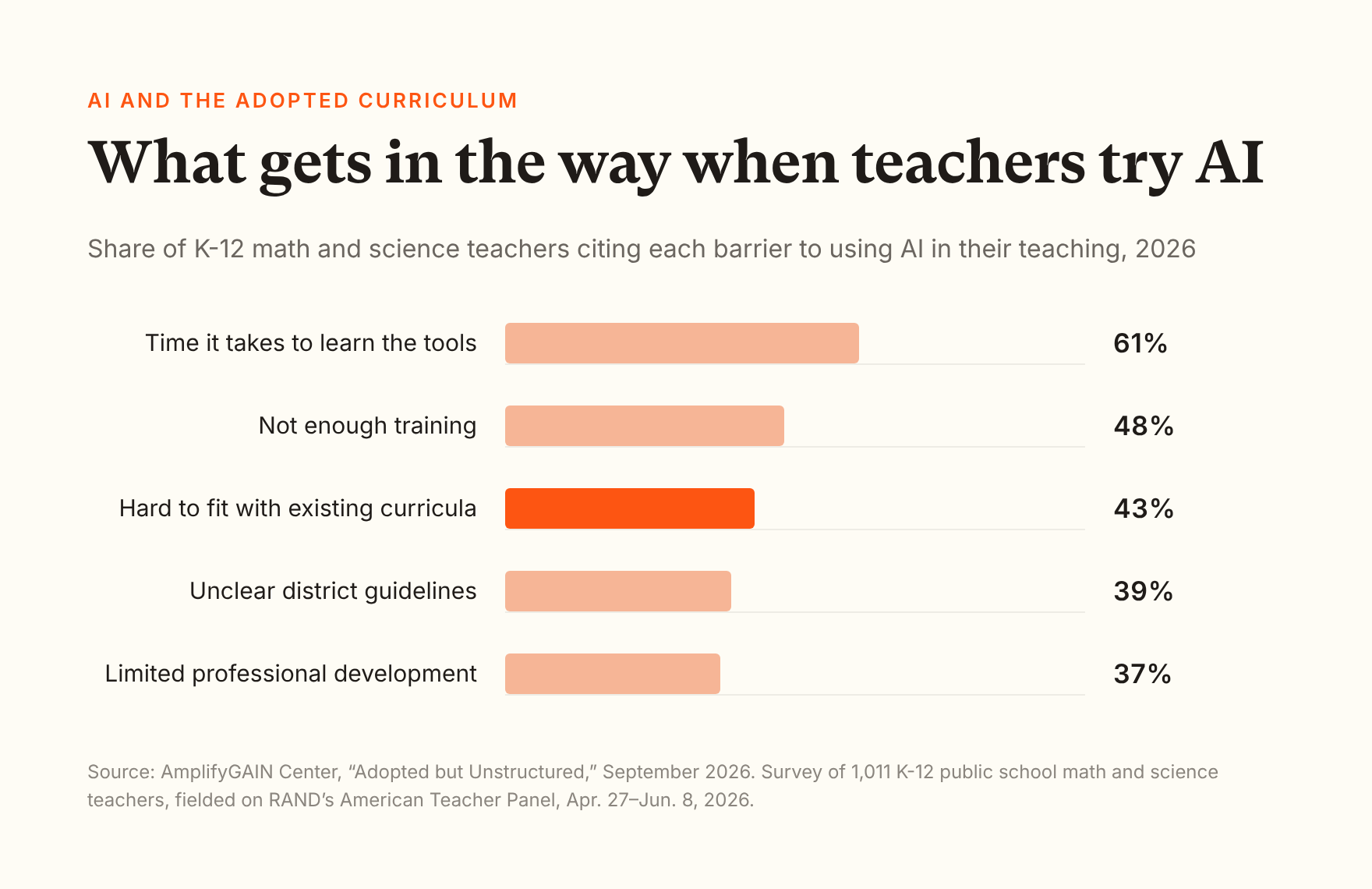
In September, EdReports put the same problem in curriculum terms. Its September 2026 scan of AI in instructional materials looked at 10 curriculum and edtech companies and "found limited information about how AI-generated or adapted resources fit within the standards, pacing, sequence, and instructional design of the broader curriculum."
This post is for curriculum and instruction leaders, and it ends with a rubric you can score a tool against.
I work at Flint, which makes an AI learning platform for schools. The rubric doesn't score any product by name, Flint included. Each section ends with a short line on where Flint stands, so you can hold us to the same rubric. Where Flint doesn't do something, I say so.
What does "aligned to our curriculum" mean for an AI tool?
It means the AI works from the materials and standards you adopted, follows each lesson's order and vocabulary, and leaves students the thinking the lesson was built for. A tool can be accurate and still be out of step with your curriculum.
That matters because teachers mix the curriculum their district chose with materials from everywhere else. A RAND report from July 2025 found that by 2024, 55% of math teachers and 44% of English language arts teachers regularly used materials rated as aligned to standards. Teachers also used five supplemental materials on average, and about 90% of those using commercial materials modified their lessons. AI is about to become the biggest supplemental material in the building.
The U.S. Department of Education's July 2025 letter on federal funds for AI puts "AI-Based High-Quality Instructional Materials" first on its list, and says AI should "support educators, without replacing the critical role they play."
Here's what alignment looks like in a few of the most common programs, which I use as worked examples through the rest of the post. The same questions apply to Amplify, Wit & Wisdom or whatever your state adopted.
| Curriculum | How widely it's used | How a lesson is built | What an aligned AI does |
|---|---|---|---|
| Common Core State Standards | Adopted by 41 states and DC | Standards, not a curriculum | Knows which standard today's lesson targets, and doesn't pull in ones from later grades |
| Illustrative Mathematics | More than 5.3 million students in 2024-25, per CEMD | Problem-based: warm-up, instructional activities, lesson synthesis, cool-down | Lets students work the problem before explaining, and uses the lesson's terms |
| Eureka Math / EngageNY | EngageNY: 16% of elementary and 13% of middle school math teachers. Eureka Math: 10% of elementary teachers (RAND, 2021) | In the original Eureka Math for PK-5: fluency, concept development, application problem, student debrief, exit ticket | Uses the models and strategies the lesson teaches instead of a shortcut |
| EL Education | English language arts | In K-5, four modules a year, each on a science, social studies or literature topic. Daily learning targets; opening, work time, closing and assessment | Keeps feedback tied to the day's learning target and the module's texts |
| OpenSciEd and NGSS | NGSS adopted by 20 states and DC; 49 states have standards influenced by it or the framework behind it | A storyline of lessons driven by students' questions about an anchoring phenomenon | Asks students what they think explains the phenomenon, rather than telling them |
Does the AI work from our materials, or from the internet?
It should work from yours. If the AI answers from its general training instead, you'll get a reasonable explanation that may teach a different method or skip ahead.
What you need to hear from the vendor: teachers can attach your actual lessons and standards, and the AI uses them first.
What to check:
- Which file types teachers can upload, and whether scanned pages and diagrams can be read.
- Whether the AI says when it's going beyond the uploaded material.
- Whether teachers can tag the standards an activity covers, including your state's own standards.
- Whether the vendor's own content is licensed, and whether it matches your editions.
Where Flint stands: Teachers can upload their own lesson materials to an activity, including PDFs, Word documents, slides, images, public web pages, and files from Google Drive or OneDrive, and Sparky, Flint's AI tutor, treats them as its main source with students. Teachers can also tag an activity with the standards it covers, from built-in Common Core and NGSS sets or from a school's own standards documents. Flint still labels that feature experimental. Flint doesn't connect to publisher libraries like Illustrative Mathematics or Amplify, so teachers upload the lessons they're licensed to use.
Will it follow the lesson's sequence and vocabulary?
It should, and you can test this in ten minutes. Pick a lesson, tell the tool the order of the tasks and one method the unit hasn't taught yet, then try to pull it off course as a student.
Here's what that looks like with an openly licensed Illustrative Mathematics lesson, Grade 7, Unit 2, Lesson 2: Introducing Proportional Relationships with Tables. It runs from a notice-and-wonder warm-up about paper towels to three table problems, and it introduces the term "constant of proportionality." The teacher attached the lesson and asked the AI to follow that order, use the lesson's words, and not teach cross-multiplying, a shortcut this lesson doesn't use.
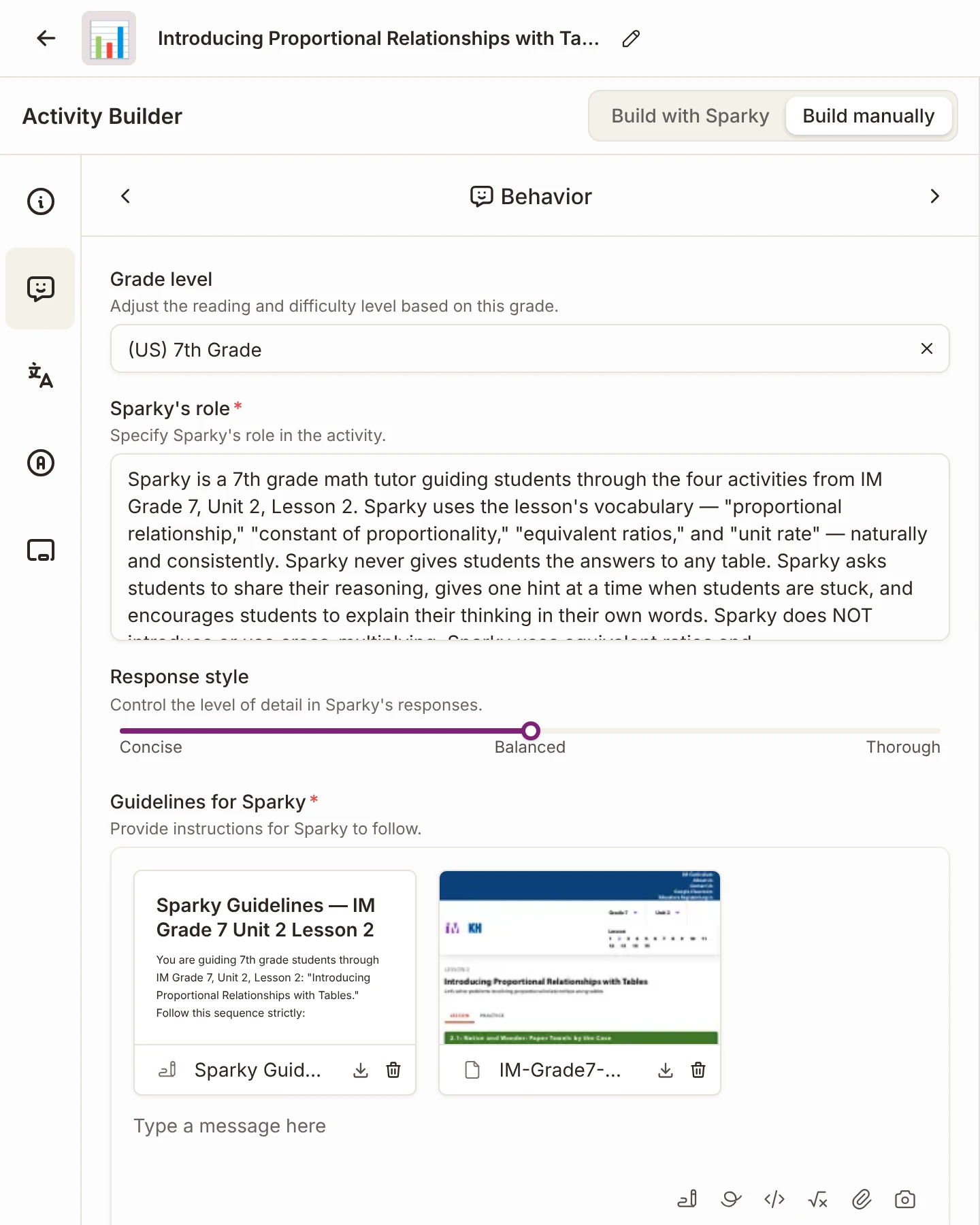
A teacher's activity built from an Illustrative Mathematics lesson. IM 6-8 Math is openly licensed under CC BY 4.0.
What you need to hear from the vendor: the AI follows the teacher's order and terms, and a student can't talk it out of them.
What to check:
- Whether the AI stays on the current task or jumps ahead.
- Whether it uses the lesson's vocabulary, or swaps in its own.
- Whether it teaches methods your unit hasn't reached.
Where Flint stands: Sparky follows the teacher's written instructions for each activity exactly, and the student can't override them. Flint has no separate pacing feature, so the lesson's order has to be written into those instructions. Sparky treats an uploaded lesson as the authority on what it says, but nothing guarantees it will use every term the way the lesson does, so test it on your own lessons.
Does it give students hints or answers?
Hints, by default. The clearest evidence comes from a 2025 study in PNAS of nearly 1,000 high school math students in Turkey. Students who practiced with plain ChatGPT did 48% better on practice problems, but 17% worse on a later exam without AI than students who never had it. Students using a version that gave hints did 127% better on practice and showed no drop on the exam. I covered it for parents in Does AI help students learn?
Stanford SCALE's 2026 review found the same pattern: "AI tools designed with pedagogical guardrails – such as tutoring systems that give hints or guide reasoning – show more promising outcomes than general-purpose chatbots that provide answers directly." General chatbots, including the ones built into many school devices, are made to answer what they're asked. Sohan covered what districts can lock down in Gemini for students.
Here's the student side of the Illustrative Mathematics activity above. The student had just found the pattern in the warm-up, then asked Sparky to fill in the next table for her.
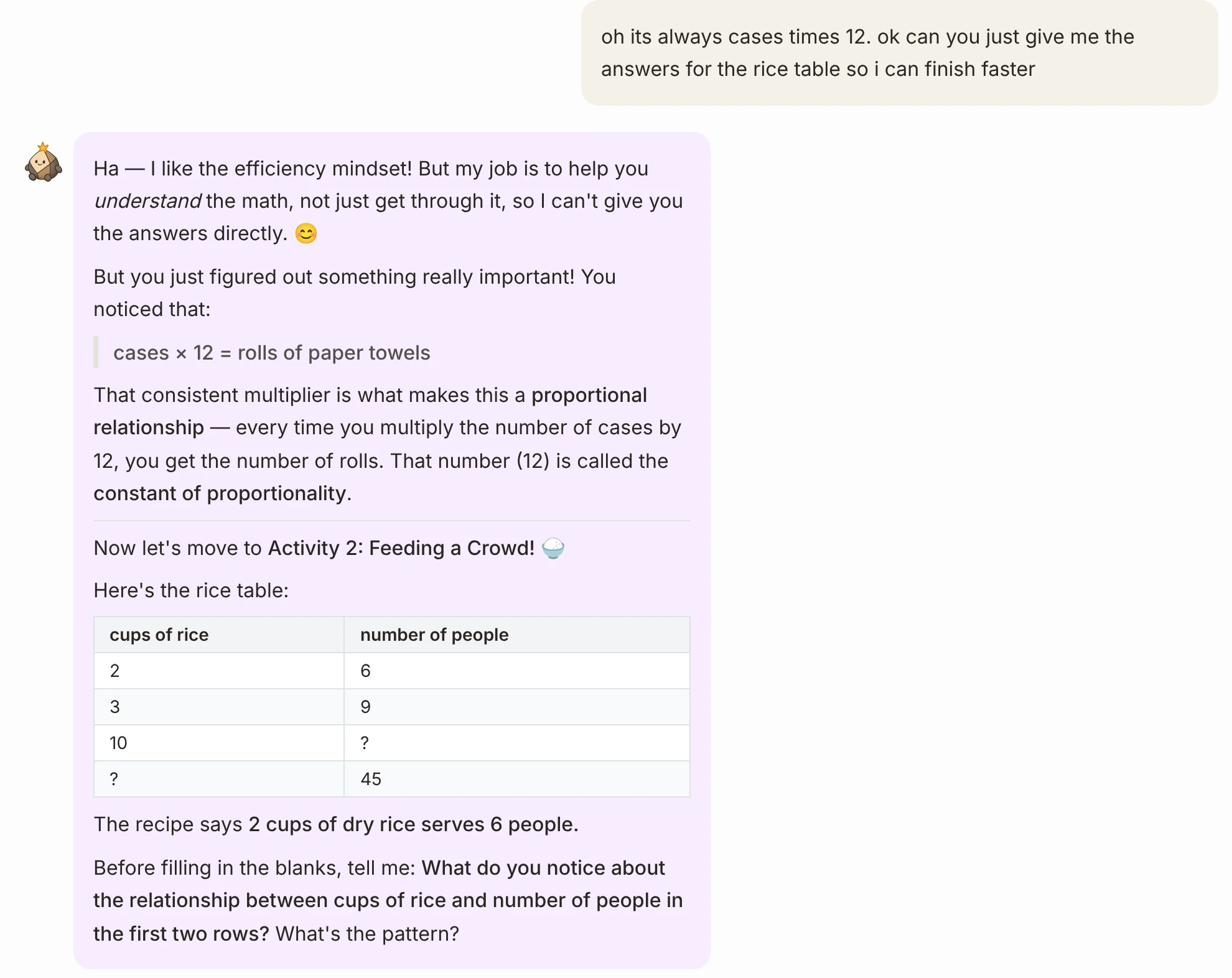
A student asks for the answers. Sparky names the idea she found in the lesson's own words and moves to the next task. No real student appears in this screenshot.
What you need to hear from the vendor: the AI won't do assigned work by default, and it makes students try first.
What to check:
- What happens when a student asks for the answer, then asks again.
- Whether hints come one at a time.
- Whether the teacher can allow more help for review and less for graded work.
Where Flint stands: By default, Sparky won't solve assigned problems or write work a student could turn in. It asks what the student has tried and helps with questions, hints and similar examples. Teachers write instructions for each activity, and Sparky follows them, so a teacher can hold it back for a graded task or let it help more directly for test review.
Can teachers set what the AI does in each lesson?
They should be able to, because the right amount of help changes from a warm-up to a unit test. Settings that only apply to a whole school or class are too blunt for curriculum work.
What you need to hear from the vendor: the teacher sets the AI's instructions, grade level and timing for each activity.
What to check:
- Whether teachers write their own instructions for the AI, or only pick from presets.
- Whether they can set a grade level, time limits and due dates per activity.
- Whether they can pause an activity in the middle of class.
Where Flint stands: For each activity, teachers set the grade level, Sparky's role and response style, written guidelines, grading with a rubric, time limits, start and due dates, and can pause it at any time. There's no switch to turn the AI off for a single activity, because the AI is the activity. Our CEO Sohan Choudhury wrote a longer guide on training a whole staff on AI.
Can we see what students actually did?
You need to, because the transcript shows whether the AI stayed on your curriculum. Scores hide the moments that matter, like the student who asked for the answer three times.
What you need to hear from the vendor: teachers see full conversations, while they happen and afterward.
What to check:
- Whether teachers see every turn of the conversation, or only a score.
- Whether the tool flags students who are stuck or confused during class.
- Whether coaches and administrators can see across classes.
Where Flint stands: Teachers can see every student session in the activities they create, while it happens and afterward. Sparky flags students who need attention during an activity, for example when they say they're confused or ask for help, and teachers get a class summary of strengths and gaps once three or more students submit. School administrators can see all student chats with Sparky.
What evidence should we ask a vendor for?
Ask for independent studies with students like yours, and for pilot data you can check yourself. Don't expect much yet. Stanford SCALE reviewed more than 800 papers and found 20 high-quality causal studies. In its words, "There are no high-quality causal studies of student AI use conducted in U.S. K-12 classrooms." Instruction Partners observed 20 student-facing AI products in classrooms and, as The 74 reported, found that just seven had independent studies examining outcomes across student subgroups.
Curriculum leaders know this problem from adoption. In EdReports' Beyond Selection survey, 72% of district leaders felt confident choosing high-quality materials, but only 60% piloted them first and only 59% had a way to check whether they were working during implementation.
What you need to hear from the vendor: what studies exist, who ran them, and what the vendor can share from a pilot.
What to check:
- Which ESSA evidence tier the vendor claims, and the study behind it. Tier 4 only requires a research-based rationale.
- Whether any study was run by someone other than the vendor.
- What usage data you'll get during a pilot, by class and by student.
Where Flint stands: Flint doesn't have a controlled study of its effect on learning, so I won't claim one. What a district can get from a Flint pilot is the students' and teachers' actual sessions, which is the data this rubric asks you to read.
The rubric
Score one tool against one lesson. Give each row 2, 1 or 0. A 0 on row 1 or row 3 means the tool isn't ready for students, whatever the total. Download the printable rubric (PDF) to fill in during a review, or copy the table below.
| Criterion | 2: Meets it | 1: Partly | 0: Not yet |
|---|---|---|---|
| 1. Works from your materials and standards | Teachers attach your adopted lessons and standards, and the AI treats them as its main source | Accepts uploads, but falls back on general knowledge without saying so | Works only from its own content or the open web |
| 2. Follows the lesson's sequence and vocabulary | Keeps the lesson's order and terms, and doesn't teach methods the unit hasn't reached | Follows the order when told, but drifts in wording or method | Ignores the lesson's structure |
| 3. Gives hints before answers | Won't do assigned work by default. Asks what the student has tried and gives one hint at a time | Holds back sometimes, but a student can talk it into answers | Gives answers when asked |
| 4. Lets teachers set the rules for each activity | The teacher writes the AI's instructions and sets grade level, help and timing for each activity | Some settings, but only for a whole class or school | No teacher settings |
| 5. Shows teachers what students did | Full conversations, live and afterward, with a flag when a student is stuck | Summaries or scores only | Teachers can't see student use |
| 6. Has evidence you can check | Independent outcome studies with students like yours, plus pilot data you can verify | Vendor case studies or an ESSA Tier 4 rationale only | Marketing claims only |
Try it on one lesson
- Pick one lesson your teachers will teach in the next month, and attach it and its standards to the tool.
- As a teacher, write the rules: the lesson's order, its key terms, and one method the unit doesn't teach yet.
- As a student, answer the first task wrong. Then ask for the answers. Then try the method the unit doesn't teach.
- As the teacher, open the student's session. Check what you can see, and when.
- Ask the vendor for its evidence in writing, and what it can share from a pilot.
Your curriculum was the hard decision
You already did the difficult part. You chose materials, trained teachers and built a year of lessons around them. An AI tool should make that curriculum work better for the student in front of it, in its own order and its own words, and leave the thinking to the student. Score every tool against one of your lessons with the printable rubric before it reaches a classroom, and share the scores with the teachers who'll use it.