ComparisonNov 9, 2026
Best Formative Assessment Tools for Real-Time Feedback in 2026
Nine formative assessment tools a K-12 teacher can use for real-time feedback: Formative, Nearpod, Pear Deck, Kahoot!, Wayground, Socrative, Classkick, Snorkl and Flint. Who sees each answer, what students get back, free plans and prices.

A formative assessment tool is only as useful as what happens in the next five minutes. Twenty-eight answers land on your screen, and you either act on them or you don't. Meanwhile each student either finds out how they did, or waits until you hand the work back.
That gives every tool on this page two jobs, and most are much better at one of them:
- Showing you every answer as it comes in, so you can reteach, regroup or pull a few students aside.
- Giving each student something back the moment they answer: a score, the correct answer, an explanation, or a written reply to what they wrote.
This page compares nine tools a K-12 teacher can use for both jobs. If you're choosing between Nearpod and Flint in particular, our Flint vs. Nearpod comparison goes deeper on that pair.
The short version
| If you want to... | Look at |
|---|---|
| Run the lesson yourself and see every answer live | Nearpod or Pear Deck |
| Play a fast review game with the whole class | Kahoot! or Wayground |
| Give a quick quiz that shows each student the right answer when they submit | Socrative |
| Watch students write and mark answers as they arrive, with AI feedback drafts you screen | Formative |
| See every student's page live, with drawing, typing and audio answers | Classkick |
| Have students explain their thinking out loud and get AI feedback on the explanation | Snorkl |
| Give every student a written reply to each answer during independent work, and get told who's stuck | Flint |
How we evaluated
We make Flint, so read this page knowing we're biased toward it.
Every claim about another company comes from that company's own website, help center or pricing page. We checked them on November 9, 2026, and linked each one where it appears. Where a company's pages disagreed with each other, we say so and link both. We did not run hands-on lessons in the other tools. Prices change often, and Kahoot! was running a sale on the day we checked, so confirm the current price before you buy.
For Flint, every claim comes from the Flint help center or our pricing page.
We started from the tools ChatGPT and Google's AI Overviews named most often when asked about real-time feedback tools for students in the first week of November 2026: Mentimeter, Formative, Kahoot!, Nearpod, Pear Deck, Poll Everywhere, Classkick, Socrative and Snorkl. We added Wayground, formerly Quizizz, because its free plan now gives students AI answer explanations. We left out Mentimeter and Poll Everywhere, which are built mainly for presenters and universities: Mentimeter's education page leads with "97 of the world's top 100 universities," and its classroom page doesn't mention K-12. Both are good for quick anonymous polls.
Two kinds of real-time feedback
Most "real-time feedback" tools are really real-time views for the teacher. The student answers, the teacher sees it at once, and the feedback the student gets is whatever the teacher has time to give.
A second group sends something back to the student without waiting for the teacher. For multiple-choice and short fixed answers, that has been standard for years: the student sees right or wrong, and often the correct answer. For a paragraph, an explanation or a worked problem, it's newer. Formative, Wayground, Pear Assessment, Classkick, Snorkl and Flint each do some version of it, and the differences matter:
- Formative's AI drafts feedback on short answer and free response questions, and the teacher screens it before sending.
- Wayground lists "AI answer explanations for students" in its free plan, and puts AI grading with rubrics in its paid school plan.
- Pear Assessment's AI essay scoring is a beta feature, and scores "stay hidden from the student until you review and approve them."
- Classkick's help center says students in an AI Answer Box get feedback without being given the answer, though its AI page still calls AI grading "coming soon."
- Snorkl gives students 2 to 3 pieces of feedback on a recorded explanation as soon as they submit, with no teacher step first.
- In Flint, Sparky replies to each answer in a conversation, and the student can revise and answer again in the same session.
Side by side
| Tool | What you see live | What students get back on their own | Free plan | Paid, one teacher |
|---|---|---|---|---|
| Formative | Responses as students enter them | Auto-grading; AI feedback drafts you screen first | Pages conflict (see below) | $249/year, under 100 students |
| Nearpod | Live Teacher Dashboard | Quiz results; written feedback comes from you | Silver: 40 student joins per lesson | Gold $159/year, Platinum $397/year |
| Pear Deck | Projector View; Teacher Dashboard on Premium | Feedback comes from you | Anonymous response projection | $149/year |
| Kahoot! | Class reporting during games | Points and correct answers in the game | Kahoot! Go (participant cap, see below) | From $36/year at the November 9 sale price |
| Wayground | Classroom Pulse | Autograding; AI answer explanations | Basic: 100 students, 20 activities | No individual plan; schools by quote |
| Socrative | Live Results | Explanation or correct answer on submit | 5 quizzes, 1 room, 50 students | $120/year |
| Classkick | View Work mode, every student's page | Answer-key grading; AI Answer Box feedback (see below) | 10 assignment slots | From $9.99/month, billed monthly |
| Snorkl | Responses and Insights after students submit | 2 to 3 pieces of AI feedback and a score on each explanation | Up to 20 activities | No individual plan; schools by quote |
| Flint | Every session live, plus Needs attention alerts | A written reply from Sparky to every answer | No student limit; up to 3 teachers and admins | School plans from $3,000£2,234 a year |
Formative
Formative calls itself "the only AI-first platform for instruction, assessment, and real-time insights." In the Responses tab you see students' answers "as they enter them in real time."

Formative auto-grades fixed answers, supports rubrics, and lets you add hints for "automatic scaffolding." Its AI assistant, Luna, can draft feedback on written answers, and Formative asks teachers to screen each draft before it reaches the student. Luna can also suggest rubric levels when you grade free responses, with "Teachers remain in control."
Formative's pages disagree about a free plan. The homepage FAQ says "Formative offers a free plan," and the help center describes a Free Teacher plan with a 14-day lookback. The pricing page lists no free tier. Paid plans start at $249 a year for a classroom of fewer than 100 students, and $3,125 a year for a small school of up to 250. The homepage says Formative "complies with FERPA, COPPA, and other K-12 data privacy standards."
Where it falls short: AI feedback waits for you to approve it, so a student working at 9 p.m. doesn't get it until you've screened it.
Nearpod
Nearpod turns a slide deck into an interactive lesson, and its Live Teacher Dashboard lets you "view student responses, reactions, and raised hands." It has nine types of formative assessment, from polls and quizzes to Draw It and the Time to Climb game, and a library of more than 22,000 ready-made lessons, videos and activities.
Feedback to students comes from you: Nearpod's pricing page describes it as "View students' work and provide immediate, personalized feedback." We found no AI feedback to students on Nearpod's pages. Its AI Create tools are for teachers, run on OpenAI's GPT-4o mini, and "only supports English." The free Silver plan can generate five AI assessments; Gold and above get the full Question Generator.
Silver is free with 40 student joins per lesson. Gold is $159 a year and Platinum $397 a year, and school licenses are priced by quote. On Renaissance's privacy page, Nearpod's iKeepSafe certification is listed as "Coming soon."
Where it falls short: if you're helping one table, the other 24 students' answers wait on your dashboard until you get to them.
Pear Deck
Pear Deck is for creating and delivering interactive lessons. You run the lesson from the Projector View while students answer on their own devices. The Teacher Dashboard, where you see each student's answer by name, "requires a Premium plan." The free plan has anonymous response projection.

Feedback during a Pear Deck lesson is yours to give. Its sister product, Pear Assessment, auto-grades answers, and its AI essay scoring is in beta with scores hidden until you approve them. Pear Deck Teacher Premium is $149 a year with the educator discount, and Pear Assessment Premium is $125 a year. Pear Deck's privacy page says it is FERPA compliant and 1EdTech TrustEd Apps certified.
Where it falls short: seeing answers by student name needs the paid plan.
Kahoot!
Kahoot! is a whole-class quiz game, and its schools page promises you'll "know exactly where every student stands, in real time." Students get points and the correct answer after each question. We found no AI feedback to students, and the plans page says "students under the age of 16 cannot interact with free-form questions."

The free Kahoot! Go plan's participant cap is stated two ways on the same plans page: 40 in the comparison table and 10 in the FAQ. Paid plans are priced by how many players can join. During the sale running on November 9, Bronze was $36 a year for up to 50 participants and One was $228 a year for up to 800. AI question generation needs a paid plan. Kahoot!'s trust center lists ISO 27001 certification and the Common Sense Privacy seal.
Where it falls short: a game shows you who picked the right answer, not how they got there.
Wayground (formerly Quizizz)
Wayground, which was Quizizz until its rename, covers quizzes, presentations, videos and flashcards. Its live view is Classroom Pulse. The free Basic plan, "Free for every teacher, forever," covers 100 students and 20 activities, with autograding and AI answer explanations for students. AI grading with custom and state rubrics is part of the paid school and district plan, which is priced by quote. There's no paid plan for an individual teacher. Wayground's privacy center says it complies with FERPA and COPPA and is ISO/IEC 27001:2022 certified.

Where it falls short: AI grading of written answers needs the paid school plan, and there's no paid option for one teacher.
Socrative
Socrative does one job: you build a quiz, launch it, and watch the Live Results tab. "The moment they submit an answer," students get "a concise explanation and/or the correct response," according to Socrative's homepage. It has AI question generation and AI report analysis for teachers, capped per week on every plan. We found no AI feedback to students on short answers.

The free plan has 5 quizzes, 1 room and 50 students per activity. Essentials is $120 a year, and Pro is $200.04 a year with a two-seat minimum. Socrative's compliance page covers GDPR, ISO 27001 and SOC 2 principles. We didn't find a COPPA or FERPA statement on it.
Where it falls short: feedback on anything beyond a fixed answer is up to you.
Classkick
Classkick "helps teachers see student thinking in real time and give instant feedback," according to its help center. Students answer on slides by drawing, typing, adding images or recording audio, and View Work mode "shows a real-time view of student work across your class."

Multiple-choice and fill-in-the-blank questions can be graded from an answer key. Classkick's AI Grading and Feedback article, updated October 26, says students in an AI Answer Box "receive immediate feedback… without being given the correct answer," and that it's available on every plan, including free. Classkick's AI page still labels AI grading "coming soon," so check before you plan around it.
The free Basic plan has 10 assignment slots and a monthly cap on student pages. Paid plans for one teacher are billed monthly, from $9.99 a month (Starter) to $34.99 a month (Champion), and team, school and district prices are published, starting at $749 a year for 2 teachers. Classkick's privacy policy says it has signed the Student Privacy Pledge and works to comply with COPPA and FERPA.
Where it falls short: you're still the main source of written feedback on anything beyond the AI Answer Box.
Snorkl
Snorkl is built around students explaining their thinking out loud. In a whiteboard recording activity, "students draw and talk at the same time," and when they submit they get "2–3 pieces of personalized feedback that can be read aloud," plus a correct or incorrect mark and an explanation score from 0 to 4. The feedback reaches the student without waiting for you, and any score you change updates for the student too. The Insights tab groups students by shared misconceptions.

The free plan includes AI feedback and Insights, with up to 20 activities. Premium is sold to schools and districts by quote, and only Premium includes Snorkl Coach, a student chat that "provides guiding prompts, not answers." Snorkl's FAQ says it is iKeepSafe and Common Sense Privacy certified.
Where it falls short: Snorkl's pages describe reviewing submissions afterward rather than watching students while they work, and there's no paid plan for one teacher.
Flint
Flint is an AI learning platform. A teacher builds an activity from their own materials, and each student works through it in a one-on-one session with Flint's AI, Sparky. Sparky responds to every answer: it says what's working, points to what isn't, and usually asks a question rather than giving the fix. If you attach a rubric, Sparky checks the work against your categories.
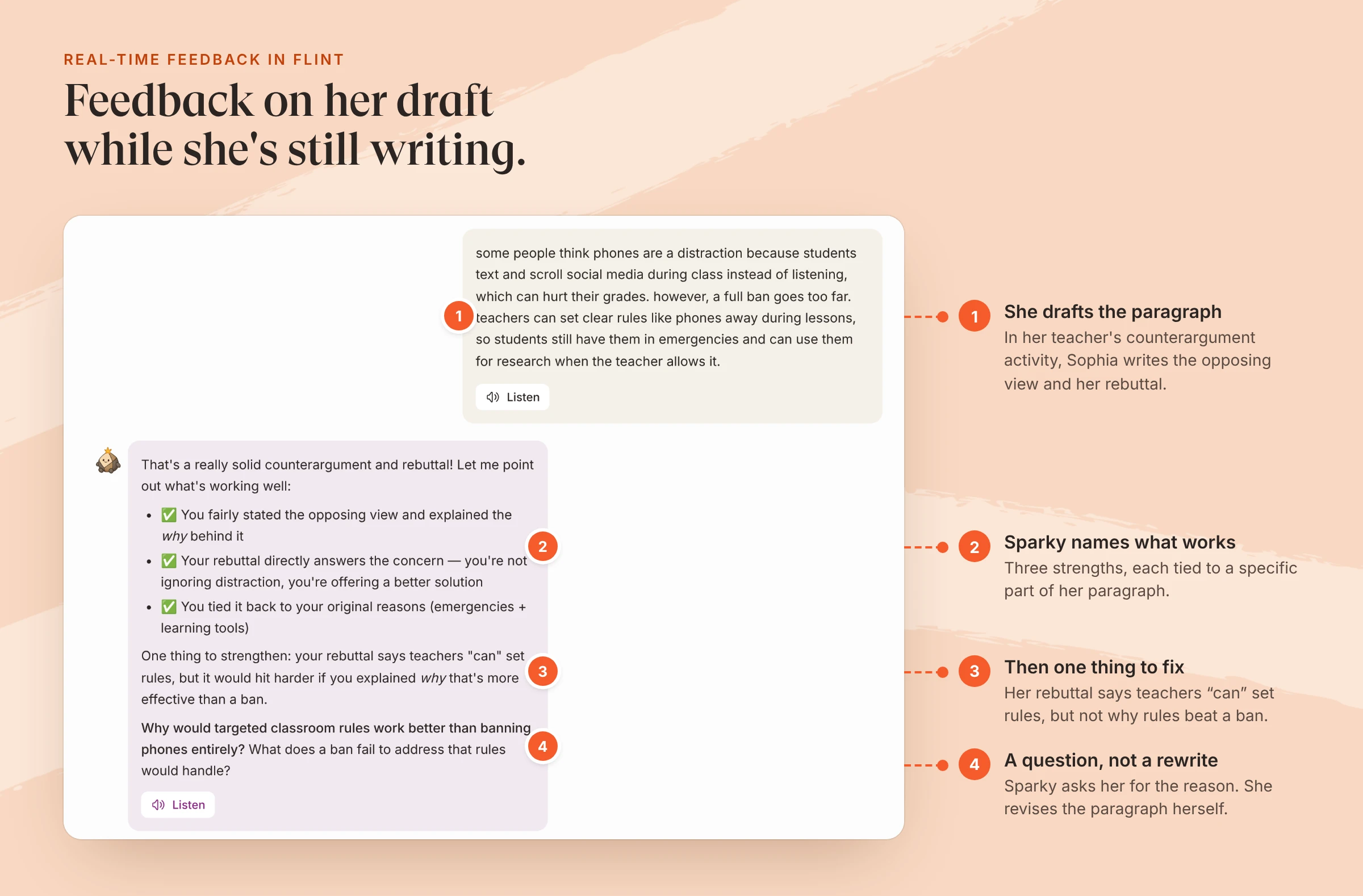
An example student's session in a 10th-grade counterargument activity. Sparky replied about 10 seconds after she sent her paragraph.
On the activity page, according to Flint's help center, two sections update live while students work:
- Needs attention, where Sparky flags repeated incorrect attempts, signs of distress or giving up, disengagement, or a request for a teacher. Each card opens that student's session at the message that set it off.
- Sessions, a table that adds a row when each student starts. You can open any session and read it before it's submitted.
Once three or more students submit, Activity analytics sums up the class as strengths, areas to improve and a suggested follow-up activity. Flint also has structured tests and quizzes: multiple-choice answers are scored against your key, and Sparky scores free responses from your grading guide (help center).
Flint is free for teachers and their students, with no student limit and up to 3 teachers and admins per free workspace. School plans start at $3,000£2,234 a year for up to 150 users.
Where Flint falls short
- No whole-class mode. Every Flint activity is a one-on-one session, so there's no teacher-paced lesson where every screen moves together, which Nearpod and Pear Deck are built for.
- No games, leaderboards or live polls. If you want the energy of a Kahoot! or Wayground game, Flint has nothing like it.
- Scores on Flint's structured tests don't reach students until you click Share results. The instant feedback is in conversational activities, not in the test format.
- No ready-made lesson library. Flint activities start from your materials or a description, while Nearpod and Wayground have large libraries.
- No paid plan for one teacher. The free plan covers a single teacher's classes, but paid plans are priced per school.
How to choose
Start with the moment you most need feedback.
- During direct instruction, a live view matters most. Nearpod or Pear Deck lets you see the room and decide whether to move on.
- For review before a test, Kahoot!, Wayground or Socrative gives every student a score and the correct answer in minutes.
- When you want to hear how students reasoned through a problem, Snorkl's recorded explanations or Classkick's student pages show the work, not just the answer.
- During independent writing or problem solving, when you can only reach a handful of students, Formative lets you watch and respond, and Flint gives every student a first round of feedback while pointing you to the ones who need you.
Many teachers use two of these: a live check during the lesson, then independent practice where each student gets feedback on their own work. A Flint activity is a quick way to try the second half. Our exit ticket guide shows a five-minute version, and the AI writing feedback tool shows what Sparky's feedback looks like on a paragraph. For a wider look at AI tools for every part of a teacher's week, see our best AI tools for teachers.
FAQ
What is the best free formative assessment tool?
It depends on class size and what you want students to get back. Wayground's free Basic plan covers 100 students with autograding and AI answer explanations. Socrative's free plan covers one room of 50 students and shows each student the correct answer when they submit. Nearpod Silver allows 40 student joins per lesson. Flint's free plan has no student limit and gives every student a written reply to each answer, for up to 3 teachers and admins per workspace.
Which formative assessment tools give students AI feedback?
On the pages we checked on November 9, 2026: Formative's Luna drafts feedback on short answer and free response questions, which the teacher screens before sending. Wayground's free plan includes AI answer explanations for students. Pear Assessment has AI essay scoring in beta, hidden from students until the teacher approves it. Snorkl gives students 2 to 3 pieces of AI feedback on a recorded whiteboard explanation when they submit. Classkick's help center describes AI feedback in an AI Answer Box on every plan, though its AI page still says coming soon. In Flint, Sparky replies to every student answer during the activity. We found no AI feedback to students on Nearpod, Kahoot! or Socrative.
What is the difference between real-time feedback and formative assessment?
Formative assessment is any check on learning a teacher uses to adjust teaching before a unit ends. Real-time feedback is the part of it that happens during the task: either the teacher sees answers as they come in and responds, or the student gets something back the moment they answer. Most tools on this page do the first. Fewer do the second for written or spoken answers.
Can I use Flint with Nearpod, Pear Deck or Kahoot!?
Yes. A common split is a whole-class check in Nearpod, Pear Deck or Kahoot! during the lesson, then a Flint activity for independent practice, where each student gets a reply to their own work and the teacher gets an alert when someone is stuck.
